Normal view

  • ✇Daring Fireball
  • ★ What to Do About Those Menu Item Icons in MacOS 26 Tahoe
    Steven Troughton-Smith, over the weekend: Here’s one for the icons-in-menus haters on macOS Tahoe: defaults write -g NSMenuEnableActionImages -bool NO It even preserves the couple of instances you do want icons, like for window zoom/resize. You do not need to restart or log out after applying this setting, but you will need to quit and relaunch any apps that are currently running for it to take effect. If this worked to hide all of these cursed little turds smeared across the me
     

★ What to Do About Those Menu Item Icons in MacOS 26 Tahoe

24 March 2026 at 19:36

Steven Troughton-Smith, over the weekend:

Here’s one for the icons-in-menus haters on macOS Tahoe:

defaults write -g NSMenuEnableActionImages -bool NO

It even preserves the couple of instances you do want icons, like for window zoom/resize.

You do not need to restart or log out after applying this setting, but you will need to quit and relaunch any apps that are currently running for it to take effect.

If this worked to hide all of these cursed little turds smeared across the menu bar items of Apple’s system apps in Tahoe, this hidden preference would be a proverbial pitcher of ice water in hell. As it stands, alas, it’s more like half a glass of tepid water. Still quite welcome when you’re thirsty in hell, though.

The problem is that while some of Apple’s system apps obey this setting across the board, others obey it only scattershot, and others still ignore it completely. Apple’s AppKit apps — real Mac apps — are the most likely to obey it. In the Finder, Notes, Photos, Preview, and TextEdit, it pretty much kills all menu item icons, leaving behind only a few mostly useful ones. (Among the random inconsistencies: Preview still shows an icon for the File → Print command — a stupid printer icon, natch — but none of the other apps listed above show an icon for the Print command.)

Mail and Calendar are more scattershot. Calendar hides most menu item icons, but keeps a few in the File menu. Mail is more like half-and-half, with no apparent rhyme or reason to which menu items still show icons. In the Mailbox menu, nearly all items have their icons removed; in the Messages menu, most keep their icons even with this setting set to hide them.

Safari is a heartbreak. It’s one of my favorite, most-used apps, and generally, one of Apple’s best exemplars of what makes a great Mac app a great Mac app. But with this setting enabled, only a handful of seemingly random menu items have their icons hidden. For example, here is the File menu in Safari v26.3.1, before and after applying this setting:
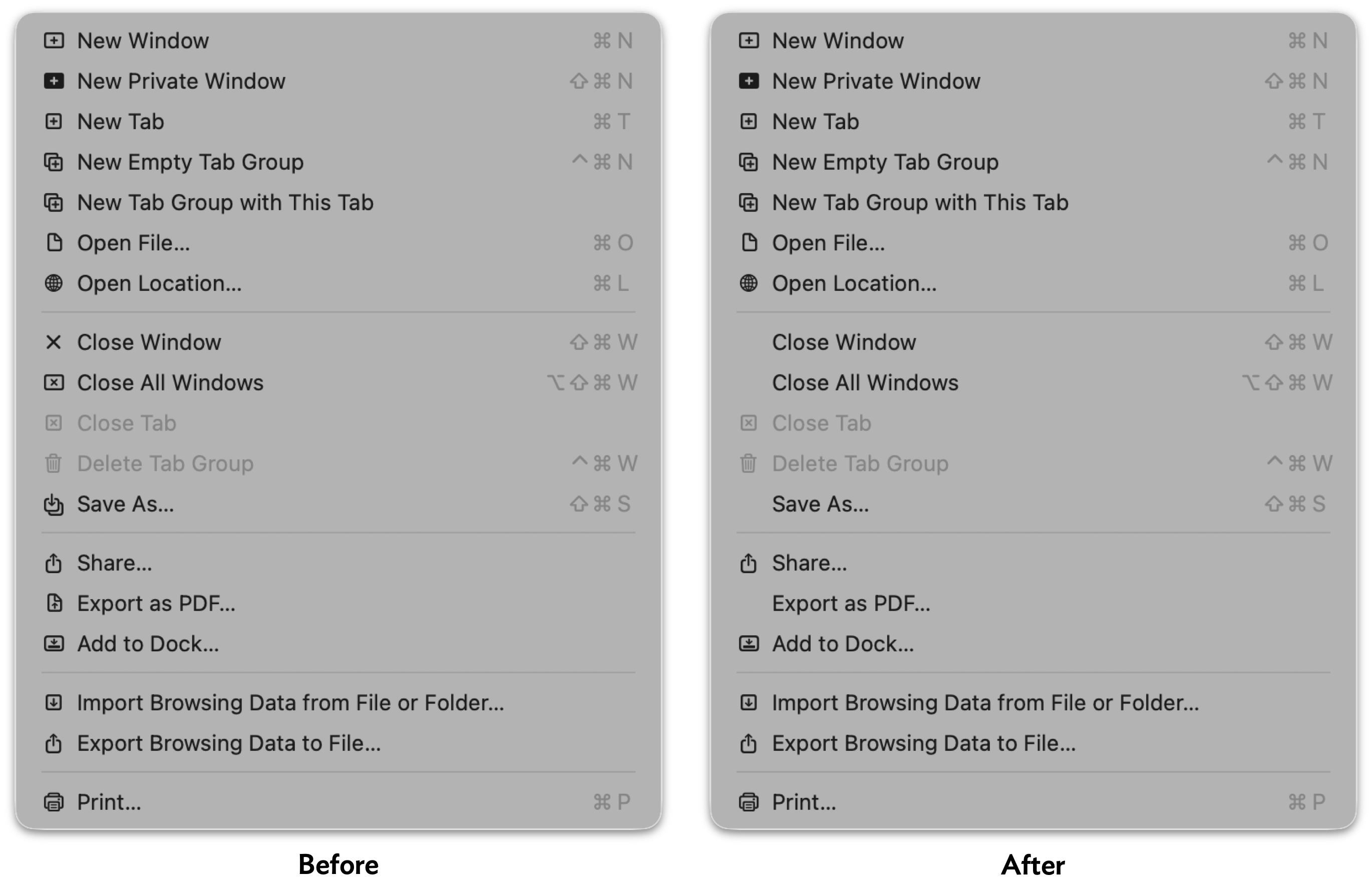
Screenshot of Safari's File menu on MacOS 26.3 Tahoe, before and after changing the hidden `NSMenuEnableActionImages` preference. In the before screenshot, every menu item has an icon. In the after image, the only items without an icon are the Close Window, Close All Windows, Save As…, and Export as PDF… commands.

So, after applying a setting that should hide almost all menu item icons, 15 out of 18 menu items still have icons in Safari’s File menu — with no rhyme or reason to the 3 that are omitted. Safari’s other menus are similarly noncompliant. Like I said, heartbreaking.

(All is not lost in Safari, however — the setting does remove the icons from Safari’s contextual menu.)

Apple’s non-AppKit (Catalyst/UIKit/SwiftUI) Mac apps are mostly lost causes on this front. Messages, Maps, and Journal keep all their icons, except for the Window menu. The iPhone Mirroring app hides the icons from its Edit and Window menus, but keeps all of them in the View menu.

So it’s a mixed bag. But even a mixed bag is better than seeing all of these insipid ugly distracting icons. Apple should fix these apps so they all fully support this global preference (that’s what the -g switch in Troughton-Smith’s command-line incantation means), and should expose this setting as a proper, visible toggle in the System Settings app. And of course, in MacOS 27, Apple should remove most of these icons from these apps, leaving behind only the handful that add actual clarity to their menu items. There’s an outcome just waiting to be had where the MacOS menu bar is better than it used to be, not worse, by carefully adding icons only next to commands where the icons add clarity.

My favorite example: commands to rotate images, like the Tools → Rotate Left and Rotate Right commands in Preview, and Image → Rotate Clockwise and Rotate Counterclockwise in Photos.1 The rule of thumb should be that menu items should have icons if the icon alone could provide enough of a clue to replace the command name. That’s very much true for these Rotate commands, and the icons help reduce the cognitive load of thinking about which way is clockwise.


And but so what about third-party Mac apps? I think the best solution is for third-party apps to ignore Apple’s lead, and omit menu item icons on apps that have been updated for the new appearance on MacOS 26 Tahoe. That’s what Brent Simmons has done with NetNewsWire 7, using code he published as open source. Rogue Amoeba Software has adopted the same technique to improve their suite of apps when running on Tahoe, and published this blog post, illustrated with before and after screenshots, to explain their thinking.

No one is arguing that icons never improve the clarity of menu items. But for the most part, menu commands should be read. If a few special menu items are improved by including icons, include just those. They’ll stand out, further improving clarity. Part of the problem with Apple’s “almost every menu item has an icon” approach with their own apps on Mac OS 26 Tahoe is that — as copiously documented by Nikita Prokopov and Jim Nielsen — the overall effect is to add visual clutter, reducing clarity. But a side effect of that clutter is that it reduces the effectiveness of the menu items for which icons are actually useful (again, like Rotate commands, or the items in the Window → Move & Resize submenu). If every menu item has an icon, the presence of an icon is never special. If only special menu items have icons, the presence of an icon is always special.2


  1. It should go without saying that these commands in Preview and Photos should use the same terms. Either both should use Rotate Left/Right, or both should use Rotate Clockwise/Counterclockwise. I personally prefer Clockwise/Counterclockwise, but the inconsistency is what grates. In the heyday of consistency in Apple’s first-party Mac software, Apple’s apps were, effectively, a living HIG. If you were adding a Rotate command to your own application, and you were unsure whether to call it “Rotate Right” or “Rotate Clockwise”, you could just check what Apple did, in its own apps, and feel certain that you were doing the right thing, using the correct terms. ↩︎

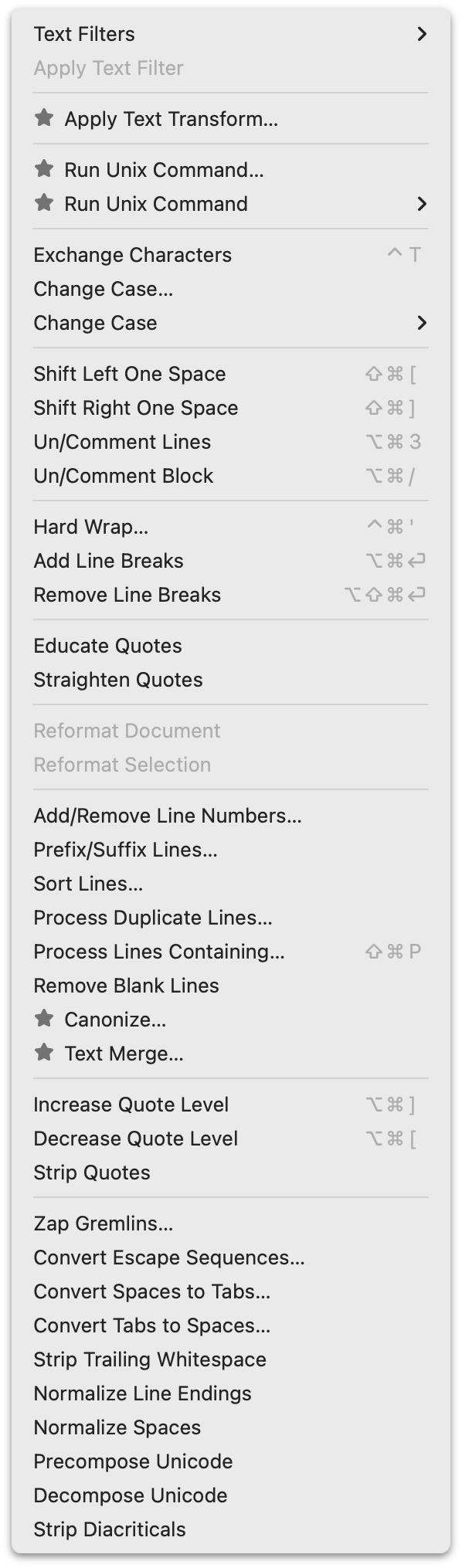
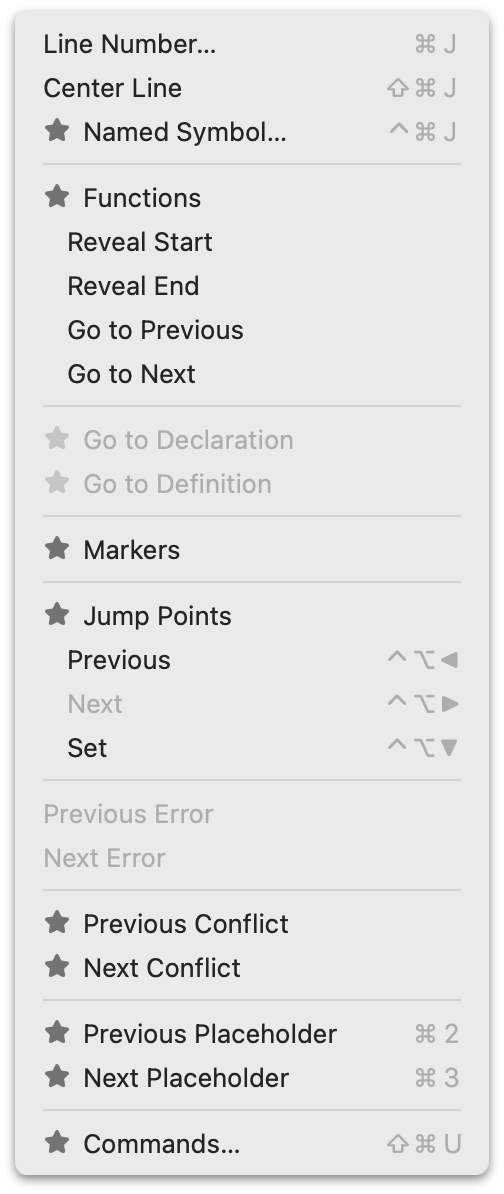
  2. BBEdit offers a great example. BBEdit can be used, free of charge, in perpetuity with a limited (but robust!) subset of its full feature set. Its full feature set is unlocked with a one-time purchase for each major release version. But the full feature set is available as a 30-day trial — which trial period is reset each time a major new version is released. During that trial period, menu commands that are paid features are available to use, but marked with a “★” icon. (A very fine choice of icon, if you ask me.) Here, for example, are screenshots of BBEdit’s Text and Go menus while in trial mode. When the trial period ends, those commands are disabled, but remain visible in the menus, still marked with those star icons. Thus, during the free trial period, users can see which commands they’re using that they’ll need to pay for when the trial ends, and after the trial ends, they can see which features are locked. (After you purchase a license, those star icons just go away.) ↩︎︎

  • ✇Daring Fireball
  • Following Google’s Lead With Pixel Phones, Samsung Announces AirDrop Support With Galaxy S26 Phones
    Samsung: Samsung is introducing AirDrop support to the Galaxy S26 series, making it easier for users to share content between devices using Quick Share. The feature will begin rolling out from March 23, starting in Korea and expanding to more regions including Europe, Hong Kong, Japan, Latin America, North America, Southeast Asia, and Taiwan. AirDrop support will initially be available on the Galaxy S26 series, with expansion to additional devices to be announced at a later date. I presu
     

Following Google’s Lead With Pixel Phones, Samsung Announces AirDrop Support With Galaxy S26 Phones

24 March 2026 at 21:39

Samsung:

Samsung is introducing AirDrop support to the Galaxy S26 series, making it easier for users to share content between devices using Quick Share.

The feature will begin rolling out from March 23, starting in Korea and expanding to more regions including Europe, Hong Kong, Japan, Latin America, North America, Southeast Asia, and Taiwan. AirDrop support will initially be available on the Galaxy S26 series, with expansion to additional devices to be announced at a later date.

I presume, but don’t know for certain, that Samsung is using the same reverse-engineered implementation of AirDrop that Google announced for its Pixel 10 phones back in November, and for which Google offered a wee bit of technical details to vouch for the security of the implementation. A month ago, Google expanded support to the Pixel 9 generation.

Apple has, to date, not commented on any of this. I get the feeling there’s nothing they can do about this without breaking AirDrop compatibility between existing Apple devices. It would be kind of funny if AirDrop — never intended as a public protocol — becomes a de facto standard, but FaceTime — which Steve Jobs impulsively announced would become an official standard at its introduction in 2010 (to the complete surprise of both Apple’s legal and engineering teams) — never does.

  • ✇Daring Fireball
  • iOS 26.4
    Good rundown of everything new and changed, as usual, from Juli Clover at MacRumors. This has been a noticeable change for me: The App Store merges apps and purchase history, and has a dedicated section for app updates. It now takes two taps to get to app updates rather than having them available at the bottom of the profile page. At first the extra tap irked me, but it really does make more sense for Updates to have its own section. I update apps manually, because I like reading release
     

iOS 26.4

25 March 2026 at 00:40

Good rundown of everything new and changed, as usual, from Juli Clover at MacRumors. This has been a noticeable change for me:

The App Store merges apps and purchase history, and has a dedicated section for app updates. It now takes two taps to get to app updates rather than having them available at the bottom of the profile page.

At first the extra tap irked me, but it really does make more sense for Updates to have its own section. I update apps manually, because I like reading release notes from developers who take the time to document changes, and I also like reading “Bug fixes and performance improvements” over and over and over again from developers who do not.

  • ✇Daring Fireball
  • OpenAI Is Closing Sora
    Sora, on Twitter/X: We’re saying goodbye to the Sora app. To everyone who created with Sora, shared it, and built community around it: thank you. What you made with Sora mattered, and we know this news is disappointing. We’ll share more soon, including timelines for the app and API and details on preserving your work. Sora was kind of fun for a week or two. But, contrary to the above, nothing anyone made with Sora mattered. It was just a very (very) expensive lark.  &#
     

OpenAI Is Closing Sora

25 March 2026 at 00:49

Sora, on Twitter/X:

We’re saying goodbye to the Sora app. To everyone who created with Sora, shared it, and built community around it: thank you. What you made with Sora mattered, and we know this news is disappointing.

We’ll share more soon, including timelines for the app and API and details on preserving your work.

Sora was kind of fun for a week or two. But, contrary to the above, nothing anyone made with Sora mattered. It was just a very (very) expensive lark.

  • ✇Daring Fireball
  • WSJ: ‘OpenAI Plans Launch of Desktop “Superapp”’
    Berber Jin, reporting last week for The Wall Street Journal (gift link): OpenAI is planning to unify its ChatGPT app, coding platform Codex and browser into a desktop “superapp,” a step to simplify the user experience and continue with efforts to focus on engineering and business customers. Chief of Applications Fidji Simo will oversee the change and focus on helping the company’s sales team market the new product. OpenAI President Greg Brockman, who currently leads the c
     

WSJ: ‘OpenAI Plans Launch of Desktop “Superapp”’

25 March 2026 at 01:00

Berber Jin, reporting last week for The Wall Street Journal (gift link):

OpenAI is planning to unify its ChatGPT app, coding platform Codex and browser into a desktop “superapp,” a step to simplify the user experience and continue with efforts to focus on engineering and business customers.

Chief of Applications Fidji Simo will oversee the change and focus on helping the company’s sales team market the new product. OpenAI President Greg Brockman, who currently leads the company’s computing efforts, will help Simo oversee the product revamp and related organization changes, an OpenAI spokeswoman said.

The strategy change marks a major shift from last year, when OpenAI launched a series of stand-alone products that didn’t always resonate with users and sometimes created a lack of focus within the company. OpenAI executives are hoping that unifying its products under one app will allow it to streamline resources as it seeks to beat back the success of its rival Anthropic.

This sounds like an utter disaster in the making. Would it make any sense for Apple to merge Safari, Messages, and Xcode into one “superapp”? No, it would not. It makes no more sense for OpenAI to merge ChatGPT, Codex, and especially Atlas together. I use and very much enjoy ChatGPT because its Mac client is such a good Mac app.

Simo came to OpenAI by way of Shopify and Instacart — and before that, was Meta’s head of the Facebook app for a decade — so it doesn’t surprise me that she sees OpenAI’s existing product-first culture of creating well-crafted native apps as a problem, not a strength to build on. If this “superapp” plan is true, it’s going to tank everything that heretofore has been good about ChatGPT and Codex.

  • ✇Daring Fireball
  • Claude Can Now Take Control of Your Mac
    Claude: In Claude Cowork and Claude Code, you can now enable Claude to use your computer to complete tasks. When Claude doesn’t have access to the tools it needs, it will point, click, and navigate what’s on your screen to perform the task itself. It can open files, use the browser, and run dev tools automatically — with no setup required. This feature is now available in research preview for Claude Pro and Max subscribers. It works especially well with Disp
     

Claude Can Now Take Control of Your Mac

25 March 2026 at 01:09

Claude:

In Claude Cowork and Claude Code, you can now enable Claude to use your computer to complete tasks. When Claude doesn’t have access to the tools it needs, it will point, click, and navigate what’s on your screen to perform the task itself. It can open files, use the browser, and run dev tools automatically — with no setup required.

This feature is now available in research preview for Claude Pro and Max subscribers. It works especially well with Dispatch, which lets you assign Claude tasks from your phone.

I think you’re nuts if you try this on your actual Mac, with all your actual data and files. But I thought people were nuts for using a lot of bleeding edge AI features before I tried them myself. It’s certainly notable that Anthropic has shipped agentic AI on the Mac before Apple has, after Apple originally promised it to arrive a year ago.

The Claude Mac client itself remains a lazy Electron clunker. If Claude Code is so good I don’t get why they don’t prove it by using it to make an even halfway decent native Mac app.

See also: Techmeme.

  • ✇Daring Fireball
  • Improved Analytics in App Store Connect
    Apple Developer: Analytics in App Store Connect receives its biggest update since its launch, including a refreshed user experience that makes it easier to measure the performance of your apps and games. There’s a lot that’s new, but all the data is still collected with an emphasis on user privacy. There’s an all-new support guide that documents everything. John Voorhees, writing at MacStories: Since the changes rolled out, a couple of concerns I’ve seen expre
     

Improved Analytics in App Store Connect

25 March 2026 at 19:16

Apple Developer:

Analytics in App Store Connect receives its biggest update since its launch, including a refreshed user experience that makes it easier to measure the performance of your apps and games.

There’s a lot that’s new, but all the data is still collected with an emphasis on user privacy. There’s an all-new support guide that documents everything.

John Voorhees, writing at MacStories:

Since the changes rolled out, a couple of concerns I’ve seen expressed online are that there will no longer be a single place to view the aggregate performance of multiple apps and that the new default reporting period is three months. Those concerns are well founded. The changes are organized on an app-by-app basis, and as Apple says in a banner on App Store Connect, the Dashboards in the Trends section of Connect and related reports where that data was available are being deprecated later this year and next. So, while the data Apple offers is deep for each app, the aggregate data falls short by not providing a birds-eye view of a developer’s entire app catalog.

For what it’s worth, Apple is aware of the feedback regarding cross-app reporting. Also, the shorter sales reporting periods, such as the past 24 hours and seven days, are still available, but they’re less visible because three months is the new default.

  • ✇Daring Fireball
  • ‘A List of Chain Restaurants Whose Names Contain Unusual Structures’
    When I first read this post from my friend Paul Kafasis last week — a One Foot Tsunami instant classic — I was hoping that I could think of an example that he missed. I can’t say I did. The closest, though, is ShowBiz Pizza Place, a 1980s archrival to Chuck E. Cheese. (Instead of a pizza-cooking rat, ShowBiz had Billy Bob, a pizza-cooking hillbilly bear.) Place is an unusual noun to put in a restaurant name, but it isn’t a structure, so it do
     

‘A List of Chain Restaurants Whose Names Contain Unusual Structures’

25 March 2026 at 19:50

When I first read this post from my friend Paul Kafasis last week — a One Foot Tsunami instant classic — I was hoping that I could think of an example that he missed. I can’t say I did.

The closest, though, is ShowBiz Pizza Place, a 1980s archrival to Chuck E. Cheese. (Instead of a pizza-cooking rat, ShowBiz had Billy Bob, a pizza-cooking hillbilly bear.) Place is an unusual noun to put in a restaurant name, but it isn’t a structure, so it doesn’t belong on Kafasis’s list. But what brings it to mind is that growing up, we had a ShowBiz Pizza Place near our mall, and I loved going there because it was a damn good arcade (and the pizza, I thought at the time, was pretty good — cut into small squares, not slices). They had the sit-down version of Star Wars, the best way to play the best coin-op game in history. (Two tokens to play that one, of course.) They had the sit-down version of Spy Hunter, too. Anyway, generally we all just referred to the joint as “ShowBiz”, but one thing that drove me nuts is that a few of my friends, when referring to it by its full name, called it ShowBiz Pizza Palace. It was like hearing someone call an iPod Touch an “iTouch”. And while I loved the place, trust me, it was not palatial — unless you’re familiar with palaces that are really dark and seedy, and had ball pits where bad things happened.

  • ✇Daring Fireball
  • The New York Yankees Have the Best Record in Baseball
    Nice 7-0 win last night over the San Francisco Giants. The game was on Netflix, and it was the worst baseball broadcast I can recall watching in the HD era. The picture quality was just awful, with embarrassing dynamic ad injection. Yes, there was haze, but it’s not like crappy weather in San Francisco is a surprise. The game had the first Automated Ball-Strike (ABS) challenge in MLB history, but the broadcast missed it while it happened. And Netflix’s scorebug is without question
     

The New York Yankees Have the Best Record in Baseball

26 March 2026 at 15:05

Nice 7-0 win last night over the San Francisco Giants.

The game was on Netflix, and it was the worst baseball broadcast I can recall watching in the HD era. The picture quality was just awful, with embarrassing dynamic ad injection. Yes, there was haze, but it’s not like crappy weather in San Francisco is a surprise. The game had the first Automated Ball-Strike (ABS) challenge in MLB history, but the broadcast missed it while it happened. And Netflix’s scorebug is without question the worst I’ve ever seen — as one guy on Reddit quipped, it was somehow “too big and too small at the same time”. I’d have to stand within arm’s reach of my TV to read those player names.

If this is the level of attention Netflix is going to pay to sports broadcasts, they should stick to bumfights.

  • ✇Daring Fireball
  • The Yankees Almost Signed Another P.E.D. Cheater
    One more nugget from last night’s 7-0 Yankees win over the Giants: During the sixth inning of Wednesday’s Opening Night matchup between two historic franchises, the Giants and Yankees, all-time home run leader Barry Bonds joined the Netflix broadcast booth at Oracle Park and told an incredible story about just how close he came to signing with the Yankees in 1992. [...] “Well, I would’ve been a Yankees [player],” Bonds said, “but Steinbrenner got on the
     

The Yankees Almost Signed Another P.E.D. Cheater

26 March 2026 at 15:19

One more nugget from last night’s 7-0 Yankees win over the Giants:

During the sixth inning of Wednesday’s Opening Night matchup between two historic franchises, the Giants and Yankees, all-time home run leader Barry Bonds joined the Netflix broadcast booth at Oracle Park and told an incredible story about just how close he came to signing with the Yankees in 1992. [...]

“Well, I would’ve been a Yankees [player],” Bonds said, “but Steinbrenner got on the phone and they called us and they told me, ‘Barry, we’re gonna give you the money — [make you] the highest-paid player … but you have to sign the contract by 2:00 this afternoon.’”

One thing you don’t do is give Bonds an ultimatum.

“And I said, ‘Excuse me?’” Bonds said. “And I just hung the phone up.”

The Yankees went on to play in six World Series from that moment until the end of Bonds’s playing career, winning four championships. Bonds played in one World Series with the Giants, losing a seven-game series to the Angels in 2002.

  • ✇Daring Fireball
  • Jennifer Daniel on the New ‘Distorted Face’ Emoji
    Jennifer Daniel, on her “Did Someone Say Emoji?” blog: First came Melting Face 🫠, our collective surrender to the liquid state. Then Dotted Line Face 🫥, the visual representation of sublimation: turning from a solid into a gas just to escape a conversation. Now, we have Distorted Face (U+1FAEA), a moment defined by tension: where you aren’t just feeling an emotion — you are being physically altered by it. I’ll live, but it feel
     

Jennifer Daniel on the New ‘Distorted Face’ Emoji

26 March 2026 at 16:43

Jennifer Daniel, on her “Did Someone Say Emoji?” blog:

First came Melting Face 🫠, our collective surrender to the liquid state.

Then Dotted Line Face 🫥, the visual representation of sublimation: turning from a solid into a gas just to escape a conversation.

Now, we have Distorted Face (U+1FAEA), a moment defined by tension: where you aren’t just feeling an emotion — you are being physically altered by it.

I’ll live, but it feels a tad spiteful that Apple only adds new emoji to the current-year OS updates. So this year’s 8 new emoji are in MacOS 26.4, but not MacOS 15.7.5, despite both being released this week.

  • ✇Daring Fireball
  • MacOS 26.4 Adds ‘Slow Charger’ Indicator for MacBooks
    Tim Hardwick at MacRumors: macOS Tahoe 26.4 includes a new slow charger indicator that tells MacBook users when their charging setup isn’t delivering full power. As described in an updated Apple support document, a “Slow Charger” label now appears in orange text in the battery status menu and above the Battery Level graph in Battery settings. The indicator is accompanied by an info button for more details. Apple says that to charge more quickly, users should use a power a
     

MacOS 26.4 Adds ‘Slow Charger’ Indicator for MacBooks

26 March 2026 at 17:13

Tim Hardwick at MacRumors:

macOS Tahoe 26.4 includes a new slow charger indicator that tells MacBook users when their charging setup isn’t delivering full power. As described in an updated Apple support document, a “Slow Charger” label now appears in orange text in the battery status menu and above the Battery Level graph in Battery settings. The indicator is accompanied by an info button for more details.

Apple says that to charge more quickly, users should use a power adapter and cable that deliver at least the minimum wattage recommended for their MacBook model.

This might be especially useful in Europe, where MacBooks no longer come with power adapters. Regular people often have no idea how power adapters work, and presume one charger is as good as another, if it works at all. After I posted this item back in October about the new MacBook Pros not shipping with chargers anywhere in Europe (not just the EU, even though it’s an EU law that requires products to be available without included chargers), a bunch of readers regaled me with tales of a family member complaining about their MacBook losing battery life even while plugged in, only to discover that they were using wimpy 5- or 10-watt USB-C adapters.

  • ✇Daring Fireball
  • Katie Notopoulos Bids Farewell to Sora: ‘You Were Too Beautiful and Stupid for This World’
    Katie Notopoulos, my favorite Sora user, at Business Insider (paywalled, alas, but available via News+): Eventually, my friends all seemed to get bored with the app. As I do at most parties, I stuck around longer than everyone else, but eventually I, too, found that the novelty had worn off. I rarely opened the app after the second week. This was, I imagine, a problem: making videos of yourself is fun, but watching videos that strangers make of themselves is not fun. The idea of a social f
     

Katie Notopoulos Bids Farewell to Sora: ‘You Were Too Beautiful and Stupid for This World’

26 March 2026 at 17:24

Katie Notopoulos, my favorite Sora user, at Business Insider (paywalled, alas, but available via News+):

Eventually, my friends all seemed to get bored with the app. As I do at most parties, I stuck around longer than everyone else, but eventually I, too, found that the novelty had worn off. I rarely opened the app after the second week.

This was, I imagine, a problem: making videos of yourself is fun, but watching videos that strangers make of themselves is not fun. The idea of a social feed of AI-generated videos is simply not something that people are interested in. Around the same time, Meta also tried this with an app of AI videos, and it was even more boring.

It’s hard to see how anyone thought Sora would have staying power, or could ever justify the apparently exorbitant cost of running it. OpenAI burned a ton of money on what was effectively a stunt.

OpenAI doesn’t appear to be a well-oiled machine at the moment.

  • ✇Daring Fireball
  • The Information: ‘Apple Can “Distill” Google’s Big Gemini Model’
    Jessica E. Lessin, Amir Efrati, and Erin Woo, reporting for the paywalled-without-gift-links The Information: While we have reported that Apple can tweak, or fine-tune, a version of Google’s Gemini AI so that it responds to queries the way Apple wants, the agreement gives Apple a lot more freedom with Google’s tech. In fact, Apple has complete access to the Gemini model in its own data center facilities. Apple can use that access to produce smaller models that power specific ta
     

The Information: ‘Apple Can “Distill” Google’s Big Gemini Model’

26 March 2026 at 17:33

Jessica E. Lessin, Amir Efrati, and Erin Woo, reporting for the paywalled-without-gift-links The Information:

While we have reported that Apple can tweak, or fine-tune, a version of Google’s Gemini AI so that it responds to queries the way Apple wants, the agreement gives Apple a lot more freedom with Google’s tech.

In fact, Apple has complete access to the Gemini model in its own data center facilities. Apple can use that access to produce smaller models that power specific tasks or are small enough to run directly on Apple devices so they can run the tasks faster, said a person who has direct knowledge of the arrangement.

The process of producing such models is called distillation, which essentially transfers knowledge from one large language model, which acts like a teacher, to another model that acts as a student.

That Apple negotiated this level of access is interesting, but not surprising. The biggest tell that this deal runs much deeper than simple white-labelling is that Apple will — or at least has the right to — run these Gemini-based models in Apple’s own Private Cloud Compute datacenters.

  • ✇Daring Fireball
  • Google Brags About Android Web Browser Benchmark Scores on Unnamed Devices; Gullible Reporters Fall for It
    Chrome engineer Eric Seckler, on Google’s Chromium Blog, under the bold headline “Android Sets New Record for Mobile Web Performance”: Today, we are proud to celebrate a major milestone: Android is now the fastest mobile platform for web browsing. Through deep vertical integration across hardware, the Android OS, and the Chrome engine, the latest flagship Android devices are setting new performance records, outperforming all other mobile competitors in the key web perform
     

Google Brags About Android Web Browser Benchmark Scores on Unnamed Devices; Gullible Reporters Fall for It

26 March 2026 at 19:08

Chrome engineer Eric Seckler, on Google’s Chromium Blog, under the bold headline “Android Sets New Record for Mobile Web Performance”:

Today, we are proud to celebrate a major milestone: Android is now the fastest mobile platform for web browsing.

Through deep vertical integration across hardware, the Android OS, and the Chrome engine, the latest flagship Android devices are setting new performance records, outperforming all other mobile competitors in the key web performance benchmarks Speedometer and LoadLine and providing a level of responsiveness previously unseen on mobile.

Three unnamed Android “flagship phones” scored higher than an unnamed “competing mobile phone platform” (presumably an iPhone 17 Pro) in two benchmarks, Speedometer 3.1 and LoadLine. Speedometer is a longstanding open source benchmark whose development is governed by representatives from WebKit (Apple), Blink (Google), and Gecko (Mozilla). LoadLine is a benchmark from Google and Android OEMs. Speedometer is a benchmark anyone can run just by visiting the benchmark’s website. Running LoadLine, especially on an iOS device, is an enormous hassle that involves two USB-C-to-Ethernet adapters, enabling Remote Automation and the Web Inspector in Safari, installing custom certificates on the iOS device, and installing custom software on an attached Mac.

You will be shocked to learn that the three unnamed Android phones outscored the “competing mobile phone” by significantly larger margins on LoadLine than Speedometer.

Claiming that these results make Android “the fastest mobile platform for web browsing” is ridiculous. It boggles the mind how many publications parroted Google’s braggadocio — MacRumors, 9to5Google, Android Authority, PhoneArena — without even mentioning that the results can’t possibly be verified because none of the devices (and none of the software versions) are named. This guy at Notebookcheck even had the audacity to put in his headline that Google “shows the receipts” for its claims. What kind of receipt doesn’t say what you bought? I would love to wager real money with the authors of any of those stories on what the Speedometer 3.1 results show for 100 random real-world Android users vs. 100 random real-world iPhone users. Or how about the average scores from the three best-selling models on each platform from the last year.

Name the devices or shut up.

  • ✇Daring Fireball
  • Disney Drops Vaporware $1B Investment in OpenAI After Sora Got Axed
    Todd Spangler, reporting for Variety: Disney has now ended its partnership with OpenAI, which included plans for the media conglomerate to take a $1 billion stake in the artificial-intelligence company led by CEO Sam Altman. A Disney rep said in a statement to Variety: “As the nascent AI field advances rapidly, we respect OpenAI’s decision to exit the video generation business and to shift its priorities elsewhere. We appreciate the constructive collaboration between our teams
     

Disney Drops Vaporware $1B Investment in OpenAI After Sora Got Axed

26 March 2026 at 19:26

Todd Spangler, reporting for Variety:

Disney has now ended its partnership with OpenAI, which included plans for the media conglomerate to take a $1 billion stake in the artificial-intelligence company led by CEO Sam Altman.

A Disney rep said in a statement to Variety: “As the nascent AI field advances rapidly, we respect OpenAI’s decision to exit the video generation business and to shift its priorities elsewhere. We appreciate the constructive collaboration between our teams and what we learned from it, and we will continue to engage with AI platforms to find new ways to meet fans where they are while responsibly embracing new technologies that respect IP and the rights of creators.”

Allow me to translate from PR-speak into plain English:

We love children, and children will always be the primary audience for Disney’s theme parks, movies, and other entertainment. But we don’t do business with children.

Most PR statements would be more effective in plain English.

  • ✇Daring Fireball
  • You Can Jump Right to the Updates Screen in the App Store App on iOS 26.4
    I mentioned the other day that I was mildly irked by a change in iOS 26.4 that moved the list of available updates in the App Store app one additional screen further into its hierarchy. Good news (via Nate Barham on Mastodon): you can long-press on the App Store app on your Home Screen and jump right to the Updates screen from the contextual menu. Nice! (This feature has been around for a few years, apparently, but it’s extra useful in 26.4). Alternatively, you can create a Shortcuts sho
     

You Can Jump Right to the Updates Screen in the App Store App on iOS 26.4

26 March 2026 at 19:35

I mentioned the other day that I was mildly irked by a change in iOS 26.4 that moved the list of available updates in the App Store app one additional screen further into its hierarchy. Good news (via Nate Barham on Mastodon): you can long-press on the App Store app on your Home Screen and jump right to the Updates screen from the contextual menu. Nice! (This feature has been around for a few years, apparently, but it’s extra useful in 26.4).

Alternatively, you can create a Shortcuts shortcut that jumps you to the Updates screen. Just one action: open the URL itms-apps://apps.apple.com/updates. Save it as an “app” on your Home Screen or an action in Control Center. Me, I’m just going to use the tap-and-hold contextual menu item on the App Store app.

❌