❌

Normal view

  • βœ‡James' Coffee Blog
  • Artemis dense layout
    This evening I added an idea I have had for a while to Artemis: a "dense" layout.By default, the Artemis interface appears in a single-column layout. The dense layout creates several columns. Each column from left-to-right shows posts for a given day. You can scroll down to the next row of columns to see posts from previous days, too.You can experiment with a new "dense" layout, designed to be skimmable, by setting your "Choose a Layout" preference to "Dense" in your account settings.Here is wh
     

Artemis dense layout

22 February 2026 at 00:00

This evening I added an idea I have had for a while to Artemis: a "dense" layout.

By default, the Artemis interface appears in a single-column layout. The dense layout creates several columns. Each column from left-to-right shows posts for a given day. You can scroll down to the next row of columns to see posts from previous days, too.

You can experiment with a new "dense" layout, designed to be skimmable, by setting your "Choose a Layout" preference to "Dense" in your account settings.

Here is what the dense layout looks like:

The Artemis dense layout showing three columns of posts for February 22nd, February 21st, and February 20th.

I made this layout with a question on my mind: how much information could I fit on the page while preserving the readability of its contents? A grid layout lets me pack in many more posts. The UI is busier than I prefer, but I like how skimmable a dense grid can be.

On reflection, this layout also lets me see clusters of posts that I haven't read (marked in white). (Although I have read more posts than the ones above via someone's site directly but that doesn't show up above.)

Addendum

This layout fits in my idea of what a "Lab" set of features would look like for Artemis (a la Ghost Labs). Such a Lab would contain features that are experimental. I don't have list of features in a Lab that you can toggle on/off, although I would love to create a Lab section at some point so people can play with experimental features that have an explicit label indicating they are experimental.

Addendum #2 (Added Feb. 23rd 2026)

I originally experimented with the idea of a "dense" layout in May last year and came up with a design that packed even more information onto the screen:

This design was the original inspiration behind what is now the "dense layout" feature, although the current "dense layout" has a little bit more whitespace.

If you use Artemis and would prefer to have this even-more-dense layout, please let me know.

Ghost Labs
  • βœ‡James' Coffee Blog
  • Graduating between mediums of communication
    The IndieWeb community chat has a feature that lets you create a wiki page from a chat interaction. You can say “what is {term}?” in the chat and, if there is a definition on the community wiki, the definition will be returned by a bot. Otherwise, the bot, Loqi, will say that you can send a message in the form “{term} is…” to create a stub wiki page with your definition.This allows community discussions to start in one medium – a community chat, which in thi
     

Graduating between mediums of communication

22 February 2026 at 00:00

The IndieWeb community chat has a feature that lets you create a wiki page from a chat interaction. You can say “what is {term}?” in the chat and, if there is a definition on the community wiki, the definition will be returned by a bot. Otherwise, the bot, Loqi, will say that you can send a message in the form “{term} is…” to create a stub wiki page with your definition.

This allows community discussions to start in one medium – a community chat, which in this case is bridged between Slack, IRC, and Discord – and end in another: the wiki. In this way, a definition “graduates” from a message in a chat which may not be easy to refer back to into a definition with a permalink to which the community can easily refer. Importantly, when information is on the wiki, others can contribute and develop the page further.

I see this pattern of what I am calling “graduation” in other places too. The group chat feature in Instagram lets you start a call with friends in the chat. You can start with text messages as normal and, at any time, move into an audio call. You can do this without having to switch contexts (i.e. go to a different application and figuring out how to invite everyone to the chat).

You can “graduate” from a text chat to a videoconference in professional contexts. I have see this be effective in many contexts, especially when a text chat has been going on for a long time and talking through a problem via a call would be useful.

Now I think about it more, the W3C has an IRC bot, Zakim, that is used for meetings. At the end of a meeting, chairs can turn the text discussion from the meeting into a permalink that serves as minutes (example).

You can “graduate” between contexts for both creative (i.e. to create an artefact that lasts) and communication purposes (to move to a medium that has better affordances for the type of discussion you want to have, like a video call with screen sharing to work through a professional task).

“Graduate” may not be the perfect term in that it may imply that something should begin in one form (i.e. text) and end in another (i.e. a video call). I don’t think that’s true; a call could graduate into a document, for example. Another term may be needed. Indeed, mediums work together: text chat has its own affordances, as does video chat, wikis, websites, and so on. “Graduation” feels like it applies to the moment when it feels like another medium would help advance a discussion at a point in time.

It has been helpful for me to think about how a place expressed through technology – for example, a chat, or a software application – may be a place to start, nurture, and develop a discussion or creative work, and also a springboard to other mediums that have other affordances (permanence of wikis for archiving, the ability to share screens and talk through a problem on a videoconference, etc.).

I wonder what other instances there are of this concept.

Loqi example Zakim
  • βœ‡James' Coffee Blog
  • Grouping threaded posts in Artemis
    Artemis lets you subscribe to ActivityPub feeds (i.e. accounts on Mastodon). To do this, you can type in an ActivityPub handle like @jamesg.blog@jamesg.blog [1] on the “Add a website” page.When you subscribe to a feed using an ActivityPub handle, Artemis can use the information in the feed to determine if a post is in reply to a previous post by the same author. This is sometimes called a “thread”; longer threads of posts by the same author used to be called “Tweet
     

Grouping threaded posts in Artemis

22 February 2026 at 00:00

Artemis lets you subscribe to ActivityPub feeds (i.e. accounts on Mastodon). To do this, you can type in an ActivityPub handle like @jamesg.blog@jamesg.blog [1] on the “Add a website” page.

When you subscribe to a feed using an ActivityPub handle, Artemis can use the information in the feed to determine if a post is in reply to a previous post by the same author. This is sometimes called a “thread”; longer threads of posts by the same author used to be called “Tweetstorms”.

Rather than present all posts by an author individually, Artemis groups threaded posts. Here is what this feature looks like:

An example of a thread in Artemis where the first post in the thread is at the top in a white colour, then replies by the same author are nested below with an indent. Replies are in a muted colour to distinguish them from the first post.

The post at the top of the thread is at the top. Subsequent posts by the author in the same thread are nested below the top post, with an arrow icon to indicate the visually nested post is a reply. Only the first two posts in a thread are shown this way so that long threads don’t take up a lot of space int he reader (although I will likely add a [and {n} more] label soon).

In addition, ActivityPub posts are presented slightly differently in Artemis. Posts with images will have [photo] to indicate there is an image in the post; posts with content warnings will have a [content warning] label; hyperlinks are replaced with [link]. Using these textual cues, you can get a sense for the post with a quick skim. Artemis acts as a preview: to see the full post, you can click through to the author’s original post.

It is also worth noting Artemis only saves posts published by an author and replies to their own posts, rather than all posts by an author (which would include their replies to others' posts, re-posts, etc.). I made this decision because I generally like to follow what someone has written as my first priority. I may extend this feature in the future to allow people to choose what they want in their reader if this is requested by users.

Conclusion

The concept of nesting posts is related to the “Grouping link posts in a web reader” post I wrote last year, except that post was specifically addressing a scenario where one website you follow responded to another. The thread grouping feature discussed in this post is specifically for threads of content by the same author published via ActivityPub.

I wanted to document this feature as an example of how to present previews of threads. If use Artemis and have any ideas on how this could be better, or have seen other implementations of this idea that you like, please feel free to email me!

Footnotes

[1] @jamesg.blog@jamesg.blog publishes a post with the title, first few words, and URL of new posts published on my website. I use Bridgy Fed for this. I set this up in case people wanted to get notifications for when I publish something new on my website. I haven't announced this anywhere yet, so consider this footnote the announcement.

1] @jamesg.blog@jamesg.blog publishes a post with the title, first few words, and URL of new posts published on my website. I use [Bridgy Fed Grouping link posts in a web reader
  • βœ‡James' Coffee Blog
  • Artemis β€œvia”
    Recently, a feed a few users – including myself – were following with Artemis published a “bookmark”-like post. The markup in the corresponding feed was a bit different than expected, so Artemis ended up linking directly to the bookmarked post rather than to the author’s post itself.I fixed the underlying bug in Artemis, but it left me thinking about an idea I have been considering for a while: should Artemis let users know when a post has a permalink that correspo
     

Artemis β€œvia”

23 February 2026 at 00:00

Recently, a feed a few users – including myself – were following with Artemis published a “bookmark”-like post. The markup in the corresponding feed was a bit different than expected, so Artemis ended up linking directly to the bookmarked post rather than to the author’s post itself.

I fixed the underlying bug in Artemis, but it left me thinking about an idea I have been considering for a while: should Artemis let users know when a post has a permalink that corresponds with a site other than the author’s?

I recently subscribed to a feed of bookmarks that someone published and had an idea: I could add “via” in the author’s name. So when they publish a post in this feed, dedicated to bookmarks, Artemis would show it as being published “via {their name}”. I liked this pattern but it meant that I had to proactively update bookmark feeds I follow to include “via” in the author name. And I would have to remember to do this when I followed other such feeds in the future.

This led me to develop a new feature: Artemis “via”. This feature shows “via” when Artemis thinks the permalink for a post is not the same as the site you are following. Here is what it looks like if a post in your reader links to a site other than the author’s:

Above there are three posts. The first post is published on the author’s site, so their author name appears as normal. The next two posts link to sites other than the author’s website that I am following. “(via)” appears before the author name when the entry links to another website. “(via)” is in italics which provides a subtle visual indication that Artemis has added this. Users can’t add italics to author names.

With the above "(via)" labels, I can see without clicking or hovering over a link that it will take me to another website.

The following things must be true for “via” to show up next to an author’s name for an entry:

  • When your feed is calculated, the hostnames of all entries are calculated. The most popular hostname is found. If the number of posts with the most common entry name is not equal to the number of posts published in the author’s feed (as defined by how many days of posts you opt to show in your reader; ideally Artemis would look further back, but I still need to scope out this work) a given post in the author’s feed will be considered for a “via” label.
  • The entry URL hostname must be different than the feed’s domain for the entry to be considered for a “via” label.

If both of these conditions are met, “(via)” shows up before the author’s name for an entry.

For example, if I have a feed jamesg.blog/bookmarks and the post permalinks in the feed point to example.com and coffee.com, my author name would appear as “(via) James’ Bookmarks” in Artemis.

This implementation accounts for an important edge case: some feeds may publish the same hostname for every entry but the feed URL itself has a different hostname. I saw this come up in the case of feeds for a blogging platform that supports custom domains; sometimes, the underlying feeds linked to the blogging platform itself rather than the custom domain.

Suppose I publish jamesg.blog and all posts use jamesg.example.com as the hostname. This would mean the first condition in the above bullet point list (a hostname for an entry must match the most popular hostname) would fail, so “via” would not show up. This means that if a site has a different hostname for all entries, “via” will not show up.

Without this condition, I saw sites that I knew to be linking to the right URL showing up as “via”. This is suboptimal: seeing “via” in cases where it is not applicable would be confusing.

The “via” logic is still very much under development: it may be the case that I need to come up with other heuristics. With that said, I think it is a good start. The overarching motivation is to make it more clear when an entry permalink points to an external site, as is common in the case of bookmark feeds. By adding “via”, Artemis can help users understand that what they are seeing is not going to be on the site they followed, but rather go to another site that the author they followed found interesting enough to put in their feed.

  • βœ‡James' Coffee Blog
  • Preserving calm in software over time
    When I announced Artemis in 2024, I titled the announcement “Artemis, a calm web reader, is available (in beta)”. So central to the philosophy of how I build the software is the principle “calm” that, when I write about Artemis, I still use the phrase “a calm web reader” to describe what the software is.While exchanging blog post titles with Britt, she asked me a terrific question:How you maintain calmness in Artemis while still adding new features. Is there
     

Preserving calm in software over time

23 February 2026 at 00:00

When I announced Artemis in 2024, I titled the announcement “Artemis, a calm web reader, is available (in beta)”. So central to the philosophy of how I build the software is the principle “calm” that, when I write about Artemis, I still use the phrase “a calm web reader” to describe what the software is.

While exchanging blog post titles with Britt, she asked me a terrific question:

How you maintain calmness in Artemis while still adding new features. Is there an upper limit on the amount of things a calm reader could do while still being calm?

I ended up writing a post on another suggested topic “A piece of art I would love to see in person”, but the question about Artemis stuck in my mind. How do I preserve calm in Artemis over time?

I have been using Artemis for over a year and a half now. In that time the software has gone from a static site that updates once a day to a service that others can use. I have added a lot of features since Artemis was a static site. With that said, I don’t think new features have reduced the sense of calm I feel when I use Artemis. I think “calm” is an attribute of a feature and its design: a feature can afford calm, or make the experience of using Artemis less calm.

Adding features while preserving calm

My own experience using the software is that it feels like Artemis exists in the background. I go to see what my friends have written lately and then I go to their website. It doesn’t feel like it demands my attention; the update cadence is much slower than social media and other readers.

The new features I have added, and continue to add, are mostly around the topic of user preferences and control. How can I let a user customise their reader more? How can I make sure the user controls what they see? That latter question, for example, relates to the work I put in on keyword filters (which can now be applied both to all feeds and to individual feeds!). I have a few keyword filters set up which allow me to not have to think about topics I don’t want to see in my reader. In this way, the feature affords calm.

Preserving the calm I associate with the software is made up of intentional choices I make whenever I choose to add, or not add, a new feature. I ask myself questions like: How can I make this as unobtrusive as possible? Does this feature give a user more control over what they see in their reader? Will this feature affect the main reading experience and, if so, how will I make sure it is not disruptive? (For the last question, the answer is often to make something opt in by default.)

In addition, if someone thought a feature was intrusive or confusing, I would consider the feedback thoughtfully before writing a response and see what I can do better. Indeed, I have the experience of Artemis as the person who builds it; others’ feedback would help me improve the software beyond what I can see from my perspective.

Roadmaps, ideas, and red lines

There have been periods of weeks where I haven’t worked on Artemis. This is important to me. I don’t have a roadmap for Artemis with dates on when I plan to deliver features. Rather, I build what feels right when the idea comes. “via” came after a user highlighted a bug that I also noticed. “roll-ups” came after I realised people may want to follow feeds that publish many posts at once, but may not want to see all their post sin their main reader.

There may come a time when I plan a short roadmap for Artemis, but at present all I can think of would be simplifying the code such that things are more stable. I would like to work on removing repetitive code in Artemis at sone point. It would take a lot of time and I would need to plan it out, but this work would make the software easier for me to understand while reading the code and therefore easier to maintain.

There are a few “red lines” for Artemis that I don’t want to cross. These are all essential philosophies of why the software exists. First, Artemis does and will not strive to refresh posts in real time. Second, I don’t want Artemis to become an inbox, so there are no unread counts. Third, I want Artemis to be a stepping stone, rather than a destination. Artemis should point you to sites you enjoy rather than trying to be the place where you go to read the web.

Regarding the question “Is there an upper limit on the amount of things a calm reader could do while still being calm?”, I think the answer is “yes”; the more features something has, the more complex it is. I am cognisant that having lots of user preferences will, over time, feel more overwhelming. To counter this I try to set as reasonable defaults as possible (and, related to the topic of software maintenance, I need to revisit the defaults to make sure they are as good as they can be; I need to do a full run-through of using Artemis from sign-up to adding feeds to keep building my understanding of how the software works for new users).

Conclusion

The original question that motivated this post is prescient. I want to make software that is useful and makes people feel empowered. I think “calm” as a design philosophy is one part of this.

To keep following through on the reason Artemis exists – to provide a calmer way to follow websites you enjoy – means I need to continually consider that reason as I build the software. The obligation to be considerate in adding features is especially great because other people use the software. As a software author making something for other people, I want to make sure people have the experience they signed up for, and for that experience to persist over time.

Britt Artemis, a calm web reader, is available (in beta) software maintenance roll-ups A piece of art I would love to see in person via

  • βœ‡James' Coffee Blog
  • Brainstorming search engine ranking introspection
    Search is one of my favourite disciplines in computing. In 2024 I spent a lot of time working on a NoSQL engine that I called JameSQL. This tool now powers the search engine on my website.Designing search engine ranking systems is tricky to say the least. When I use my blog search engine, I sometimes notice that the article for which I am looking does not show up at the top of the search results. Google set a high standard for search; when I type something in Google in a site search, I can ofte
     

Brainstorming search engine ranking introspection

23 February 2026 at 00:00

Search is one of my favourite disciplines in computing. In 2024 I spent a lot of time working on a NoSQL engine that I called JameSQL. This tool now powers the search engine on my website.

Designing search engine ranking systems is tricky to say the least. When I use my blog search engine, I sometimes notice that the article for which I am looking does not show up at the top of the search results. Google set a high standard for search; when I type something in Google in a site search, I can often find what I am looking for.

I am not yet ready to delve back into the world of search, but I did want to take a note of an idea I had today: I want my next search project to have tooling for ranking introspection. By this I mean I want to have tools that let me know why a particular article ranks above another.

At present, JameSQL only returns a single attribute, _score, which is computed using either TF-IDF or BM25, with any additional boosts you have specified (i.e. give h1s 3x more weight). I imagine having a value like _score_answer that would tell me how much weight each attribute used in ranking had, for example:

[
  {"bm25_on_post": 100.01},
  {"score_after_h1_boost": 101.01},
  {"score_after_inlinks_added": 109.01},
  ...
]

This would be an ordered list that specifies what calculation has been made, followed by the score at that point in time. This could then be used to calculate how many points each ranking factor added onto the final score. This can be done by calculating the difference between scores after each weight is applied.

This information would help me answer the question “why is this post ranking in this place for this query?” much more effectively than right now, by letting me see exactly how each calculation and ranking factor affects the final search engine ranking.

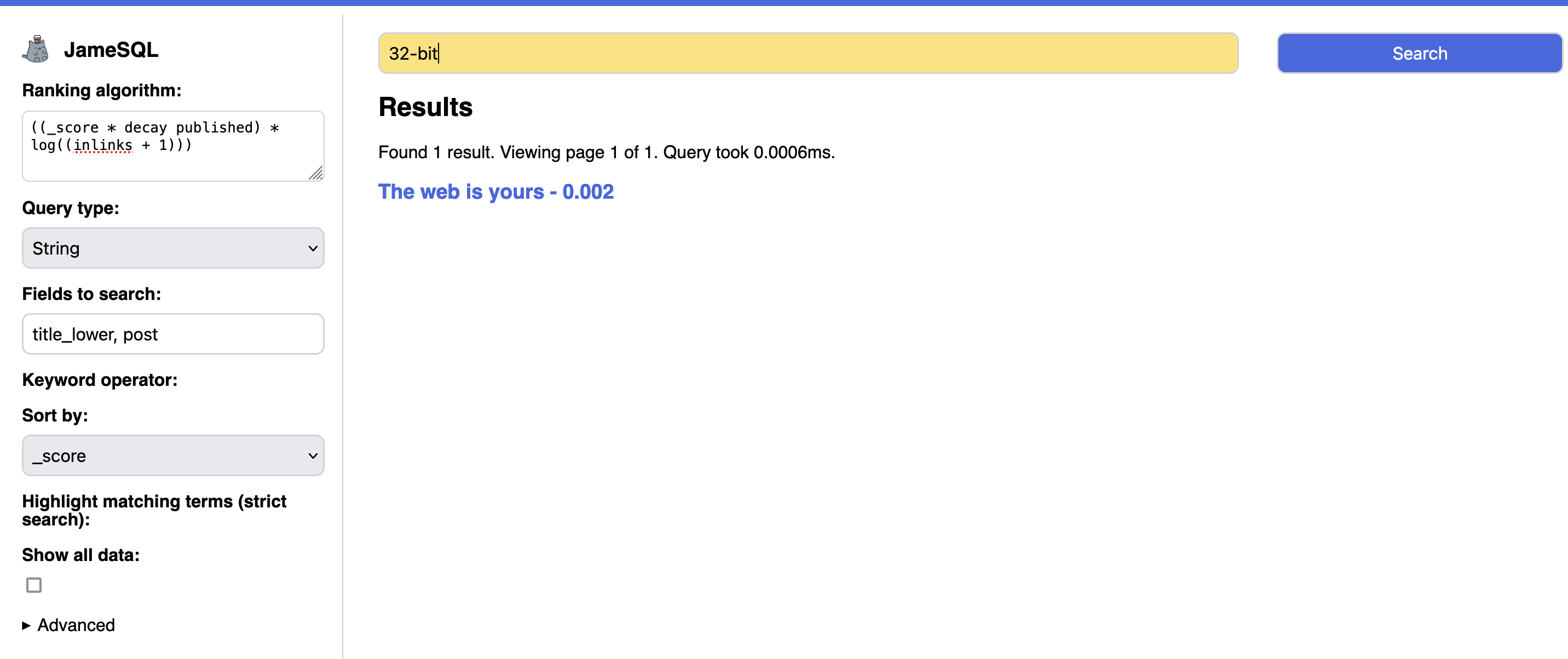
I started building a tool that lets me interactively experiment with different algorithms (see image of the dashboard) which was useful. I think I would like to revisit that dashboard to make it more useful if/when I work on a search project in the future.

Outside of the scope of this particular, developer-focused context, I generally want to use software that gives me a clear idea as to why I am seeing what I am seeing. As a user, I shouldn’t be left thinking “why did this show up?” With many opaque recommendation systems used on the web today, I am often left feeling exactly like that: “why did this show up?” This makes it a lot harder for me to understand, and therefore trust, a system.

NoSQL engine that I called JameSQL see image of the dashboard
  • βœ‡James' Coffee Blog
  • Dopplr colours
    Last year I was introduced to the idea of “Dopplr colours” in the IndieWeb community. This refers to an accent colour assigned to cities on the now-defunct travel website Dopplr. You can see examples by clicking through different Dopplr city pages in the Internet Archive and paying attention to the borders of the map.While I haven’t been able to find an authoritative description of the algorithm, to the extent I understand the Dopplr colours were assigned using an MD5-based al
     

Dopplr colours

24 February 2026 at 00:00

Last year I was introduced to the idea of “Dopplr colours” in the IndieWeb community. This refers to an accent colour assigned to cities on the now-defunct travel website Dopplr. You can see examples by clicking through different Dopplr city pages in the Internet Archive and paying attention to the borders of the map.

While I haven’t been able to find an authoritative description of the algorithm, to the extent I understand the Dopplr colours were assigned using an MD5-based algorithm. Aaron implemented a demo of the Dopplr colour system and described the algorithm in PHP as:

substr(md5($_REQUEST['city']), 0, 6)

Here is an equivalent Python implementation:

import hashlib

colour = hashlib.md5("jamesg.blog".encode()).hexdigest()[:6]

print("#" + colour)

These code snippets calculate the MD5 hash for a string, then take the first six characters. This creates a hexadecimal value that can then be used as a colour. The Dopplr colour for my domain name is #e228f3. It’s pink! Of note, you can calculate a Dopplr colour for any string, not just city names.

The IndieWeb community uses Dopplr to assign colours to cities in its timeline of in-person IndieWebCamp events:

A table showing a list of cities with cells coloured using the city's Dopplr colour if an IndieWebCamp event was held in the city in a given year.

I had never heard of the idea of Dopplr colours prior to the IndieWeb, and a Google Search was not fruitful in returning a page that described the algorithm. I thought I’d write this page to document the idea, and make it easier for people to find the idea.

described the algorithm in PHP Dopplr its timeline of in-person IndieWebCamp events: demo of the Dopplr colour system different Dopplr city pages in the Internet Archive
  • βœ‡James' Coffee Blog
  • Pens, sleeves, and whiteboards
    When I was in high school, I used to keep a pencil or pen up my sleeve. I don’t remember anyone else doing it, or why I started. But if I had a pen up my sleeve, I would at least know I had one nearby for when I’d need one. (I may be mis-remembering whether having a pen up my sleeve actually helped me remember one (oh the irony!). I remember a lot of times that I would forget a pen or a pencil. My organisational skills are better now, although still more on the chaotic side than I w
     

Pens, sleeves, and whiteboards

24 February 2026 at 00:00

When I was in high school, I used to keep a pencil or pen up my sleeve. I don’t remember anyone else doing it, or why I started. But if I had a pen up my sleeve, I would at least know I had one nearby for when I’d need one. (I may be mis-remembering whether having a pen up my sleeve actually helped me remember one (oh the irony!). I remember a lot of times that I would forget a pen or a pencil. My organisational skills are better now, although still more on the chaotic side than I would like.)

Now, I keep a pen in a pencil case that is in my backpack: there just in case I need it.

I started thinking about this yesterday because, during a session where I was writing a lot down on my whiteboard, I realised that I had put the whiteboard pen up my sleeve. I haven’t done this in years. I felt a little bit of joy thinking about keeping a pen up my sleeve. Shortly thereafter, I took the cap off the pen and started writing. So as not to forget the moment, next to the words “search engine introspection” (an idea whose essence later became a blog post), I wrote down “pen up my sleeve” – a little bookmark that, every time I look at it, brings back nice memories.

I love that the whimsical and the serious can co-exist on whiteboards. Whenever I see a whiteboard, I like to draw a smiley face on it. Occasionally, I will draw a smiling cat face too. I will do this wherever I am and have access to a whiteboard. Why? This might make someone smile.

an idea whose essence later became a blog post
  • βœ‡James' Coffee Blog
  • IndieWeb Carnival March 2026: Museum memories
    Museums and galleries are places we can go to learn about the past, think about the present, and consider the future. Museums are places we can connect: with times, people, and place. We can have conversations in museums. We learn in museums. We can explore.The topic I have chosen for this month’s IndieWeb Carnival is “Museum memories”.This month, I invite you to write a blog post about a memory that you have of a museum. It can be any museum: your local art gallery, a museum
     

IndieWeb Carnival March 2026: Museum memories

1 March 2026 at 00:00

Museums and galleries are places we can go to learn about the past, think about the present, and consider the future. Museums are places we can connect: with times, people, and place. We can have conversations in museums. We learn in museums. We can explore.

The topic I have chosen for this month’s IndieWeb Carnival is “Museum memories”.

This month, I invite you to write a blog post about a memory that you have of a museum. It can be any museum: your local art gallery, a museum you visit often, a museum you visited on holiday, a museum dedicated to one of your interests (the sea, video games, transportation, your favourite football team), or a museum at a historic site you have visited.

To get you thinking about this month’s topic, I have a few questions that you can use as starting points:

  • What is your favourite museum? When did you realise it became your favourite?
  • Do you recall a time when an object in a museum or an art gallery made you feel something? What was the feeling?
  • Do you remember when you first stumbled upon a new kind of history or art that you hadn’t thought or known about before?
  • Have you met anyone interesting at a museum? A new friend? A tour guide that got you thinking about something in a new way?
  • Is there a museum you loved as a child? What made it so interesting to you?
  • How does/did the physical space of a museum you visit or have visited affect you? Do you feel a certain way when you enter?

This month’s IndieWeb Carnival runs from March 1st to March 31st. To participate, write a blog post on the topic of “Museum memories” on our website. Then, send me an email at readers@jamesg.blog with a link to your submission.

I will curate all of the submissions I receive on this page as I receive them. At the beginning of April, I will write a round-up that summarises all of the submissions I have received.

Entries are listed below in reverse chronological order of submission. This means that the most recently received posts are at the top of the list.

Entries

Exit through the gift shop > The fine line between culture and ostentation by Andrei Two Museum Memories by Joe On Museum Memories: Daniel's Story by Bix Growing up around a museum by Matthew Museum Memories by David Museum memories by James Two Museum Memories by Jeff IndieWeb Carnival: Museum Memories by Kristof 美術館による記憶 / Museum memories by Last Encore Museum Reflections March 2026 - The WAG-Qaumajuq by Jinny Museums by Noahie Museum memories by Paul The Antique Telecommunications Museum by Reilly Museum memories by Beto Museums That Aren't Quite Museums by Sammie Museum memories by Mike Museum memories by Elena The Museum of Possibilities by Jatan Collections and catalogues: The lasting power of museums by V.H. Belvadi Lost in the Met by Nick Museum memories by Zinzy 26W11. The little book in the velvet-lined case by Anthony The power of museum memories by Ben
  • βœ‡James' Coffee Blog
  • Girl on a Divan by Berthe Morisot
    Berthe Morisot’s Girl on a Divan, displayed in the National Gallery, London, caught my eye as soon as I saw it. The painting was the last one I saw in the Impressionist room in the Gallery, but despite having been on my feet for hours before I stood for several minutes looking at the painting from all angles. There was something wonderful about the painting.Girl on a Divan portrays a woman gazing directly at the viewer. The woman’s expression is relaxed and friendly; the woman has a
     

Girl on a Divan by Berthe Morisot

3 March 2026 at 00:00

Berthe Morisot’s Girl on a Divan, displayed in the National Gallery, London, caught my eye as soon as I saw it. The painting was the last one I saw in the Impressionist room in the Gallery, but despite having been on my feet for hours before I stood for several minutes looking at the painting from all angles. There was something wonderful about the painting.

Girl on a Divan portrays a woman gazing directly at the viewer. The woman’s expression is relaxed and friendly; the woman has a slight smile on her face. The woman is wearing a white dress with several stripes of colour. The stripes are somewhat incongruent with the white, not having any particular pattern. With that said, the stripes add to the depth of the image, and the colours of the stripes – mainly blue and orange – contrast well with the blue background.

In the middle ground, a shade of blue/green is used to create what could be a chair. This further adds depth to the painting. The woman has one arm raised slightly. Could the arm be resting on the arm of the chair?

I love the use of blue in this painting; the colours are both soft (through the shades chosen) and eye-catching (through the extensive use of blue for the background) at the same time.

The painting is made with sketch-like brushstrokes for the dress, background, and the hair; the face is more relatively detailed.

After several minutes of looking at the painting, I noticed a white dot in the left eye: a glimmer of light. This brought me a lot of joy. First, it took a while to notice this detail! I love “Slow Looking”. Second, after noticing the glimmer in the eye, I thought about how much it adds to the expression of the sitter.

Girl on a Divan is now one of my favourite paintings.

I didn’t include a photo of the painting in this post for licensing reasons. You can see a detailed photo of the painting on the National Gallery website.

_detailed photo of the painting on the National Gallery website_ displayed in the National Gallery, London Slow Looking
  • βœ‡James' Coffee Blog
  • I wish there was a (simpler) way to highlight text in inputs
    When I was building the search engine for my blog, one feature I wanted to implement was syntax highlighting within the search input field. I wanted special operators (i.e. has:noalt, which shows posts that contain one or more images without alt text) to have a different background colour indicating that a given segment of text had some semantic meaning.Here is an example of the GitHub search feature which has semantic syntax highlighting:In the above image, the "capjamesg/indieweb-etherpad-arc
     

I wish there was a (simpler) way to highlight text in inputs

3 March 2026 at 00:00

When I was building the search engine for my blog, one feature I wanted to implement was syntax highlighting within the search input field. I wanted special operators (i.e. has:noalt, which shows posts that contain one or more images without alt text) to have a different background colour indicating that a given segment of text had some semantic meaning.

Here is an example of the GitHub search feature which has semantic syntax highlighting:

In the above image, the "capjamesg/indieweb-etherpad-archiver-v2" text is set in a light blue font; the text background is in a darker blue. This text is highlighted because it follows "repo:". This part of the query means that I want to scope my search to focus on a specific repository, "capjamesg/indieweb-etherpad-archiver-v2".

By highlighting the text that is part of the search query, I have a visual indication that what I have typed has some special meaning to the software.

Regex101 has a similar semantic syntax highlighting feature in the regular expression form field on their website:

Various characters in the above screenshot appear with coloured backgrounds; each one has semantic meaning.

The status quo

There doesn’t appear to be a semantic way to implement text highlighting in a native input tag. GitHub uses an input tag as the text and a lot of other code; a cursory read doesn’t make it obvious exactly what is going on. Regex101 uses a contenteditable div and gives every character in it a span tag. Both of these involve more code than I would like, all of which I would have to maintain.

I also explored an implementation of an input field that involved clipped background gradients, but there turned out to be many limits: maintaining state while scrolling, glitches in positioning the background, the requirement to use a monospaced font for the input so I can use ch to estimate where characters are in the input field.

What I would like

In my dream browser implementation, I would like to be able to apply the following styles:

  • Text colour
  • Background colour

I tried to use the CSS Custom Highlight API on an input field but it didn’t work. It feels like this API could be a stepping stone to highlighting text in an input field?

For my use case, which is to style a text input field, I would like to be able to specify the character indices at which a highlight should start and end. I can then use JavaScript with my own grammar parser to determine what character indices should be highlighted, and in what colour (I may want to use one colour for filter keywords, for example, and another for sort keywords).

Security

I suspect there are security considerations for this idea: what if the input field has white text that hides from a user what is in the form field? A malicious site could make it seem like there is no text in a form field visibly even if there is such text. With that said, I wanted to write down my thoughts to start a discussion.

Related discussions

CSS Custom Highlight API CSS Working Group Issue #4603
  • βœ‡James' Coffee Blog
  • How to change the Duolingo app icon
    I am using Duolingo to learn a bit of German. I have been using the app for a while and enjoy the exercises. With that said, I am not a fan of Duolingo’s changing application icons on iOS.I don’t like that an application can set its own home screen icon without my permission. I further do not appreciate that there doesn’t seem to be a way to change the app icon in some states. For example, there is an icon where the application mascot, Duo, appears with a plaster. I find the i
     

How to change the Duolingo app icon

3 March 2026 at 00:00

I am using Duolingo to learn a bit of German. I have been using the app for a while and enjoy the exercises. With that said, I am not a fan of Duolingo’s changing application icons on iOS.

I don’t like that an application can set its own home screen icon without my permission. I further do not appreciate that there doesn’t seem to be a way to change the app icon in some states. For example, there is an icon where the application mascot, Duo, appears with a plaster. I find the icon relatively distressing.

This weekend I figured out a workaround to reset the icon (at least on my home screen). Now, I have an Apple Shortcut that does one thing: open Duolingo. Because you can set custom icons for Apple Shortcuts and add them to your home screen, you can create a Shortcut that opens Duolingo using whatever icon you like, including the original application icon.

Here is what my Shortcut looks like on my home screen:

Two app icons on an iOS homescreen: Pocket Casts on the left, and Duolingo on the right.

Whereas my current Duolingo app shows the plaster icon, my Shortcut shows the icon I chose.

This approach has a limit: because it isn’t the original application icon, I am unsure if you will see the red application notification icons on the icon. This is acceptable for my use of the app; my phone is mostly in Do Not Disturb so I don’t see the notification icons anyway.

Furthermore, your custom application icon will not be used as the icon in push notifications. Indeed, my solution doesn't actually replace the application icon; it only lets you use your own icon on your home screen.

Here is how the Shortcut is set up:

My Duolingo Shortcut with a single step: Open Duolingo.

To change your app icon, create a new Shortcut with one step: to open an application. Choose Duolingo as the application to open. Set the name of the Shortcut to “Duolingo”. Next, download a copy of the Duolingo app icon and save it to your device.

Then, click the share icon in the Shortcuts application:

Click “Add to Home Screen”:

The Share task tray with several buttons, including one that says "Add to Home Screen" indicated by a plus icon.

Click "Image" to choose a custom image as an icon:

The home screen icon editor interface. "Image" is selected, which has three options: Choose Photo, Take Photo, and Choose File.

Click “Choose Photo” if you saved the app icon as a photo. Choose the app icon you want to use. Then, click “Add” to add the shortcut to your device:

The Duolingo app icon is set in the home screen app icon preview page.

You will now have a Duolingo app icon that looks like this:

My Duolingo shortcut.

You can then remove the original Duolingo app from your home screen and keep your shortcut.

While this approach is a workaround, it satisfies the requirement of allowing me to use a custom Duolingo app icon.

download a copy of the Duolingo app icon
  • βœ‡James' Coffee Blog
  • State of the Browser 2026
    State of the Browser was electric. This is how I summarised my experience at the annual State of the Browser event in London in my notes. I like to capture moments as they happen, then write about them later. The note is the essence of a blog post; the starting point. The note blossoms at home.State of the Browser is a conference about the web. There is always a nice mix between web technologies, standards, and designing for the web. This year was no different. The day started by learning about
     

State of the Browser 2026

3 March 2026 at 00:00

State of the Browser was electric. This is how I summarised my experience at the annual State of the Browser event in London in my notes. I like to capture moments as they happen, then write about them later. The note is the essence of a blog post; the starting point. The note blossoms at home.

State of the Browser is a conference about the web. There is always a nice mix between web technologies, standards, and designing for the web. This year was no different. The day started by learning about CSS anchor positioning and ended with a demo of an interactive video game on the web, between which everything from accessibility compliance to introversion as covered.

What makes State of the Browser distinct is that the talks generally peel back layers of the web, allowing the audience an insight into a part of the web they may not see. This was exemplified by Jason Williams’ talk “Temporal: It’s about time”, which was all about how the Temporal API standard was developed. If I heard correctly, work on the standard – which provides a more reliable, intuitive way to work with dates and times in the browser – has taken around ten years. There are four thousand tests that accompany the standard.

In learning about how much time was spent on the Temporal API – no pun intended – I can’t help but feel in awe of the work that goes into web standards: all the discussion, scoping, writing, implementing, documenting, testing, and adopting that goes into making parts of the web better. And when a new standard is available and implemented, all developers can use it with their applications.

One thought I had at the conference is that I am starting to look forward to new releases in the browser. The more I learn about HTML, CSS, and native JavaScript APIs the more I am excited about the cutting edge. Anchor positioning is implemented in most major browsers. Work is being done on masonry layouts. The technology that powers the web is improving. Behind every change and improvement are people. State of the Browser uniquely brings together many people who make, use, and appreciate standards. I appreciate that I can go to the conference and hear stories from the people who are actively building the web platform.

Mike Hall’s talk “Lessons from building for the bottom of the web” was all about his experience building a website that had to work with 2.5G connections. It was fascinating to hear the design considerations behind that. The project team wanted to deliver a web page that was no heavier than 128 KB, including images. They succeeded in their goal through many creative optimisations and technical decisions. It made me think about how light I could make a web page. What would an “ultra-light” version of a web page look like, I wonder?

I have lots to say about every talk I saw, but I will end by reflecting on one more talk: “The Plateau of Accessibility Compliance: Where do we go from here?” by Chad Gowler. This talk opened my mind to the work that is being done in the video games industry on accessibility. Gowler showed a video game that had an “arachnophobia mode” that allowed users to change the appearance of spiders if they preferred. In another example, Gowler showed the plethora of accessibility options made for one game – so many that the page kept going on and on as they scrolled through the instructions.

I loved the mix of talks, and thoroughly enjoyed meeting so many interesting people. Indeed, one of the best parts of the event is the conversations with other participants – at the start of the event, in the breaks, at lunch, and at the pub at the end of the day.

The synopsis for all the talks mentioned above is available on the State of the Browser website. I suspect talks will be available on the London Web Standards YouTube channel at some point. Thanks to Dave for organising the event, and for the whole team that made the event happen.

Tickets for the next event will be available on the 2027 State of the Browser website. The in-person Super Organised Bird tickets have already sold out, but more tickets should be available soon.

State of the Browser State of the Browser website 2027 State of the Browser website The Plateau of Accessibility Compliance: Where do we go from here? Temporal: It’s about time Lessons from building for the bottom of the web Dave more tickets should be available soon London Web Standards YouTube channel
  • βœ‡James' Coffee Blog
  • The Church at Varengeville by Monet
    I am writing about a few paintings to help me build my description skills. My analyses are not formal or comprehensive. If nothing else, I hope that you enjoy the painting that I feature!The warm colours in Monet’s The Church at Varengeville (1882) stood out to me the moment I saw them in a corner of the Courtauld Institute in London [1].ALTThe Church at VarengevilleIn the top left of the painting, the subject, the church of Varengeville, is painted. But the church takes up a relatively s
     

The Church at Varengeville by Monet

3 March 2026 at 00:00

I am writing about a few paintings to help me build my description skills. My analyses are not formal or comprehensive. If nothing else, I hope that you enjoy the painting that I feature!

The warm colours in Monet’s The Church at Varengeville (1882) stood out to me the moment I saw them in a corner of the Courtauld Institute in London [1].

The Church at Varengeville

In the top left of the painting, the subject, the church of Varengeville, is painted. But the church takes up a relatively small portion of the painting: a much greater portion is dedicated to the cliffside, bushes, and two trees that span from the bottom to the top third of the canvas. This is in contrast to other paintings of churches that Monet has made like the Roen Cathedral and the Church at Vétheuil where the church takes up much more of the canvas.

The Church of Varengeville stood out to me for its use of colour; Monet paintings always make me feel something, and one question I would like to answer in my studies is why his use of colour makes me feel the way it does. The sky is a warm yellow. Is the sun about to set?

I appreciate the contrast between the sky and the ocean: the sky is yellow and bright, whereas the ocean is a soft blue with yellow tones. The sea and sky are separated by a horizon line.

The bushes in the foreground are more clearly defined than the fields of grass; the bushes use a mix of vivid yellows and reds and oranges, whereas the grass uses a more limited range of colours. The left side of the painting is orange. I am unsure what phenomena or flora it depicts.

I was mesmerised while looking at this painting, studying up close the detail of the brushstrokes in the bushes and from afar the overall composition and use of colour. I like to look at paintings from many different angles to help me understand what I see, and if what I see is different as I change my distance from the work.

Now that I am back home and analysing the painting, I realise that, if I put a romantic lens on, the two trees in the foreground take on new significance for me. There is something beautiful about there being two trees so close seeing the sun set together.

Visual analysis aside: this painting brings me joy.

[1]: The painting is displayed as part of a temporary exhibit while the Barber Institute of Arts that usually houses the painting is renovated.

_The Church at Varengeville_
  • βœ‡James' Coffee Blog
  • Guitar; sunset
    The days are getting longer and brighter. The bite of the winter air is being replaced by a delicate breeze. It feels like Spring is here.I have been trying to play my guitar every day, usually before I eat dinner. Over the last week, I have noticed that the time I play the guitar coincides with the setting sun. Today, I stopped playing a bit early so I could admire the orange glow of the sun on the horizon. I love watching sunsets. I keep going back to the window to look at all the other colou
     

Guitar; sunset

4 March 2026 at 00:00

The days are getting longer and brighter. The bite of the winter air is being replaced by a delicate breeze. It feels like Spring is here.

I have been trying to play my guitar every day, usually before I eat dinner. Over the last week, I have noticed that the time I play the guitar coincides with the setting sun. Today, I stopped playing a bit early so I could admire the orange glow of the sun on the horizon. I love watching sunsets. I keep going back to the window to look at all the other colours in the sky: the faint pink hue where there was only half an hour ago a vibrant orange, the light blues.

Looking at the hills now, I notice they have a hint of blue, too. A couple just hugged outside as I stand with my laptop arches on one knee, writing about what I see. When you look outside you never know what you are going to see. The couple are now walking together. I love moments when people get together.

Anyway: the hills have a hint of blue. Like some paintings I have studied. I didn’t know why until recently. It turns out there is a name for this phenomena: aerial perspective, where the “colours of the object also become less saturated and shift toward the background colour, which is usually bluish”. I have never thought about how the hills can really take on a blue hue in the distance, and how that is mirrored in art. Studying art is giving me new lenses through which to see the world; new words to explain what I see.

I have been practicing the guitar for a few months now. Since the beginning I have hoped that I could sing along to a song. Over the last few weeks I have been trying little by little and, this week, I have finally been able to sing along with a few songs. I feel my right hand becomes more automatic when I am strumming. I am starting to notice that I can find the rhythm of a song. For all the guitar players out there, the DUDU DUDU DDU and DD UU DU strumming patterns are the easiest for me to sing along to right now.

It feels great to be able to sing along to songs I love and play them at the same time. I am not a good singer, but I am having fun.

The days are getting longer and brighter. I see the early stages of the sun rise and can watch the sun set. I see colours I forgot the sky could have. I think about how those tones are mirrored in art. The vibrant colour of the orange sun this evening reminds me of the colour of the sun in Monet’s Impression, Sunrise, the first painting to be known as Impressionist. The colours are beautiful.

aerial perspective
  • βœ‡James' Coffee Blog
  • Night time; walking
    i'll spend my whole life looking for the next best thingbut when I finally find it, i’ll be too busy lookingfor the next best thingI had spent half of the day travelling and the other half looking at art. Whenever I am going anywhere, I like to arrive as early as I can and either walk around or go to an art gallery; ideally, I like to do both. After all the galleries had closed and I had eaten dinner, I walked for an hour or two as the sun set. I had spent enough time indoors; I needed to
     

Night time; walking

4 March 2026 at 00:00
i'll spend my whole life looking for the next best thing
but when I finally find it, i’ll be too busy looking
for the next best thing

I had spent half of the day travelling and the other half looking at art. Whenever I am going anywhere, I like to arrive as early as I can and either walk around or go to an art gallery; ideally, I like to do both. After all the galleries had closed and I had eaten dinner, I walked for an hour or two as the sun set. I had spent enough time indoors; I needed to exercise my legs.

I love walking around central London, especially down the Thames. There is a nice path on the south side of the river that takes you past many wonderful places. You can see skateboarders in their element in a skate track, which is next to a cinema; across the river you see the grand Somerset House, home to the Courtauld Gallery. The more you walk, the more you see: cathedrals and parliament and bridges and water.

I was walking over a bridge and admiring the colours of the city after the sun had set. Pink neon lights coming from the bridge I was on cast beams of light in front of me. The clock of Big Ben shone bright. In the heart of so much beauty – and so close to many stories – it was not the light but a few words that caught my eye. As I was walking, I saw a message written on the pavement.

i'll spend my whole life looking for the next best thing
but when I finally find it, i’ll be too busy looking
for the next best thing

“What’s next?” I ask myself that question a lot. What is the next thing I am going to make? What will I do next? It is little wonder that I have felt lost lately; if I am worried about what’s next, I lose sight of what is in front of me. Despite the size and scale of London relative to where I call home, I didn’t feel lost at any point on my trip. I didn’t have time. I was walking and listening and talking and studying art. I was following familiar paths and going on detours and listening to my feet. I am here.

With the message written on the pavement in mind, I decided to focus on what I could see: all of the beautiful buildings around; the calm flow of the evening river on a spring day. I admired the cityscape. I turned around so that I could see as many perspectives as I could from where I was standing. I am here.

I continued on with my walk. London is beautiful in the evening. I ended my day watching the city around me. I love to watch and study. I started the next day with a walk by the same river, a day on which I had plans – a day for which I had been looking forward for weeks. And as the weekend went on, I found myself with more and more answers to: what’s next? Among them: I don’t need to push to move forward: there is so much for me to learn from where I am.

The writing on the bridge was signed @beakandsqueak, who has reportedly written hundreds of messages in chalk across London. I am sincerely grateful that they took the time to write a message for others to enjoy.

_@beakandsqueak_ _written hundreds of messages in chalk across London_
  • βœ‡James' Coffee Blog
  • Offline mode
    My blog has an offline mode that lets you view articles you have previously read on my website. This mode allows you to read something on my website even if you don’t have an internet connection. If the page you want to view has not been cached, you will see a custom page that lists articles you can read:ALTA page with the heading "You Are Offline" with a list of articles and pages that can be viewed offline.How it worksMy offline mode works using a service worker (see code) that is based
     

Offline mode

4 March 2026 at 00:00

My blog has an offline mode that lets you view articles you have previously read on my website. This mode allows you to read something on my website even if you don’t have an internet connection. If the page you want to view has not been cached, you will see a custom page that lists articles you can read:

A page with the heading "You Are Offline" with a list of articles and pages that can be viewed offline.

How it works

My offline mode works using a service worker (see code) that is based on Jeremy Keith’s examples of service workers (example one, example two; NB: I may be missing some examples; See also: Minimum viable service worker). Jeremy wrote a book that documents how you can add offline support to your website: Going Offline. I haven’t read this book, but all the code snippets and blog posts that Jeremy has posted has helped me get to something that works for me.

When you visit my website, a service worker is registered. This service worker maintains a cache using the JS Cache API. When the service worker is first registered, a selection of articles I have written are automatically cached. This means that if you only visited my website once or twice, you would still have something to read. My offline page is also cached.

This service worker intercepts web requests to my website. If I am reading the code correctly (it has been years since looked at this, and my work is largely based on Jeremy’s examples), a fetch request is made to my site first. If the request is successful, the result is cached for later. If the request fails and there is a cached version of the page available, the cached page is returned. If the user is offline and no cached page is available, the /offline page is displayed. [1]

My offline page lists articles and web pages that have been cached in your browser, listed in descending order by the date the URL was added to the cache. This allows you to see what is available to read while you are offline.

Looking at this page now, I think I want to separate the list of articles available for offline reading into two lists: a list of blog posts and a list of pages. I may work on this at some point.

The reason I am so reliant on Jeremy’s examples is that service workers aren’t the easiest to work with. I am not an expert on service workers; I have used them sparingly, and I can't say what I have follows best practices since it is a few years since I am not up to date on service workers. I encourage you to do your own reading and experimentation while playing around with them. I found working from examples to be the easiest way to get something that worked.

You are free to copy mine in its entirety if you would like, as it is licensed under the same CC0 1.0 Universal license as Jeremy’s original work. You’ll need to update the list of URLs to add to the cache to be posts that exist on your website, and update the /offline link to wherever you end up storing your offline page. You will also need to add the registration code to every page on your site:

<script>
    if ('serviceWorker' in navigator) {
        window.addEventListener('load', function() {
            navigator.serviceWorker.register('/service-worker.js');
        });
    }
</script>

Experience

I love having an offline mode.

I think I have only used the offline mode once when I was at an IndieWeb event, sitting in a cafe with my WiFi off. I was writing a blog post and had my WiFi off in part because the connection was bad in the cafe and also in part because I wanted to focus on writing. I needed to consult a page on my website though. Offline mode lets me do that.

While I haven't used the feature much, given how much I consult my website on a day to day basis it is reassuring that I can access some of it offline (ideal if I am using my phone).

I have been working on a new project for sharing contacts at events that stores all data locally. For this, too, I am using a service worker to add an offline mode. This means I can use the website even if I have variable or no connectivity.

Designing an offline mode has several parts: the technical infrastructure behind it (in this case, the service worker), the offline mode experience, and, in more complex cases, additional technical decisions that need to be made if a site has an offline mode (i.e. synchronisation for applications that need to send data back to a server). For a blog like this, the service worker does most of the heavy lifting, and my offline page does the rest.

See Also

[1]: If a request is for an image, the cache is checked first, then the network and then finally an “Offline” placeholder image is displayed.

Minimum viable service worker sharing contacts at events My offline page offline page example two example one Going Offline IndieWeb offline wiki page IndieWeb offline-first wiki page IndieWeb service worker page offline mode You are free to copy mine in its entirety see code
  • βœ‡James' Coffee Blog
  • Museum memories
    This is my entry for this month’s IndieWeb Carnival on the topic “Museum memories”.When I was 10 or so – maybe younger; childhood can be hazy – my grandparents took me to the National Museum of Flight in Scotland for a day. My memory starts as many of my earlier museum memories do: with the joy I felt having lunch in the museum cafe. I then start to think about the day and realise I remember the trip vividly: the hangars, the planes, walking across the airfield, go
     

Museum memories

5 March 2026 at 00:00

This is my entry for this month’s IndieWeb Carnival on the topic “Museum memories”.

When I was 10 or so – maybe younger; childhood can be hazy – my grandparents took me to the National Museum of Flight in Scotland for a day. My memory starts as many of my earlier museum memories do: with the joy I felt having lunch in the museum cafe. I then start to think about the day and realise I remember the trip vividly: the hangars, the planes, walking across the airfield, going inside a decommissioned plane.

The National Museum of Flight is on a different scale to other museums because of its subject matter: flight. Planes are huge. They were especially huge for young me who would look up in awe at the vehicles. This was the closest I had ever been to planes.

I feel that same sense of awe now in art galleries when I look at large paintings: the scale of the thing in front of me can be so grand – or indeed small and extensively detailed – that, for a moment, I can’t help but think “wow!” That feeling never gets old.

On that day, we walked around a lot, exploring the different planes. As I think back I realise museums are playgrounds for curiosity; places to imagine. One exhibit I remember in particular depth was a Concorde plane that you could go inside. I didn’t know the significance of Concorde at the time, but the experience was nevertheless amazing. Indeed, you don’t need to understand all the history around something in a museum to appreciate what you see.

I appreciated that the museum was outside. I suspect that I was probably tired toward the end of the trip; the car journey, walking around a lot, it all would have been tiring. Although I don’t remember exactly, we may have got fish and chips for dinner that day on the way back; I remember other such trips where fish and chips was the meal to end the day.

I just looked at the map and saw that the National Museum of Flight is near East Linton. East Linton was home to an office of 4J Studios, the creators of Minecraft Xbox Edition. I don’t know if it was on this day or on another trip but I do remember seeing the sign that we were going through East Linton and thinking wow, Minecraft [Xbox Edition] is [partially] made here! The journey can be as exciting as the destination.

Although my memory is hazy and I may have mashed together a few memories together, the museum itself remains vivid. I had a lot of fun that day: going into a Concorde plane, walking across the airfield, having a nice lunch. I look back and wonder if I was in awe that day; a day before I probably would have known what “awe” meant.

_Museum memories_
  • βœ‡James' Coffee Blog
  • Take two
    Trafalgar Square is a special place. The architecture and views are breathtaking. The National Gallery, the church of St. Martins in the Fields, Canada House, and more, all surround the Square. From the right place you can look down Whitehall and see Big Ben.In the heart of the Square is the National Gallery, a huge, Neoclassical building. I have visited the gallery a few times and only last weekend, on my most recent visit, did I start to feel oriented in the gallery. I love that feeling of ge
     

Take two

5 March 2026 at 00:00

Trafalgar Square is a special place. The architecture and views are breathtaking. The National Gallery, the church of St. Martins in the Fields, Canada House, and more, all surround the Square. From the right place you can look down Whitehall and see Big Ben.

In the heart of the Square is the National Gallery, a huge, Neoclassical building. I have visited the gallery a few times and only last weekend, on my most recent visit, did I start to feel oriented in the gallery. I love that feeling of getting lost in an art gallery; of wandering around and exploring and building a map of where things are. I also love the feeling of looking back and realising it is getting easier to find your way because you have visited a place a few times before.

I studied the architecture of the new Sainsbury Wing in the V&A course I did last year. [1]

Visiting now, following my studies, I came to see the building. with a new perspective. My first perspective is as it always is when I see beautiful architecture: wow. Then I thought “I studied the new building!” I started to appreciate the architecture more.

I noticed the columns that I had until then only studied on the screen. I find myself looking at columns in architecture more. I now know the difference between an Ionic and Corinthian column; learning about architecture feels like learning languages of design.


Inside the gallery, I noticed a few paintings I had seen before only on a computer screen. That’s Hay Wain by John Constable! I thought with excitement as I noticed the painting. The gallery is also home to Turner’s Rain, Steam, and Speed, a painting I first learned about through a blog post. I studied the painting with great excitement. What can I see that I don’t remember from looking at it first? Many details stood out: the bridge feels darker in the real painting; there is a person in a boat in the bottom left of the image. The boat is tiny in comparison to the scale of the bridges.

I went to the National Gallery with new perspectives: of architecture, of seeing paintings I had only until then seen on a computer screen.

When I visited the Rembrandt room I said to myself I thought I knew Rembrandt’s work. I had seen paintings by him before, understood that he used dark backgrounds to highlight the subject of the painting. But I knew so little: of Rembrandt’s difficult life, of his changing artistic style over the years, of how expressions were his subject.

On reflection, studying a work of art involves a lot of “take twos”: of looking and looking again to gain a better understanding of a painting, either in one sitting (looking around a work and coming back to different features) or across multiple sittings. Impressions of art change with time, too: with knowledge of the artist, the time period in which the work was painted, growing knowledge of how others painted similar subject matters, my own new experiences since I last saw the painting, and the context in which a painting is seen (location, digital vs. physical).

As I learn more, I know more of what to look out for in a work of art. I am learning to distinguish details that are significant in painting: how colour is used, perspective, theme, brush-stroke, symbols. I recently learned that anchors are the symbol of hope in some paintings.

I will soon be starting my first art history block in school where I’ll be learning how to use a visual analysis toolkit to analyse a painting. I am excited to learn and apply what I learn when I visit galleries in the future.

In a lecture this week we were asked to say what we saw in a painting as a light introduction to visual analysis. One person noted the presence of a dog under a table. The lecturer then said they had looked at the painting many times through the course of their teaching and never noticed the dog. This makes me think about how we all see different things, and how much there is to see even in art we already know.

This is my (very late) submission for the June 2025 IndieWeb Carnival on the topic “Take Two.”

[1]: The Sainsbury Wing has a storied, tumultuous history; then-Prince Charles publicly criticised one of the proposals for a redesign in May 1984. Today, the Sainsbury Wing houses a wonderful collection of medieval art.

Rain, Steam, and Speed learned about through a blog post _June 2025 IndieWeb Carnival on the topic “Take Two.”_ 1]: [The Sainsbury Wing has a storied, tumultuous history
  • βœ‡James' Coffee Blog
  • Artemis changelog #8
    I have been working on a few new features for Artemis, the calm web reader I maintain. You can read a summary of what’s new below.Organise subscriptions with foldersYou can now create folders in Artemis. This feature is designed to help you organise websites you follow into separate pages in your reader.To add an author to a folder, go to the Edit page for an author, then scroll down to the “Folder” option:ALTA form input field with the label "Folder" and the descriptive text
     

Artemis changelog #8

6 March 2026 at 00:00

I have been working on a few new features for Artemis, the calm web reader I maintain. You can read a summary of what’s new below.

Organise subscriptions with folders

You can now create folders in Artemis. This feature is designed to help you organise websites you follow into separate pages in your reader.

To add an author to a folder, go to the Edit page for an author, then scroll down to the “Folder” option:

A form input field with the label "Folder" and the descriptive text "You can put this subscription in a folder so it shows up in a custom view in your reader."

Set a name for the folder to which you want to add the author. Then, save your changes.

You will then see a new “folders:” label in your reader with an “all” folder (the default folder) that lists all of your subscriptions, and the new folder you created.

Notes: Folder names are automatically converted to lowercase. You can only add one folder per author. To delete a folder, you will need to remove the folder name from all authors in the folder. I may work on improvements to this experience in the future.

Hide YouTube Shorts

You can now hide YouTube Shorts on a per-author basis. This is ideal if you only want to follow the long-form videos published by a YouTube channel rather than Shorts.

To hide YouTube Shorts for an author, go to the Edit page for an author and toggle the checkbox next to the option “Should YouTube Shorts by this author be hidden from your reader?”:

A form label with the text "Should YouTube Shorts by this author be hidden from your reader?" with a checkbox next to it.

Thanks to Ava and Suliman for providing the inspiration for these features!

_Ava_ _Suliman_
❌