❌

Normal view

  • βœ‡Do You Even Blog
  • Blogging Productivity 101: Where Should Your Time Be Spent?
    Here’s what us bloggers spend time on: creating content promoting back-end administrative The 1,028 items on our to-do lists can be put into those broad categories. The question is… How should we split up our time working–so as to MAX out our blog growth potential? As new bloggers? As experienced bloggers? Where should we focus our time and energy and resources? Here’s Heidi’s original question: read her responseHere’s the rest: With
     

Blogging Productivity 101: Where Should Your Time Be Spent?

15 October 2019 at 18:00

Here’s what us bloggers spend time on:

  • creating content
  • promoting
  • back-end administrative

The 1,028 items on our to-do lists can be put into those broad categories.

The question is…

How should we split up our time working–so as to MAX out our blog growth potential? As new bloggers? As experienced bloggers? Where should we focus our time and energy and resources?

Here’s Heidi’s original question:

blog productivity question
read her response

Here’s the rest:

With 35 posts–how should she be spending her time?

Note: what follows is absolutely my opinion.

Other blogging influencers might tell you something completely different. You should always judge for yourself and find what works for you!

You can also listen to this post in podcast format!

or listen on Apple Podcasts \\ Google Podcasts

Advanced or Experienced Bloggers: Here’s how you should be spending your time:

If you have more than 100 total pieces of content published–you automatically fall under this category.

If you have less than 100 total pieces of content but feel you’re ready–use your best judgment.

experienced blogger productivity'
  • creation = 20%
  • marketing = 75%
  • admin = 5%

If this time split sounds stupid or unreasonable, here’s my rationale.

If you’ve been blogging a while have a body of work built up–there is oftentimes NO reason to publish new content.

Every blog post you write has the POTENTIAL to be evergreen. Updated, revamped, and republished.

Experienced bloggers have the option to revamp and repurpose old, existing content.

In fact, not only do they have that option, but it is Pete’s personal opinion that they SHOULD make this “repurposing” cycle a larger and larger part of their content strategy.

Robert at The College Investor (who has hundreds of old posts) publishes 5x a week.

  • M, W, and Fri = new content
  • Tu and Thurs = old content, revamped.

Brennan Dunn has a year-long email funnel that walks new subscribers through all of his best content.

So–if you have loads of content already–you can easily update and revamp it–and re-release! This takes a fraction of the time as opposed to starting from scratch.

Experienced Blogger Admin & Marketing

There’s another benefit to NOT being a newbie–you’ve likely already started to solidify a marketing strategy.

  • you’ve found your tribe (at least a little)
  • you’ve nailed down your social channels
  • you’ve built some relationships

Once you have a body of content–my semi-pro opinion would be to focus more on marketing.

  • continue guest posting
  • (for media features & backlinks)
  • double-down on preferred channels
  • build more partnerships and collaborations

What about 5% of the time spent on admin? Like, wtf?

This is a tough one…

It’d be easy to say “At this point, you should hire your first virtual assistant!” or something–but I don’t think that’s entirely doable for many bloggers.

Experienced bloggers CAN start to systemize and create scalable processes for engaging with and managing their community (email, FB groups, etc).

Rather than respond to every single question–write a post about it (example: this post), or do a Facebook live. Then you can simply reference the post anytime you get the question again.

That, and you’ll hopefully start to get better at creating your own systems to save time in email, responding to comments, working on back-end website stuff.

This stuff takes a TON of time as a newer blogger just starting to get traction.

Beginner Bloggers: Here’s how to spend your time for max productivity and ROI:

First–there’s no magic number to go from “beginner” to “experienced” blogger. It’s different for everybody.

However…

If you don’t have a ton of “passive” traffic–your traffic tends to die off a few days after each new post, etc–or you don’t have a lot of old content to work with (less than 50 posts)–you qualify for the following recommendations.

Here’s my recommend time split for newer bloggers:

new blogger productivity
  • creation = 75%
  • marketing = 15%
  • admin = 10%

Why it’s vital for new bloggers to spend MOST of their time on the creation process.

Two huge reasons…

  1. to get better and more efficient at it
  2. with no following, your content IS YOUR BEST MARKETING.

When you first start–it takes a super long time to develop your “content muscles.”

There’s a reason I can sit down and record a decent podcast episode in one take, and publish it 10 minutes later–I’ve done it a lot (and I’m lazy).

The more time you can spend focusing on the creation process–the quicker you’ll find your voice, and the more efficient you’ll get at creating.

And the marketing time?

When you have massive organic traffic, 30,000 email subscribers, etc–you can hit publish, email your list–and watch the traffic roll in.

Not so for newbies.

new blog traffic
anddddddd…no traffic.

You can spend all the time in the WORLD on various marketing strategies only to see small ROI.

The biggest marketing ROI for new bloggers? Really, really, really remarkable and useful content.

Let’s talk about things that matter–and stuff that doesn’t.

  • a pixel-perfect website
  • 300 more twitter followers
  • learning advanced technical SEO
  • rock-solid branding across every pixel of your blog

There are tons of bloggers who have this stuff–and as a new blogger, you’re competing with all of them! (for attention btw).

Until you have a body of work–spend your time obsessing over producing quality content consistently.

Quality content consistently.

Also, it’s never too early in your blogging career to utilize tools to save time…

Even in month zero–there are definitely “must-have” tools. The trick is learning when enough is enough–for now.

A new blogger shouldn’t spend hours on hours learning 15+ WordPress plugins.

If you’d like a run-down on my tried-and-tested blogging tools, read this guide.

Conclusion:

New blogger?

I believe with all my heart that you should spend a LARGE majority of your time on the creation process.

  • brainstorming remarkable content ideas
  • writing writing writing
  • learning how to produce images and graphics that engage
  • learning about headlines and intros
  • making engaging and interest posts that people talk about.

This will grow your following more than tricks or tactics for more Pinterest followers or nit-picky SEO optimization. You’ll get better at that stuff in time.

However…

If you have a nice body of work built up, and have a decent flow or passive/organic traffic–it’s time to explore more advanced marketing tactics.

  • Go deep on technical SEO. Use a paid tool to track your posts across the first few pages of Google–then update, revamp, and re-release.
  • Go back through your Pinterest boards and clean up crappy or outdated content.
  • Focus on influencer outreach and use your time finding strategic ways to grow your blog and business.

You can afford to spend less time creating original content–until you just want to again 😉

*

The post Blogging Productivity 101: Where Should Your Time Be Spent? appeared first on Do You Even Blog.

  • βœ‡Do You Even Blog
  • The 12-month New Blogger Case Study – Traveling Tanya
    It’s been a DREAM of mine to release a long-form case study that takes place over 12 months, and I’m excited to present part 2! Please meet Tanya from Traveling Tanya! She’s a brand new blogger (at the time of this post), and we’re going to be following and picking apart her journey over the next year. This is part 1 of 4! Here are links to the updates: October 2018 – 1 month in January 2019 – 4 months in April 2019 – 7 months in September 2019 &nda
     

The 12-month New Blogger Case Study – Traveling Tanya

15 October 2019 at 18:55

It’s been a DREAM of mine to release a long-form case study that takes place over 12 months, and I’m excited to present part 2! Please meet Tanya from Traveling Tanya! She’s a brand new blogger (at the time of this post), and we’re going to be following and picking apart her journey over the next year. This is part 1 of 4!

Here are links to the updates:

This case study is currently in progress! I’ll be updating this page as we go along 🙂

Here’s how we’re going to cover each part of this series:

Rather than craft an entire blog post based on the podcast episodes–which is normally what I do for podcast episodes–we’re going to keep things simple and straight forward.

We’ll structure each part of the series like this:

  1. the facts
  2. the questions & answers
  3. Tanya’s progress
  4. Tanya’s “to-do” list
  5. Big Takeaways

Got it? good.

Side note for brand-spanking-new bloggers reading this: Please check-out my comprehensive guide to starting a blog in 2019 and beyond. This should be your blueprint for the first year.

1 Month in: The Facts for Traveling Tanya.

Listen to my interview with Tanya – Part 1 (Months 0-3)

FYI – you can also listen to all four parts on these channels (maybe just search for “Tanya” 🙂 Apple Podcasts \\ Google Podcasts

Website: https://travelingtanya.com/

Started: September 1, 2018

Experience: None before this blog, 1 month as of the time of podcast recording.

Niche: Travel, specifically for “busy people.”

Big Goal(s): To EXIST a year from now, cultivate a tribe to help, an eye for monetization in some form.

The Q&A’s from Part 1: “I don’t know what I don’t know”

“I have Google Analytics installed on my new site–but how can/should I use this information right now?”

You shouldn’t–like at ALL.

You simply don’t have the data to make this information useful, and seeing 5 visits a day is not going to bring any joy after week 1.

New Blogger Takeaway: Please DO install the Google Analytics (and FB ad) pixel on your site–then forget about it!

“I’ve heard that I need plugins, and have downloaded a few–which ones should I spend time learning? What more do I need right now?”

Keep it as simple as humanly possible!

As a new blogger, please do NOT concern yourself with learning 3+ plugins. You simply don’t need to right now. Focus on publishing good content consistently and learn plugins as the needs arise (and they will!)

Grab these in your first 3 months:

  • A plugin for Mailchimp just to get a form up! https://wordpress.org/plugins/mailchimp-for-wp/
  • A plugin for connecting analytics: https://wordpress.org/plugins/google-analytics-dashboard-for-wp/
  • A plugin for share buttons: https://sumo.com/ maybe–else just search for a social sharing plugin and pick one.

The trick is to NOT waste time right now. Don’t think you have to learn everything overnight.

“Do I need a freebie or lead magnet to grow my email list–at this stage of my new blog?”

Absolutely not.

Not only is this going to take time to learn how to do–but you probably don’t have a great idea of WHAT your audience really wants right now anyways…

…plus, ya know–you don’t have traffic (which you’ll need for optins).

Here’s what new bloggers should do to get people on their email list:

In short, write out 1-2 small paragraphs on WHY they should join.

Specifically, read this post on the WHAT-WHY-WHAT formula–then do that.

Example:

Hi! I’m Tanya, and I help busy adults find the time and money to travel the way they dream of!

Join my newsletter, and I’ll send you less than 3 emails a month with my very best travel tips, deal alerts for hotels and airfare, and general inspiration to travel better (and more often!)

🙂

Tanya’s Progress: Month 1

After exactly one month with a brand-new site–Tanya’s blog is looking great!

tanyas travel blog after 1 month

Also, she already has posts up. Sweet!

I’d call this a winning month 1, and a great springboard to jump off from.

New Blogger To-do List for months 2-5 (the 3 months before our next check-in):

1 – Fight to produce “good” content–consistently.

This is priority #1. It’ll take a long time to figure out what “good” is for her writing skills–and also her audience, but it’s what she should focus on for the 1st 3 months.

2 – Ignore tech stuff for 3 months.

She already has the site set-up w/ some plugins, and should not concern herself with anything further at this time–at all.

3 – Go BROAD on her marketing channels.

As in, a new blogger should probably experiment across all the big channels, and post everywhere to begin with.

After time and analysis–Tanya will probably be able to figure out exactly where she is getting the highest ROI for her time spent marketing–and then focus almost exclusively on those channels.

4 – Build a loyal following above all else (specifically for monetizing later!)

Monetizing a blog is 100x easier with a built-in audience–specifically a loyal and trusting audience. Courses like EBA, 10K Subs, Blogger U, etc–and promote the “get to 1,000 subscribers then test products) formula–and I’m no different.

Build tribes. Monetization is a byproduct of that.

Part 2 – 4 Months in as a New Blogger:

Listen to part 2 with Tanya

The Q&A’s from part 2 – The honeymoon phase is over 🙂

The idea of starting a blog is often intoxicating–it seems like so much fun, and often seems sooo easy at first!

Until you realize how hard it is and how much time it takes ?

Tanya’s main questions in month 4:

  1. The “newness” is wearing off; How do I persevere and thrive? (specifically balancing time and a posting schedule?)
  2. The blog growth vs. time spent spectrum. How do deal with?
  3. Google Analytics – What good is it? How do I use it?

Let’s dive in.

1 Key to conquering the “marriage phase” of publishing.

Publish less, but publish better.

*gasps

Oh no you DIDN’T PETE. You’re constantly yelling at new bloggers that “consistency is key key key!”

It’s true.

Publishing blog content consistently is key to growth–but not at the expense of stress, unhappiness, a feeling of “the grind” leading to burnout, etc.

And here’s the thing...

There are different ways to “publish” consistently–including revamping old blog posts, introducing different–and quicker–formats, and more. These will help struggling bloggers persist.

Here’s the thing…

Tanya’s blog isn’t new anymore. She’s been publishing several posts a week for 3-4 months now. (40ish total posts)

That’s a nice body of content to work with!

My personal recommendation to bloggers in this situation: You shouldn’t feel pressured to keep hitting publish 3x a week.

Question:

What do you think the difference would be if Tanya continued posting 3x per week–vs 2x per week–over the next 3 months?

Huge difference? No difference?

Think about it.

Instead of a publishing goal–adopt a writing goal.

Or a “creation” goal, including videos, podcasts, images, etc.

Instead of “I want to post 3x a week,” the goal becomes something like “I want to write 250 words every single day.”

The benefit of this is 2-fold:

  1. It removes deadline pressure while maintaining a personal productivity pressure
  2. It aims to make you equally prolific

250 words a day.

You can use something like this to write better, longer, in-depth posts–or simply get ahead on content.

This little switch in attitude can help new bloggers overcome that feeling of “oh this is starting to become a grind.”

Introducing the blog growth spectrum.

blog growth spectrum

At some point you have to make a decision: Where do I want to shoot for on this spectrum?

Example – Pete McPherson

I could probably grow DYEB and BU quicker if I worked more–and sometimes I do want to work more.

But I can’t.

I’m married with two kids–and frankly, I don’t like working for more than 6-8 hours a day. I’m not willing to give up the hours of 5pm to midnight, which I usually devote to kids, my wife, and to my hobbies.

Will I grow slower than if I gave up those hours to work on my blog/business?

Possibly.

Where do you want to be on the spectrum?

  • Some bloggers don’t have full-time jobs and don’t need a steady income like you do.
  • Some bloggers have 50-70 hours a week to blog–and do.
  • Some bloggers don’t have 4 kids and 2 jobs.

You can’t always control your circumstances–but you can choose where you want to aim for on the blog growth spectrum based on reality.

Re-read that.

Choose where you want to aim for. Make a decision and be comfortable!

When it comes down to how much time you spend working on your blog–embrace your decision and embrace the resulting growth curve you can expect.

?

Part 3 – April 2019, 7 months in as a new blogger:

Blog Tribe–if you’re still reading, can you drop a tip for new bloggers in the comment?

What do bloggers in months 0-3 NEED to realize? What should they focus on?

Leave a comment below!

Part 4 – September 2019, 12 months in as a new blogger:

Woooo the final chapter in a new blogger’s journey!

Listen to my FINAL episode with Tanya

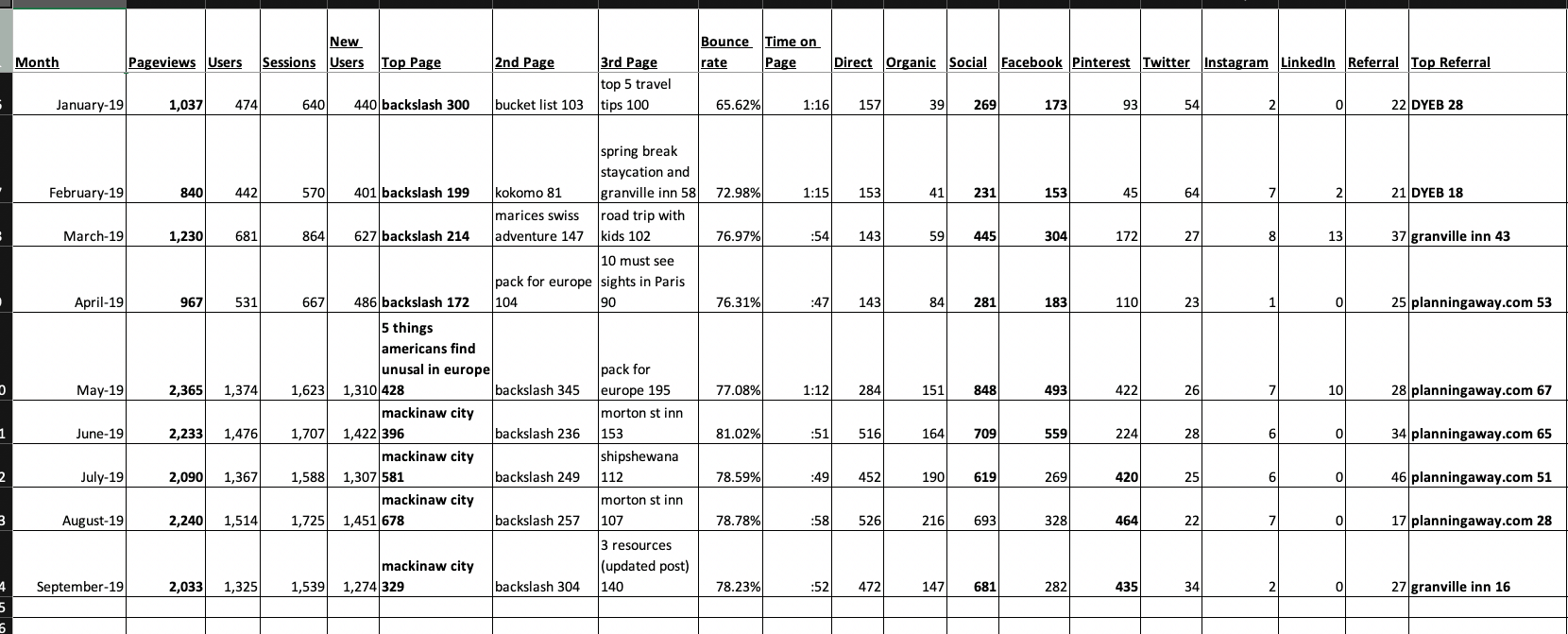
Here’s a screenshot from the blog tracker Tanya mentioned in the episode:

Click for larger view

There were a few big takeaways from Tanya’s one-year mark:

1. After a while–you should probably CHANGE how you spend your time blogging.

Actually, I wrote an entire post on this: Blogging Productivity 101: Where Should Your Time Be Spent?

The gist of that post is this: Once you have a respectable body of published content–you can probably start to spend less time creating new content, and more time marketing (and/or updating existing content).

Spending a ton of time on SEO and list-building with a new blog that has less than 20 posts is fairly low ROI.

Once you’ve been at this for a while, you’ll begin seeing a higher return on time spent marketing! (optimizing your site, finding partnerships, updating and republishing old content, etc).

2. Finite vs Infinite Games (like blogging)

There’s no “winning” your blog.

  • There’s no cap on traffic
  • There’s no “end” of any kind
  • There’s no “Well I finally hit THIS metric and now I’m DONE.”

Blogging is not finite.

Note: Some strategies are finite, though. There is a CAP on how many people are searching for one of your keywords in Google. There’s a number there. It’s not infinite. Trying to rank for that keyword in SEO is a finite game you’re playing with your “competitors.”

But the overall blogging game you are playing is infinite: Once you hit your own defined “success,” the definition changes.

Why this matters:

You can and should set goals for growing your audience and making money. 100%.

But if ever find yourself feeling like you’ve lost–you haven’t. You’ve just failed, experienced set back, etc…

and you need to CHANGE THE RULES of the game you’re playing.

Move the goals. Redefine your timeline for “success.”

Learn, move on, and get better. ALWAYS.


The real strategy in the blogging game is to do whatever it takes to be able to CONTINUE playing the game.

👍

Thoughts?

Watching Tanya go in and out of the “honeymoon” phase of blogging has been incredibly interesting to me.

It’s now one year in, and she seems to be having fun, growing slowly but steadily, and even getting some monetization benefits!

Did you get anything from this little case study?

Please drop us a comment below!

The post The 12-month New Blogger Case Study – Traveling Tanya appeared first on Do You Even Blog.

  • βœ‡Do You Even Blog
  • How to Manage (& Monetize) 5+ Blogs – Elna Cain
    I kept seeing Elna Cain’s name everywhere. In Google search results. In random articles on freelance writing, blogging, etc. On Facebook. As it turns out, she’s just insanely prolific. She… Runs a freelance writing site Is a freelance writer Runs a mom blog Occasionally acquires new blogs And more. In this episode, we chat about blogging productivity, managing freelancers & contributors, and monetization! Listen to my episode with Elna Cain! or listen on
     

How to Manage (& Monetize) 5+ Blogs – Elna Cain

23 October 2019 at 09:00

I kept seeing Elna Cain’s name everywhere.

In Google search results. In random articles on freelance writing, blogging, etc. On Facebook.

As it turns out, she’s just insanely prolific. She…

  • Runs a freelance writing site
  • Is a freelance writer
  • Runs a mom blog
  • Occasionally acquires new blogs
  • And more.

In this episode, we chat about blogging productivity, managing freelancers & contributors, and monetization!

Listen to my episode with Elna Cain!

or listen on Apple Podcasts \\ Google Podcasts

Big fat takeaway from this episode w/ Elna:

Give your projects individual time to grow

  • One blog
  • One blog & one podcast
  • One blog & one podcast & one YouTube channel
  • Five blogs

Doesn’t matter.

I think managing multiple blogs (or even multiple channels or marketing strategies) can easily lead to spreading yourself thin (duh).

One important aspect from Elna’s own projects is that she focus on one initiative at a time–until it had grown to a reasonable point.

Past a certain point on your blog, you can probably focus on other things without killing the first blog.

But you gotta give things time to grow.

The post How to Manage (& Monetize) 5+ Blogs – Elna Cain appeared first on Do You Even Blog.

  • βœ‡Do You Even Blog
  • How Carrie Monetized Her Podcast in Month ONE
    Making money from a podcast is reserved for those with like, 1,500,000 downloads a month right? NO. NOT IN THE LEAST. In part 2 of this “how to start a killer podcast” series, I’m joined by Carrie from the Hippocratic Hustle podcast to talk all things starting and EARLY monetization. Enjoy! In the 2 months of the Do You Even Blog podcast, here are the stats: Downloads = 1,200 Expenses = $170 (hosting and mic) Revenue = $150 Made $50 in month 1, $100 in month 2Is t
     

How Carrie Monetized Her Podcast in Month ONE

25 October 2019 at 19:26

Making money from a podcast is reserved for those with like, 1,500,000 downloads a month right? NO. NOT IN THE LEAST. In part 2 of this “how to start a killer podcast” series, I’m joined by Carrie from the Hippocratic Hustle podcast to talk all things starting and EARLY monetization. Enjoy!

In the 2 months of the Do You Even Blog podcast, here are the stats:

  • Downloads = 1,200
  • Expenses = $170 (hosting and mic)
  • Revenue = $150
podcast monetization month one
Made $50 in month 1, $100 in month 2

Is this John Lee Dumas or Tim Ferriss level money?

Of course not–But it’s something, and it almost paid for a YEAR’S worth of podcast hosting and a nice USB mic. (this one)

Not only is it POSSIBLE to monetize a podcast from the very beginning, I’ve personally found it much easier than monetizing a blog. This post is going to show you how.

Carrie’s story was similar:

  • Downloads = 300 in month 1
  • Revenue = $75 per episode

That’s crazy. Let’s dig in.

The “How to quickly and easily run an amazing podcast that builds an audience” series:

  1. Chris from Popcorn Finance
  2. Carrie Reynolds (you are here)
  3. Steve Stewart
  4. The Podcast Launch Checklist

Listen to my episode with Carrie from the Hippocratic Hustle podcast

or listen on Apple Podcasts \\ Google Podcasts

So why is it relatively easy to make money from podcasting *so early?*

A few reasons:

1 – More and more people “understand” what it entails.

When you pitch folks for blog or YouTube sponsorships–it’s not mainstream enough yet to really be understood.

But anybody that listens to podcasts (50% of Americans) know that sponsorships are how podcasts are monetized. 95% of popular podcasts have live-reads.

FAQ: What on Earth is a “live read?”

It’s taken from radio, but really just means “you read the advertisement out loud, live on the air.”

It’s not really “live” for most podcasts, but it just means an audio advertisement.

2 – You can start small.

We’ll talk more about this in a minute, but it’s obviously easier to land a $50 sponsorship than it is a $500 sponsorship. (or is it? More in a sec).

3 – Audio is superior to text when it comes to authority and brand-building.

When you read “I fully recommend Freshbooks” on my blog post, that could even be copy/pasted from some Freshbooks partnership manager.

But when you hear my voice whispering in your ear while you’re washing dishes in your underwear–telling you how awesome Freshbooks is–it’s a different experience.

Sincerity and authenticity shine through in audio. It’s a podcaster’s weapon.

Here’s Why You Should FORGET the Industry Standard CPM Monetization Models

Have you seen guidelines like this?

podcast CPM guidelines
Um no. We’re not Art of Charm.

Let me share how I really feel:

Feel free to use CPM models when you reach 10M downloads a month. Until then, these models are stupid and limiting, and can EASILY be overcome with a bit of creativity and hustle.

Carrie got $75 an episode.

Per these “standards,” that would mean she’d require roughly 3,000 downloads an episode.

She had 300/month.

Here’s Exactly How to Monetize a Podcast From Day One.

Step 1 – List out all the different ways you can add value.

Remember what we said about live reads?

It’s the obvious benefit people pay for, but ask yourself this:

What do live reads really offer sponsors?

People listen to podcasts while they’re

  • driving
  • cleaning the house
  • sexing?

Never, in the history of podcast sponsorships has anybody dropped what they’re doing to rush to a laptop and check out a sponsor. That’s why we MUST offer more than just live-reads!

#overexaggerating

If you’re looking to make money in month one, with small download stats, you’re going to need to list out more ways to add value.

podcast sponsorship pitch
Part of my old pitch template

The full template is available below by the way.

So step 1? List out all the ways you can add value!

Even if you don’t have tons of downloads, traffic, Twitter followers, etc–it can add up.

  • Email newsletter mentions
  • Social media shares
  • Live-reads for one or several episodes
  • An add in your blog sidebar
  • Wear their t-shirt every day for a month.
  • etc

Get creative and find ways to add value top every sponsorship. Blow them away.

Make it a no-brainer.

Related: Don’t forget to check out my MEGA guide to monetization here!

Step 2 – Find a very specific person/brand you can add value to.

So you’ve got a few ways you can help a brand–but what brand?

The next step in the process is to investigate your audience, and your authority/expertise, and then create a small list of targeted sponsor prospects.

The goal?

To be able to show a sponsor how your podcast topic and target listeners can benefit THEIR brand.

What do I mean by “brand?” What type of entities routinely sponsor podcasts?

Brands = businesses.

This could be anything from Fortune 100 companies to tech startups to small local businesses to other bloggers–as long as they have one small trait: They want to grow their business and are willing to invest some amount of cash to do so.

The people you target MUST have that trait.

So where should you start? Who should you target first?

Freshbooks? No.

Small businesses, fresh startups, or bloggers.

Find other bloggers who…

  • want to grow (hey, that’s everybody!)
  • can benefit from YOUR audience
  • are willing to experiment and drop cash

When Carrie started her podcast (geared towards women physicians), she booked a “friend of a friend” who was directly interested in her niche.

When I started the DYEB podcast, most of my audience was personal finance bloggers (carried over from my previous blog), so who did I target?

Non-newbie PF bloggers on the Rockstar Finance Forums (sorry J$).

rockstar finance forums
Where I pitched my first few sponsorships

Speaking of month 1 sponsorships…

How Much Should You Charge for Podcast Sponsorships?

It depends on one thing: your ability to add unique value.

Note: I did NOT say “how many downloads you have.”

This can make it difficult to land on a fee, but I’ve put together a baseline below. These are all based assuming you provide multiple services in addition to just a live-read!

Baseline for a podcaster in months 0-6 = $50 per episode

Do you have an existing audience before launching? = Add $50-100 per episode

Are you really good at pitching people? Be honest. = Add $25

Is your sponsor’s niche competitive? = Add $25

Are you alive? = Add $25

Example 1 = Brand new podcaster w/ no existing audience in a standard niche (travel, personal finance, blogging). $50-75 an episode.

Example 2 = Podcaster in month 4 w/ 100-300 downloads per episode and an email list of 150 people. $75-100 an episode

Example 3 = Podcaster in month 9 w/ 300-500 downloads per episode and an email list of 500 people who are LOYAL. $125-150 an episode.

Example 4 = Podcaster in month 12 w/ 700-1,000 downloads per episode and an email list of 1,200 people who are LOYAL (Hey that’s me!). $200-300 an episode.

FORGET CPM models. Add more value than live reads.

Charge what your worth, then add $25 😉

Step 3 – Customize & Craft the Pitch.

First, you need to realize something:

You will get rejected. Plan on it. Embrace it. WELCOME IT.

I pitched about 10 people in my first 2 months, converted 2 of them to sponsors, and the 8 others to friends 🙂

Huge Important Bold Text: Your primary goal when pitching people for anything is to build a relationship. The actual sponsor/deal is of secondary importance. Friendships are 10x more valuable in the long-term.

That said, here are a few DOs and DON’Ts of landing sponsors via a cold/warm pitch:

1 – DO keep it short and sweet and to the point.

Nobody likes their time wasted. If the email takes longer than 8 seconds to read, it’s too long.

2 – DO ask permission to pitch them first.

This is adapted from Seth Godin’s Permission Marketing, but asking permission to pitch brings several advantages, such as

  • it’s polite and unexpected.
  • it all but guarantees they’ll open the actual pitch email
  • it gives them an easy “out” if they know they don’t want it
  • it’s respectful

An example would be:

“Hey Freshbooks marketing person!

Straight to the point–I run the Do You Even Blog podcast, and I have a pitch I’d love to run by you.

Cool to send it along? It’ll only take 37 seconds and would make Freshbooks money for sure 🙂

Pete”

3 – DO be completely honest about your podcast stats

Valuable relationships are built on trust.

4 – DON’T send 6 follow-ups

Send 1 follow-up. Maybe 2, if spread out over enough time (a month or so).

5 – DON’T be clever.

There’s a fine line here somewhere, but if you want people to take you seriously, don’t do this:

#fail

Have a personality, but be a professional.

make money podcasting
Pin me!

The post How Carrie Monetized Her Podcast in Month ONE appeared first on Do You Even Blog.

  • βœ‡Do You Even Blog
  • Podcasting, Google, and Why Audio Reigns Supreme – James Cridland
    The best time to start a podcast was 12 years ago–the second-best time is right now. If you’ve followed DYEB for any length of time now, you’ve probably heard me shout about the awesome benefits of reaching people via audio… Builds trust in your brand Builds authority Reaches new audience Takes less time than blogging (for some) Generally influences people better than text. Is fun. In today’s chat, I am THRILLED to bring on James Cridland from Podnews!
     

Podcasting, Google, and Why Audio Reigns Supreme – James Cridland

30 October 2019 at 09:00

The best time to start a podcast was 12 years ago–the second-best time is right now.

If you’ve followed DYEB for any length of time now, you’ve probably heard me shout about the awesome benefits of reaching people via audio…

  • Builds trust in your brand
  • Builds authority
  • Reaches new audience
  • Takes less time than blogging (for some)
  • Generally influences people better than text.
  • Is fun.

In today’s chat, I am THRILLED to bring on James Cridland from Podnews!

He’s a “radio futurologist”

I saw James give a talk at Podcast Movement (on Google Podcasts and what their recent changes mean for podcasters)–and immediately made a note on my phone to reach out to him to come on the show.

Now it’s here!

  • Why podcasting (and audio content in general) is so effective
  • Where the medium is going
  • Some recent Google changes (listen for this alone)
  • Practical advice and tips for podcasters!

It’s a good one. Enjoy!

Listen to my episode with James Cridland from Podnews:

or listen on Apple Podcasts \\ Google Podcasts

Psst current podcasters! See how I only linked to Apple Podcasts and Google podcasts above?

Hat tip to James for that one as well! You can read more in his Medium article on that here.

Twas a fantastic show today folks. Thanks for listening!

The post Podcasting, Google, and Why Audio Reigns Supreme – James Cridland appeared first on Do You Even Blog.

  • βœ‡Do You Even Blog
  • How to Be a Confident Podcast Host – Joe Saul-Sehy
    “I could never be a podcast host.” – loads of bloggers everywhere. Or maybe… “I don’t have a good voice.” “I don’t know what to say.” “I don’t even know where to start.” Fam, I got you. Actually NO. Joe Saul-Sehy has you! You’ll know him from the Stacking Benjamins (and Money With Friends!) podcast(s), and I’d argue he’s a bonafide expert when it comes to running a microphone. So if yo
     

How to Be a Confident Podcast Host – Joe Saul-Sehy

6 November 2019 at 10:03

“I could never be a podcast host.” – loads of bloggers everywhere.

Or maybe…

  • “I don’t have a good voice.”
  • “I don’t know what to say.”
  • “I don’t even know where to start.”

Fam, I got you.

Actually NO. Joe Saul-Sehy has you! You’ll know him from the Stacking Benjamins (and Money With Friends!) podcast(s), and I’d argue he’s a bonafide expert when it comes to running a microphone.

So if you’re curious about starting a podcast (or already have one), Joe is here to help us…

  • Run engaging interviews
  • Create interesting content that keeps listeners coming back for more
  • Generally be capable of producing quality audio content.

It’s good. I’m excited for you to listen & learn.

Listen to my episode with Joe Saul-Sehy

or listen on Apple Podcasts \\ Google Podcasts

Fun quotes from Joe:

I would tell anybody that wants to go into podcasting–Don’t worry about getting it right, get started! We started roughly eight years ago, and we should have started nine years ago. Had I started a year earlier, we would have made the mistakes earlier that everybody makes and we’d be further ahead.

and one more…

Make the show you’d want to listen to.

💪

How can I get more comfortable & confident in front of a microphone?

From Joe…

You’re going to mess it up. You’re going to hate your voice.

It’s going to really sound like nails on a chalkboard and you’re not going to be good because it is a 10,000 hours kind of thing.

So, Realize you’re going to make mistakes, and the only way NOT to–is to start talking, because you will figure things out as you go along!

You get on the microphone, and you evaluate yourself. I think the important question is: “Can I constantly sharpen your saw and think about how can I get better?”

How can I “get better” as a podcast host?

Joe brings up two points:

1. Think in terms of stories:

Think in terms of Stories.

Podcasts are phenomenal story vehicles, and instead of trying to get facts–try to get stories!

Facts are fantastic if you’re in listicle world and blog world–but facts suck on a podcast. Our eyes are designed for factual stuff. Our ears are designed for storytelling.

Further reading? Check out my blog post: How to tell marketing stories!

2. Put away the overused questions and focus on the conversation:

For a new podcaster, those pre-arranged questions can actually be a crutch.

As a host, you WILL probably have a few huge points, lessons, and topics that you want your guest to get to–but those are just lead-off topics.

You’ll want to simply kickstart that conversation, story, example, etc, and have your guest do most of the storytelling and explaining!

While YOU listen attentively with the goal of understanding and staying involved in the conversation for proper follow-ups, etc.

Do you INSTANTLY feel more confident about producing podcast content?

Or still “meh?”

Drop me a comment below!

I’d love to hear if podcasting is even on your radar, and if you found this chat with Joe Saul-Sehy helpful 👍

The post How to Be a Confident Podcast Host – Joe Saul-Sehy appeared first on Do You Even Blog.

  • βœ‡Do You Even Blog
  • How to Use Research to Quickly Grow Backlinks and SEO Traffic – Kyle Byers
    If you hate SEO traffic and generating quality backlinks in a short time frame–this chat with Kyle from Growth Badger isn’t for you. Kyle started his site about a year ago and has since SKYROCKETED a few posts using a very specific strategy. (utilizing surveys & research & other unique approaches to content). holy SEO batman!We’re talking thousands of shares, 100+ referring domain, and an 843% increase in traffic–from one blog post. In this post &
     

How to Use Research to Quickly Grow Backlinks and SEO Traffic – Kyle Byers

13 November 2019 at 10:00

If you hate SEO traffic and generating quality backlinks in a short time frame–this chat with Kyle from Growth Badger isn’t for you.

Kyle started his site about a year ago and has since SKYROCKETED a few posts using a very specific strategy.

(utilizing surveys & research & other unique approaches to content).

holy SEO batman!

We’re talking thousands of shares, 100+ referring domain, and an 843% increase in traffic–from one blog post.

In this post & podcast, we’re chatting about…

  • Using data-driven content to grow your SEO
  • How to run effective surveys
  • Other ways to produce unique content for SEO that DOESN’T require a huge audience already.

Enjoy 😉

Listen to my episode with Kyle from Growth Badger:

or listen on Apple Podcasts \\ Google Podcasts

Want to grab Kyle’s freebie where he walks you through his Double Survey techinque step-by-step? You can grab that here!

Survey resources & more:

Other highly relevant content:

The “Double Survey” Technique (the quick version)

In short, here’s the formula

  1. Choose a topic you feel would be interesting to do research on.
  2. Poll or survey your audience (or conduct research another way)
  3. Share THOSE findings with other influencers in your space.

The first step is actually tougher than it seems…

Let’s say you run a personal finance blog, don’t have a huge audience, and want to start ranking for budgeting related keywords in Google.

So you’re into budgeting worksheets, templates, planners, etc. Great!

But how to turn that into original content backed by data or research?

  • Poll your audience on what makes worksheets good/bad to them?
  • Download and personally analyze as many budgeting worksheets as you can get your hands on?
  • Something different?

If we’re shooting for some quick shares, backlinks for SEO, etc, I might choose the 2nd one–ESPECIALLY if we don’t have a huge audience to survey.

The goal:

  1. Do original research around budgeting worksheets, and come up with SOME finding, interesting tidbit, anything.
  2. Present your findings to other personal finance bloggers, podcasters, and YouTubers, asking for their opinions.
  3. Present the findings AND the influencer opinions in one blog post.

Yes, even this small-scale data-driven blog post would take a bit of time–but doesn’t that sound like a MUCH more interesting piece of content than a super-standard budgeting worksheet blog post?

THAT’S the kind of content that Kyle has used to generate backlinks and SEO wins.

Some other approaches to “unique” content for backlinks:

Like I mentioned above, you don’t necessarily need a mega-huge audience to use research, polls, etc.

How about the “Myth Busters” approach?

“bust” other people’s research/data

The idea is simple.

Since you don’t have access to a huge audience in which to poll or survey–you can test other people’s data, findings, research, etc, and report on it.

Bust that myth and present your findings (and make sure to tell the original researchers about your detailed work!)

Or do your own original research.

Run an experiment about a topic in your niche.

Use yourself as a guinea pig.

Example:

Let’s say you run a health & fitness blog.

Here are a few made-up headlines that would be based on your original research:

  • “I did 500 situps every day for 60 days, here’s what happened [Case Study]”
  • “I ate pizza for every meal for a week, here’s what happened [Case Study]”
  • “I asked 373 people in my hometown about their biggest weight-loss challenges. Here’s what they said.”

Run your own experiements.

The bottom line: this content is great for backlinks & SEO

Let’s not forget WHY we’d be doing this: It’s to bump our SEO traffic.

Unique, original content gets shares and backlinks–even if it doesn’t rank for anything!

Boom.

The post How to Use Research to Quickly Grow Backlinks and SEO Traffic – Kyle Byers appeared first on Do You Even Blog.

  • βœ‡Do You Even Blog
  • We asked 100 bloggers about blog income reports: Here’s what they said.
    If you’ve been in blogging for a while, you’ve seen ’em. A detailed blog income report detailing how “Bloggy McBlogga” made over $79,940.12 in her 1st month blogging! Inspirational, motivating, and interesting! (Impressive Mr. McBlogga!) However… If you been a blogger for more than 48 hours, you’ve also seen the dark side of these reports… The “look how much money I made this month neener neener” income report. Ok,
     

We asked 100 bloggers about blog income reports: Here’s what they said.

14 November 2019 at 20:40

If you’ve been in blogging for a while, you’ve seen ’em.

A detailed blog income report detailing how “Bloggy McBlogga” made over $79,940.12 in her 1st month blogging!

Inspirational, motivating, and interesting! (Impressive Mr. McBlogga!)

However

If you been a blogger for more than 48 hours, you’ve also seen the dark side of these reports…

The “look how much money I made this month neener neener” income report.

Ok, so they don’t have the “neener neener” part, but still.

For better or worse, blog income reports are an A+ marketing tool.

Why?

Because we all want to make crazy revenues from our blog, and when we see other bloggers making serious cash from their RV somewhere…

We want to know how.

So we click through. And subscribe to their email lists, and leave comments like this…

But here’s the kicker…

I’m tired of monthly income reports. Even my own.

(hey gimme a break. It’s only my 4th month).

  • Do you really receive value from these posts?
  • Do they legit help your blogging efforts?
  • Which bloggers produce the most valuable income reports?

Well, the DYEB team (there are technically 2 of us now yippee!) set out on a mission to answer these questions.

First, the results of the survey. Monthly Income Reports: How useful are they?

Here’s the choices:

I got 87 responses from a few tweets, emails, and post to 2 different Facebook groups.

(Nice engagement Pete! Thanks Tribe member!)

Here are the broad level results:

mostly as expected?

The takeaway:

For the most part, bloggers approve of monthly reports, and find them useful.

Very few people found them not useful at all, but a HUGE majority agreed on one premise: blog income reports should be detailed, and provide MORE than just the numbers.

Specifically,

  • lessons learned
  • wins, losses
  • strategies
  • a detailed breakdown of affiliate income,
  • etc.

Though I definitely include goals, wins, fails in my own reports, even from the get-go (here’s my first month for $51, woot!), I’m not planning on doing even more of this.

It’s clearly the value proposition with these reports. The more we can provide actual, concrete insights, the better.

In addition, I also asked the Do You Even Tribe what they thought…open-ended style.

Several folks responded with some reallllly great points.

If you publish income/blog reports of any kind, these will definitely help you make em even more appealing and valuable 🙂

Eric at High Five Dad

I LOVE them with one caveat. As a newbie knowing there is a pot at the end of rainbow is super exciting. I’m super analytical (my wife hates it), so I look at their income report and then scrub their website/ emails sent through their list to figure out HOW they did it.

The one caveat that I wish more bloggers would include is expenses.

It does me no good seeing someone saying they made $3500 on Bluehost when in reality they spent $2400 on Facebook ads or used an affiliate service so their profits really was 1100. Way more transparent.

One of the reasons bloggers quit before the first year is they never peek behind the curtain or never connect the dots. They see huge income reports and think I’m a failure because I’m not there. What they fail to realize is that those bloggers are networking, paying for ads, building connections and creating affiliate partners that help pitch their product.

Okay rant over. Income reports good just be transparent. Mic drop

Mandi from Big Tiny Steps

A lot of income reports spread “noise” about what blogging is really like and can be discouraging to new bloggers.

Also, larger sites that make a ton don’t say their cost of running the blog itself so that can be misleading. And I have also seen people who list their side jobs and stuff that is totally unrelated.

(Pete’s note: note a trend from these already? Seeing huge $$$$$ can be super discouraging for new bloggers)

CJ at CJ The Money Guru

They mostly make me feel like s**t.

We’ve been blogging for almost 3 months now and we haven’t made a dime yet. When I see bloggers pulling in thousands of dollars every month, it makes me feel bad about myself.

I will read the reports and see if I can do what these other people are doing so I can start making money. But so far I just can’t replicate even a fraction of their results.

I really don’t want to be a statistic and quit after 9 months ( I learned that from your podcast), but hopefully reading these income reports will encourage me to keep going instead of giving up.

That’s my rant.

Lee from Bald Thoughts (also an upcoming guest on my podcast)

I don’t always read them, but blog income reports add value to other bloggers.

Like one of your recent guests said, by inspecting the income reports of blogs in your space and that you admire, you can see where their revenue is coming from and seek to duplicate that success.

And if you follow a blog and want to support them, you can see how you can best do that by supporting companies that provide revenue to the blog.

Kiwi and Keweenaw (great name)

I definitely don’t think everyone should write monthly blog income reports!

They need to add something to the conversation, provide valuable information for other bloggers, and not replace better content. I think they are definitely appropriate for a blog like yours! But there are lots of blogger that publish monthly income posts in the personal finance field, so I wouldn’t choose to do that on my site.

Cato at The Dollar Build

As a blogger I’ll occasionally read other people’s income reports to learn a few tips and tricks about how to make it in the blogging world. I find it encouraging to read about other bloggers having success.

However, I’ve decided not to publish income and traffic reports for my blog for a couple reasons.

It’s not what my readers want. (I’m assuming this, of course. My blog has only been live for a month, who knows what they really want. Or if they even exist.) I assume those who visit my site are there to learn about personal finance – not about page views.

If my blog were about blogging (like yours), then sharing site traffic and income makes sense. It’s proof of authority.

What bugs me most is when it crosses the line into a heavy-handed or semi-misleading sales technique. Too often, I see bloggers who say straight up “It’s easy to start your own blog.” That’s true, but they leave out “…but it takes a ton of hard work to make money from blogging.”

I know this sounds a bit rant-ish. I hate to sound like an old curmudgeon. You know, the ole’ “get off my lawn” type thing. Overall, I don’t mind income reports when done tastefully.

Really. I swear.

Shivika at Dirt Cheap Wealth

My main gripe with monthly blog income report is – meh! they mean nothing and add absolutely zero value. Here is why:

  • you undermine your true blog audience (remember, not everyone who comes to your blog wants to become a blogger, since you may have some really kick-ass content)
  • you get into unnecessary competition with self, and assume things for other bloggers based on superficial information you see
  • the reports never ever calculate the value of time, which when calculated correctly, will always negate your reports

Lisa at Mad Money Monster

I like income reports. They’re motivating and informative. I like to gauge how other bloggers are making their money. In my opinion, they have their place in the blogging community, but I’m sure they’re not enjoyable for most readers.

Kathy at Baby Boomer Super Saver (A+ blog name!)

As someone who is new to blogging, I have found the monthly blog reports to be very inspiring. I don’t read them all anymore, but it was great to see the financial growth so many different bloggers were able to achieve. It opened my eyes to possibility and opportunity, always a cool view!

(Pete’s notes: me thinks this: Income Reports are more useful the EARLIER you are in your blogging journey, yes?)

Jenny from Good Life Better

I haven’t read a ton of these but the ones I have read I don’t really find that helpful for a number of reasons:

For people in my niche, they are often not specific enough to guide what I might want to pursue (e.g., “$XXX from affiliate income” vs. “$XXX from my affiliate contract with Bluehost that is a mix of 500 ongong clients and 8 new ones.”). I would especially find helpful the new and reoccurring client info because that lets me know how much readers value that product now.

I think I would actually prefer quarterly statements or year over year statements. Blogging is seasonal so let me compare an April to an April vs. an April to a September. And with a quarterly summary, it can even out a product lunch that inflated income and visitors.

Maybe I am being naïve but I am enjoying blogging for me. I want people to read my blog and I want to make money from it but I think I would do it anyway if those things never happened. Income statements make me question the satisfaction I get from just hitting “publish.”

Linda from She Climbs the Ladder

I think they were interesting and actually sparked my interest into blogging as a real side hustle.

It might be nice to see a mix of them though so it’s not just those people that are like ‘hey I make $$$$ blogging every month.’

Jeff Proctor from Dollar Sprout

I have a love/hate relationship with them.

If more than 20% of it is copy and pasted from the previous month, I hate them. If you are sharing original content and REAL business insights and it’s simply delivered as an income report, I absolutely love them.

Pee Hermanos (I have NO idea who this guy is, but he’s in the DYEB Facebook group >_< )

nooooo income reports are great! it’s something to relate to and take inspiration from, also a great way to spark a convo. The only time I don’t enjoy them is when the income is super huge as its no longer personal or relatable.

(Pete’s note: Rosemarie Groner’s income is also totally unrelatable, but she decided to publish OTHER blogger’s reports that ARE relatable for her audience. Brilliant.)

Physician on Fire

I think bloggers like looking at income reports. I’m not sure how the non-bloggers feel about them.

Some might be curious, but I would guess the interest level drops off for those who don’t have sites of their own.

Araminta from Financially Mint

I think they’re really helpful because not only do they give you an idea of how much blogger earn, but I also find them very motivating, it’s easier for me to see myself in the future earning that kind of money.

Chris from Keep Thrifty (also a former guest on my podcast)

I LOVE income reports (even though I don’t publish my own). Please keep em going!

Veneta from Becoming Life Smart

I actually like looking at them because it gives me an idea of how bloggers earn money. Before I stumbled on them, I didn’t realize how much money can be made from blogging and how it’s done.

Barnabas from The Dad Wallet

But for me, they can be useful if done correctly, but I do not think monthly reports are useful once you hit like 10k/month as it becomes either so far out there that people get this idea they can do the same easily. Or for people who have been around awhile, it becomes oh well I bet they spent 5k as well on costs. Just my two sense.

***

Our all-time favorite monthly blog reports

Note: Some of these have very little to do with blog income, but rather traffic, marketing, etc!

Those insights are actually more relevant to more bloggers, as some bloggers seriously couldn’t care less about replacing full-time incomes.

Rosemarie Groner from The Busy Budgeter (Here’s the latest report).

Why it’s awesome: Rosemarie is a rockstar for sure, but she actually doesn’t publish her own reports. She publishes other beginner bloggers, and produces amazing feedback for them! It’s. so. good.

Loads of value here. (She’s also gave a killer podcast interview here)

Pat Flynn from Smart Passive Income (Here’s the latest report).

Why it’s awesome: Pat is skill a king of blogging for good reason: He really does have valuable content. Plain and simple.

His income reports are the best of the best. Inspiring and motivating, but also really well designed, personal….and he shares a detailed breakdown of expenses as well.

Mrs. FAF from Frugal Asian Finance (Here’s the latest report)

Why it’s awesome: She isn’t concerned about blog revenues per se, but her traffic stats and strategies are compelling, engaging, smart, and useful.

Highly recommended.

Lily from The Frugal Gene (Here’s the latest report).

Why it’s awesome: The exact same reason Ms FAF’s is. She goes deep into her traffic stats and sources, and generally just produces incredible fun and engaging content.

These two were on the podcast as well, found here. Might seem like I’m just plugging podcast guests, but that’s because I am. They give extremely valuable income reports. So they deserve to be plugged.’

JLD from Entrepreneur on Fire (Here’s the latest report).

Why it’s awesome: Well laid out, transparent, includes accounting and legal tips, and very personal and engaging. A+.

Youuuuuu guessed it. Also had him on the podcast.

(Internal link madness!!!)

***

What are your thoughts? Anything surprising here?

If you publish regular blog reports, did this give you any insights as to how to make them better?

The post We asked 100 bloggers about blog income reports: Here’s what they said. appeared first on Do You Even Blog.

  • βœ‡Do You Even Blog
  • How the Flea Market Flippers Built a Crazy Profitable Blog
    Rob and Melissa, from the Flea Market Flipper, almost didn’t have a blog. After a few months of documenting their flipping lifestyle (they made over $80,000 flipping items last year) and trying to sell an online course, they quit. For months. They didn’t see immediate results, lost focus, and decided it wasn’t worth it. Luckily–for them and us–they did return to their blog and have managed to build a&nbs
     

How the Flea Market Flippers Built a Crazy Profitable Blog

15 November 2019 at 15:45

Rob and Melissa, from the Flea Market Flipper, almost didn’t have a blog.

After a few months of documenting their flipping lifestyle (they made over $80,000 flipping items last year) and trying to sell an online course, they quit.

For months.

They didn’t see immediate results, lost focus, and decided it wasn’t worth it.

Luckily–for them and us–they did return to their blog and have managed to build a budding flipping empire!

Want to listen to my chat with the Flea Market Flippers?

or listen on Apple Podcasts \\ Google Podcasts

Really quick, lemme hit you with my 2 huge takeaways from this chat with Flea Market Flipper:

1 – How much free content do you give away–before charging?

There are two types of thinking about this:

  1. Give away as much as humanly possible for FREE. It’s great marketing for you.
  2. Give away a lot for free, but some/most of your content deserves to be behind a paywall.

What do you think?

Where’s the line?

Note: I don’t have an answer for YOU here. You’ll have to figure it out for yourself!

Here’s something important to keep in mind though.

When people pay for things–they are “enrolling.”

I.e. voluntarily committing, to themselves and sometimes others, that they will use your product.

A payment is a commitment.

When you charge for your content (via courses or otherwise), your students who DO end up in front of the content–are far more likely to take action based on what they’ve learned.

This helps both parties.

I’d be curious to hear your thoughts on this.

Drop me a comment below?

Is there a great way to KNOW when you’ve given away too much for free?

2 – What’s the “right order” to build your monetized blog?

Should you monetize your blog in month one?

Should you build an audience first and foremost before even THINKING about selling courses, etc?

Sadly, there’s no “right” answer for all of us…

but…

95% of bloggers should seek to grow an audience that knows and trusts them–before monetizing *heavily,* especially with their own products.

Note the word “heavily.”

Ads and affiliate marketing can and should be utilized as soon as you can reasonably expect to get some views and click-throughs.

*opinion alert.

But in order to really get a high-ROI from your time, I’d personally recommend waiting to launch your flagship courses, books, products, etc, until you have an audience!

It simply won’t be worth your time until then.

?

One more secret to the success of Flea Market Flipper, specifically…

They are DOERS.

They LIVE the life that they teach others how to do.

Honestly–Rob was a master flipper before they started this brand. This is actually a big takeaway for building “authority.”

  • Do things
  • Show how you did them

That’s an incredible recipe for a successful blog. Kudos to the Flea Market Flippers for, ya know–actually flipping stuff.

That’s obvious, but powerful.

What do you think? Drop us a comment below!

Is there a good way to tell when you’re ready to start monetizing? Launching courses? Switch to meta-blogging?

The post How the Flea Market Flippers Built a Crazy Profitable Blog appeared first on Do You Even Blog.

  • βœ‡Do You Even Blog
  • How to Get Podcast Sponsorships (Even With a Tiny Show) – Andy Hill
    If there’s one area of podcasting that I haven’t done much with, it’s this: Book podcast sponsorships 💰 That’s why I ended up attending my buddy Andy’s presentation at FinCon–where he laid out a nice little system & strategy. Andy runs the Marriage, Kids and Money podcast, and has had some incredible success booking podcast sponsorships–starting when he had 500 downloads a show! His show is not so tiny anymore 😎 For co
     

How to Get Podcast Sponsorships (Even With a Tiny Show) – Andy Hill

20 November 2019 at 10:00

If there’s one area of podcasting that I haven’t done much with, it’s this:

Book podcast sponsorships 💰

That’s why I ended up attending my buddy Andy’s presentation at FinCon–where he laid out a nice little system & strategy.

Andy runs the Marriage, Kids and Money podcast, and has had some incredible success booking podcast sponsorships–starting when he had 500 downloads a show!

His show is not so tiny anymore 😎

For context, 500 downloads/episode is technically right around podcast “averages,” but I know a ton of people with more downloads–who haven’t been able to do what Andy has. The DYEB podcast averages around 2k downloads/episode in the first few weeks and I definitely haven’t done what Andy has lol.

In this show we chat about 👇

  • How to FIND podcast sponsors (specifically where to look and figure out who is paying)
  • Putting together the proposal
  • Media Kits!
  • Turning getting sponsorships into a repeatable system.

Enjoy. I have just a weeeeeeee few takeaways in text format just below.

Listen to my episode with Andy Hill from Marriage, Kids, and Money.

or listen on Apple Podcasts \\ Google Podcasts

Show Notes:

Here are some tips for booking podcast sponsorships:

These are my personal takeaways & reminders from this episode:

1 – Build long-term relationships with these brands.

Psst. This tip applies to WAY more than just podcast sponsorships. Blog sponsors, partnerships, guest post outreach, etc.

You WILL hear “no” a lot.

It’s vital to remember to keep the relationship open at all costs. You may have plenty of different opportunities to partner up in the future–even if they turn down your sponsorship!

True story: I just booked about $2,200 in freelance work from a long-term brand relationship that initially started with a “no” outreach!

2 – Be persistent

This also applies to any other blog/podcast strategy that involves outreach.

Just because they don’t reply, doesn’t mean it’s a no.

  1. Follow up with unread emails
  2. Try different channels (Instagram or Twitter direct message)
  3. Do it again.
  4. But be professional!

You don’t have to be nagging or annoying or spammy. You do have to be persistent.

The difference is how professional and respectful you are.

3 – Start your search with brands how have advertised on podcasts before.

Go check out other podcasts in your niche (the large and medium-sized ones) and see who is sponsoring their shows.

It will be a LOT easier to pitch sponsorships to companies who know what podcast advertising actually looks like.

It’s a different beast than other types of PPC advertising to these companies.

Podcast sponsorship track records. Go find those brands.

4 – Create a snazzy media kit

This doesn’t have to take you days and days and a professional design team.

Brands care less about that, and more about “will this show give us sales?”

Here’s a handy article on creating media kits, and I’ll also throw out this media kit from Podcast Junkies as an example.

It’s spot on!

5 – Deliver value beyond “live reads.”

In Podcast Junkie’s sponsorships packages (shown above), you’ll notice they add additional benefits other than “live reads.”

Live reads = you reading your sponsor’s ads on your show in audio format.

  • Banner ad on your site?
  • Social media promotions on show day? Every week?
  • Email mentions?
  • You’ll run an ad campaign with your money? (I know people who do this as part of their package).

No need to get super creative either, just try to get your sponsors a great deal!

Sending referral traffic and/or direct leads is a great additional benefit.

6 – Grow your podcast (and don’t give up)

If you’re just starting a podcast and have little “existing audience,” you might only get 50 downloads the first month.

You might actually be too small to start booking sponsorships. Don’t you worry!

With more downloads comes more opportunities.

Yes, I’m aware this is a cop-out, but it’s also a vital thing to remember.

Grow your show. The sponsors will follow.

Questions? Tips? Drop a comment!

I’d love to hear from you! Did you enjoy this episode w/ Andy?

The post How to Get Podcast Sponsorships (Even With a Tiny Show) – Andy Hill appeared first on Do You Even Blog.

  • βœ‡Do You Even Blog
  • Blogging Taxes: What to deduct to save money!
    Yes, taxes are uber boring (even blogging taxes). But you know what’s NOT boring? Saving money. 💰 Bad news = any income your blog produces is taxable Good news = you can TOTALLY offset that income with your blog-related expenses! But the best news of all? All the money-saving & blogging tax tips in this post do NOT just apply to those making $100k/month from their blogs! I’d argue these strategies are actually more important for those of us not earning ANYT
     

Blogging Taxes: What to deduct to save money!

24 November 2019 at 21:44

Yes, taxes are uber boring (even blogging taxes).

But you know what’s NOT boring?

Saving money. 💰

  • Bad news = any income your blog produces is taxable
  • Good news = you can TOTALLY offset that income with your blog-related expenses!

But the best news of all?

All the money-saving & blogging tax tips in this post do NOT just apply to those making $100k/month from their blogs! I’d argue these strategies are actually more important for those of us not earning ANYTHING yet.

Today we’re going to dive into:

  • What blogging expenses can/should you deduct?
  • How non-accountants can organize your businessy-stuff year-round without wanting to scream.
  • LLC? Sole-proprietor? S-corp? What should you do and why?
  • and more.

Let’s blog like a business.

Disclaimer: All tips, tactics, strategies, advice, etc that appear in this blog post and podcast–are MY OPINION, not professional legal or accounting advice. Consult your lawyer and CPA, please. I can’t be held responsible 😉

I also have a podcast on blogging taxes, featuring another accountant, Eric Nisall!

or listen on Apple Podcasts \\ Google Podcasts

What blogging expenses can I deduct come tax time?

A lot.

Anything that you have to spend in order to make money.

Here’s a more specific list of stuff I know that you probably spend money on.

Deduct the basics for starting up a blog:

  • Domain name
  • Hosting (lol)
  • Premium WordPress themes
  • Paid plugins
  • Logos you had designed

If your blog makes any money, or you plan on it making money in the near future–you can deduct these expenses!

Deduct educational expenses:

If your learning expenses are related to your business, deduct.

Deduct blog marketing expenses:

  • Your paid SEO software
  • Facebook ads
  • Social Media software (Buffer, SmarterQueue, Tailwind, etc)
  • Your ESP (Mailchimp, ConvertKit, Drip)
  • Anything other product you pay for to run the blog

As long as these things are “directly related to your business” and you plan on making money from your blog–deduct ’em.

deduct facebook ads
keep the receipts though (more on that below)

Sell stuff? Deduct processing fees and CC interest:

Misc. deductions for bloggers, contractors, freelancers, solo entrepreneurs:

Note: Calculating the following can be a bit tricky. Again, we suggest speaking to your accountant officially and reading up on the “work-at-home” specifics here from Turbotax.

  • Home office expense (proceed carefully here. Further tips)
  • Daycare or storage expenses (see above link for more)
  • business cards
  • conference expenses (coming to FinCon? Deduct the tickets, as well as travel and meal expenses
  • Podcasting mic. DSLR & Laptop (if NEEDED for your business, etc)

Does the IRS want me to prove that my blog is a “legit” business? Yes.

From this Intuit Turbotax article:

The IRS will disallow your tax deductions if your blogging business is categorized as a hobby. To claim your deductions, you must demonstrate to the IRS that you are running a bona fide business. The most obvious way to prove this is to earn a profit. If you have a profit in at least three of the most recent five tax years, you can usually qualify your business as legitimate.

Other things the IRS may consider are the time and activity you put into the business, whether or not you depend on income from it and if you can reasonably expect to make a profit in future years.

The bottom line?

Yes, you should be prepared to prove that your business is legitimate–and this is done via demonstrating profits, as well as how much time you spend on your blog!

And also demonstrate that you can reasonably expect profits in the future (as your site grows).

Neato.

So I can deduct stuff. How do I organize these expenses and receipts?

You could pay for fancy-pancy receipt software like ShoeBoxed, but I personally don’t think it’s needed for most bloggers.

Here’s what I’d recommend:

  • A separate Google Drive folder
  • A separate Dropbox folder
  • A separate label/inbox in Gmail

Notice how I used “separate” 3 times? Hint hint. That’s key to this process!

Choose your “one stop” to house all your receipts–digitally–and make it a routine to automatically send your receipts there throughout the year. Come tax time–double-back and add them up!

Here’s my process over here at DYEB:

I house everything in a separate label within my personal Gmail.

how i manage blogging receipts
I set-up a “rule” to have stuff sent here. More below.
  1. Physical receipt? Snap a photo with my phone and email to pete+receipts@doyouevenblog.com
  2. Digital receipt? Email to the same address, or drag-n-drop to that RECEIPTS label if already in the inbox.
  3. Wait until tax season
  4. Create a Google Sheets and list every expense out, 1 by 1 (doesn’t take that long surprisingly)
  5. Categorize expenses (marketing, advertising, processing fees, software expenses, education)
  6. Calculate home office and travel expenses
  7. File taxes

Gmail Pro Tip: Set-up a “skip the inbox” filter for receipts:

Watch the gif below:

gmail filters for receipts

This allows me to email receipts, etc, to “pete+receipts@doyouevenblog.com” and Gmail will have them skip the inbox and move straight to my little “folder,” i.e. Label.

Handy!

You can also add to Dropbox and Google Drive folders from just about anywhere as well (including from inside Gmail for emailed receipts).

Should you incorporate your blog? What business entity should you choose?

The short answer?

Consult a lawyer! This is mainly a legal decision, not a tax and money-saving decision (for the most part. See below).

Here’s a brief rundown of the legal entities 97% of bloggers will likely consider:

Disclaimer: I, Pete McPherson, am not a lawyer. These are just my opinions based on limited knowledge!

Sole Proprietorship

I like to consider myself a Soul Proprietor. #dadjokes.

Unless you’re hiring employees are your lawyer thinks there is a risk to your personal assets (house, cash, cars, anything)–this is the choice for most solo bloggers.

Also, there is NO DIFFERENCE between a single-member LLC, as far as taxes are concerned. You’ll simply deduct expenses on your personal tax return (specifically on the Schedule C for self-employment income!)

Plus, you don’t have to register anything with the state.

Want your blog to be a business? Say the words and it’s done. Boom.

FYI, the only downside is that if you DID get into legal trouble, your personal assets would be put at risk.

Limited Liability Company (LLC)

This is the most blogger-friendly “separate entity” option, meaning your personal assets would have limited liability!

From a tax perspective, it’s essentially the same thing as a sole proprietorship though.

(You can actually choose to be taxed like a partnership or a single-member entity. Pretty neat.)

While an LLC does require registration with your state, it’s generally fairly simple and cheap (compared to the options below)

C-Corporation

This means your blog/business would be a completely separate entity from you.

This means your personal assets would be separate–but you’d also be subject to double-taxation (meaning your sweet blog revenues would get taxes TWO TIMES, one for your business return, and again when your business pays you. Ew)

This isn’t necessary for most bloggers.

S-Corporation.

This has the same limited liability as the C-corp, but your income would NOT be subject to double-taxation. Woot!

Why shouldn’t bloggers do this? Because they’re expensive to create, and you also have to file paperwork, comply with corporate formalities like creating bylaws and holding board and shareholder meetings.

Um, no.

DYEB Recommends:

First, consult your lawyer, not me.

Second, if you’re not doing anything risky (legal-wise) or otherwise require a separate entity for other reasons, stick with a Sole Proprietorship and deduct blogging expenses on your personal return (Schedule C)

That’s it.

Over to you. Do you deduct blogging expenses? Did I miss any opportunities to save?

Drop me a comment below!

The post Blogging Taxes: What to deduct to save money! appeared first on Do You Even Blog.

  • βœ‡Do You Even Blog
  • 22 Perfect Gifts for Bloggers & Podcasters (Updated for Christmas 2019)
    Gifts for outdoorsy folks? Grab them a fleece. Knitting enthusiasts? Grab some crazy yarn. But what about gifts for bloggers? Podcasters? WordPress nuts? SEO slaves? Side hustlers? (It’s ok if you don’t know what these words mean. We’re here to help!). Here are some solid gifts for bloggers: Pro Tip to save cash: Make sure you’re using Ebates to save money while shopping online. You can often get up to 20% cash back from places like Amazon, Wal-Mart,
     

22 Perfect Gifts for Bloggers & Podcasters (Updated for Christmas 2019)

29 November 2019 at 20:00

Gifts for outdoorsy folks? Grab them a fleece.

Knitting enthusiasts? Grab some crazy yarn.

But what about gifts for bloggers? Podcasters? WordPress nuts? SEO slaves? Side hustlers?

(It’s ok if you don’t know what these words mean. We’re here to help!).

Here are some solid gifts for bloggers:

Pro Tip to save cash: Make sure you’re using Ebates to save money while shopping online. You can often get up to 20% cash back from places like Amazon, Wal-Mart, and more.

Click here to get $10 extra when you sign-up for Ebates!

Blogging gifts under $25-$50

1 – Books ($)

There are plenty of amazing reads for bloggers to help them grow their audience and learn!

Can’t go wrong with those 👍

2 – A GOOD set of Earbuds or headphones ($)

Anyone who works at a computer should invest in a decent pair of earbuds or headphones. Good news is….you CAN get a decent pair for less than $9.

The Panasonic Ergofit Earbuds ($9) are absolutely incredible, but if you feel like splurging a bit more, go with the Audio Technica M20x.

I use the big brother M50x myself 🙂 🙂

December 2019 Update: Better Ways to Charge Gadgets!

I’m not joking when I say that a good portable charger can change your life. I HIGHLY recommend these as Christmas gifts–they’re incredibly useful for everybody and affordable!

  1. Jackery 6,000 mAh Portable Charger – If you can spend $10 more–upgrade to the 10,000 mAh version. It’s what I have and I LOVE IT.
  2. 2-port USB Wall Charger (3-pack for $11!)
  3. POWRUI Multi-Wall Outlet Surge Protector – 4 USB plugs? Yes please.

3 – Laptop stand ($$)

For laptop users, the computers overheat on your lap and can get uncomfortable. Laptop desk and lap stands are affordable and effective.

The Amazon Laptop Stand ($19) is super easy, but the Rain Laptop Stands are bar-none. (It’s also rated 5/5 stars on Amazon, which is rare).

4 – A sturdy laptop bag ($$-$$$)

Laptop bloggers often carry around a LOT of stuff. Journals, USB drives, External SSDs, Miss, Webcams, Chargers, and more. Their gear is expensive, so a solid bag is essential.

For podcasters, or anybody with lots of gadgets (mics, webcams, etc), the Case Logic DSLR bag ($63) should do the trick.

If you’re looking for something more snazzy, I love all the CoolBELL bags I’ve tried over the years. (try this messenger bag)

5 – A WordPress theme ($)

First, ask your blogger if they’re on WordPress. If so, write “5 Pro WordPress Themes” on a piece of paper and wrap it. Sit down together with your blogger and pick out the themes!

Let him or her choose why they want. It’ll be fun for you too 🙂

I HIGHLY recommend a StudioPress Genesis Theme. There are loads to choose from.

They make beautiful themes at a great price.

6 – A productivity app designed for digital creators (bloggers and podcasters) ($$)

Distractions stink when you’re trying to get stuff done! Our personal favorites are Freedom.to ($30/year) and Hey Focus ($20) (Mac only).

Both of these can block social media sites, etc to force your blogger into, ya know…blogging.

Then there’s TextExpander–one of the most useful and time-saving tools ever. 😃😃

TextExpander Price: $30-40 Easily insert text snippets in any application from a library of content created by you! A HUGE time-saver for anybody who does stuff on the computer! Buy Now TextExpander

You could grab a year’s worth for LESS than $40–and it’s an amazing gift for any blogger.

7 – Coffee! ($)

No explanation needed, right? May we suggest Death Wish, The World’s Strongest Coffee ($19)? Or for mere mortals, how about a tea variety box ($11)?

8 – USB Flash Drive ($-$$)

These are pretty handy for everyone, but especially those of us constantly creating images, graphics, videos, and content for our blogs. These are incredibly cheap these days. Grab a metal Samsung 32gb for $14. This is an excellent gift idea.

9 – A Writing and Organization App ($-$$)

Bloggers = writers, and getting an app specifically designed to enhance the writing process can make a world of difference.

We use Bear Pro ($15/year and FREE!) for all-things brainstorming and writing, but Evernote ($40/year and FREE!) is still the gold standard for organizing notes, to-do lists, writing, and pretty much everything you can think of.

10 – A Journal ($-$$)

This might seem like an odd gift for a digital-enthusiast, but a physical journal provides a much-needed break from computer screens.

You can start basic with an Amazon Basic Journal ($9), nerd out with the Traveler’s Notebook ($25), or grab a more guided journaling experience with The Freedom Journal.

Medium-sized Blogging gifts $50-$100

11 – Gift Cards ($$-$$$) Let’s be honest, this is the easy AND effective route.

You can never go wrong with an Amazon gift card.

Is it kinda lame? Only from your point of view as a gift-giver? I personally love getting gift cards lol.

12 – Personalized Mouse Pad

This is more fun and quirky, but we’d sure love a Do You Even Blog Podcast mousepad. Shutterfly is easily the fan-favorite for customized…well, anything really.

13 – A Pro upgrade to their favorite Social Media Management Tool ($$)

Managing social media can be a pain, but luckily there are fantastic (and affordable) tools to help with this.

Buffer ($120/year) is widely-used, but SmarterQueue ($20/month) is actually our platform of choice. It has just as many features as MeetEdgar ($50/month, it’s arch rival), but at half the cost. Click here to get a double-length free trial!

If your blogger uses Pinterest, grab them Tailwind. It’s the gold standard.

14 – ConvertKit Subscription ($$-$$$)

This is the single most valuable SOFTWARE blogger gift idea in this entire guide.

Email marketing is crucial to the success of any blogger, and while there are dozens of platforms on which to host your newsletter, ConvertKit ($29/month) is the only one specifically made with bloggers in mind.

If you really to support your blogger loved-one, grab her a ConvertKit subscription, a book, and one of the online courses below.

You’ll be her favorite relative by FAR.

THE hot tool for bloggers right now.

Ok, now for some audio and video focused gifts!


Gifts for Podcasters and YouTubers!

Podcast & YouTube gifts under $100

Podcasting books! ($)

There is only ONE book on podcasting I really recommend, and it’s So You Want to Start a Podcast by Kristen Mienzer.

I listened to this one on audiobook a few months back, and it’s solid 👍

USB Microphone ($$-$$$)

If your blogger creates any kind of webinar, YouTube videos, podcasts, etc, a decent microphone goes a long way.

The Blue Snowball ($49) and Blue Yeti ($129) are great choices for bloggers, along with the Audio-Technica ATR2100 ($65, definitely better for podcasters).

Oh, and here’s the desktop mic stand ($30) we use for the ATR2100.

It’s amazing.

Podcast & YouTube gifts over $100+

A decent Webcam (and/or a light!) ($$-$$$)

If there’s ANY video involved, a decent webcam is mandatory. The Logitech C920 ($49 on sale at the time of this writing!) is the only choice.

It’s the gold standard, and it’s affordable.

If you’re doing any YouTube work, you’ll also benefit from some light! It helps more than you’d think.

The tiny Neewer LED ($33) is fantastic, as are the LimoStudio Umbrella 2-kit ($52).

Recommended cameras for YouTubers. ($$$)

I personally recommend Canon! I’ve been using them for years, and have had ZERO disappointments.

There are 2 cameras I’d recommend for aspiring YouTubers, and these are both in the YouTuber gift price range as well 🙂

  1. Canon SX740 (above)
  2. Canon Rebel T7i (below)

Both of these have HD video quality (up to 4k), dual-pixel autofocus (a MUST for YouTubers), and are generally awesome.

A new Laptop ($$$$$)

Mac-fanatics love their upgrades, and this very blog post is being written from a high-powered MacBook Pro w/ Touch Bar ($2,300). Expensive but worth every penny.

But you don’t NEED to spend $2k+ on a computer!!

The big thing every blogger should care about is the processor, and thankfully you can grab a Window’s based Lenovo Thinkpad for around $600, and an Ideapad for under $250.

That is more than enough!


Online courses your blogger is sure to love (and find immensely valuable)

Blogging is hard, and courses (both free and paid) are the QUICKEST way to help you blogger grow their audience!

FREE – My mega-guide to starting a blog.

If you’re loved one doesn’t actually have a blog yet, there’s no need to spend any money–I’ve put over 100+ hours into that guide above, and it covers EVERYTHING they’d ever need to know for their first year!

$197 – Michelle Schroeder’s Affiliate Marketing Course ($$$)

Michelle makes over $100,000 a month from her blog. Yes, you read that correctly. Her course, Making Sense of Affiliate Marketing ($197), is a crash course on using affiliate marketing, in connection with a blog, in order to generate side-income (or full-time income!)

It’s highly regarded as one of the best online courses for monetizing a blog.

Membership to Online Impact (a private community of experienced bloggers and podcasters) $50/month

This program is game-changing for bloggers.

There are over 15 full-sized courses.

  • SEO
  • Affiliate Marketing
  • Blog Traffic
  • Website Design.

Everything’s in there!

Sadly, this membership community is only twice a year, but if you email me, I can let you pre-purchase access as a gift for when the membership community opens up again.

So that’s that. What gifts are you getting your internet-obsessed love one?

The post 22 Perfect Gifts for Bloggers & Podcasters (Updated for Christmas 2019) appeared first on Do You Even Blog.

  • βœ‡Do You Even Blog
  • Inside Brendan’s Updated SEO Strategies for 2020
    It’s been a wild year for SEO traffic. Algorithm updates More competitors than ever Everybody following the same ole’ SEO tips and strategies, yada yada. SO MUCH ADVICE TO SIFT THROUGH. What do experienced bloggers need to know about SEO for 2020? How about newer bloggers? This episode answers that question for BOTH of you. I thought it high time we get Brendan Hufford (SEO for the Rest of Us, 100 days of SEO, etc) on the podcast again. (1st episode here). We chat abou
     

Inside Brendan’s Updated SEO Strategies for 2020

4 December 2019 at 10:00

It’s been a wild year for SEO traffic.

  • Algorithm updates
  • More competitors than ever
  • Everybody following the same ole’ SEO tips and strategies, yada yada.

SO MUCH ADVICE TO SIFT THROUGH.

What do experienced bloggers need to know about SEO for 2020? How about newer bloggers? This episode answers that question for BOTH of you.

I thought it high time we get Brendan Hufford (SEO for the Rest of Us, 100 days of SEO, etc) on the podcast again. (1st episode here).

We chat about…

  • 2020 SEO Strategies (for both newbies and experienced bloggers/sites)
  • What’s changed/new for 2020?
  • How can new blogs start building links quickly?
  • and more SEO goodness.

I’d trust Brendan 100% with my SEO–and with my life.

Or at least the SEO part 😉

Listen to my episode with Brendan on 2020 SEO Strategies:

or listen on Apple Podcasts \\ Google Podcasts

Brendan’s SEO link-building advice for new-ish blogs:

  • Focus on “linkable content.”
  • Get off your own site (and get on other people’s)

“Linkable content” really just means “content worthy of linking back to.”

Copycat or “Skyscraper Technique” content generally doesn’t fit into the “linkable” category anymore (unless it is TRUTHFULLY 10x quality, which is tough in 2020).

Rather, try doing something unique (that word has lost a lot of meaning, but I mean it in the true sense of the word).

NON-copycat content.

Start there.

Then, do more guest posting, freelance writing, etc.

As a new blogger, you don’t have access to 1,000s of readers and/or blogging influencers to get backlinks.

Guest posting then, is indeed, factually, ACTUALLY–not dead.

Especially for newer folks who literally have less than 15-20 referring domains.

  • Get guest posts
  • Get freelance writing clients
  • Write on Medium (not exclusively though. Maybe just once or twice).
  • Write for your company
  • Get in front of students at a local university (and try to get on their blog).
  • More more more more more.

Get off your own site (once you’ve reached a small body of QUALITY content). Get backlinks 🙂

What do experienced bloggers need to know about SEO in 2020?

Search intent is still the name of the game (now more than ever I’d argue).

That, and if you already have a decent body of blog content–keep updating and optimizing your blog posts for SEO.

Resource: How to update old blog posts for SEO.

This practice takes less time than producing new content and is great for keeping your site fresh in the eyes of Google (AND READERS).

Heck, even if your older audience has already seen one of your older posts–chances are high they’ve forgotten about it (or need a refresher anyways).

Then?

Leverage your audience, connections with other influencers, etc, to keep up the never-ending game of building quality links.

  • Get on more podcasts
  • Pursue media opportunities
  • Do even more quality guest posting (I can feel you shuddering right now).

SEO in 2020 = a more competitive 2019…

Plus

  • Original/unique content that is linkable…
  • that satisfies user intent
  • a cohesive site strategy
  • quality, relevant links

Done and done, blogger!

Question/comments?

Ask away in the comments 😉

The post Inside Brendan’s Updated SEO Strategies for 2020 appeared first on Do You Even Blog.

  • βœ‡Do You Even Blog
  • How to run a crazy successful blog giveaway [case study]
    This post will teach you how to create and run a blog giveaway to grow your email list. Specifically, we’ll walk through my own giveaway results, then we’re diving deep into strategy and set-up! A quick warning: The case study you’re about to read was only accomplished thanks to a personal skill I have: pitching and negotiating. Thanks to these, the $1,600 Do You Even Blog Giveaway cost me $350. But there’s good news. We’re going to look at how I ma
     

How to run a crazy successful blog giveaway [case study]

20 December 2019 at 13:10

This post will teach you how to create and run a blog giveaway to grow your email list. Specifically, we’ll walk through my own giveaway results, then we’re diving deep into strategy and set-up!

A quick warning:

The case study you’re about to read was only accomplished thanks to a personal skill I have: pitching and negotiating.

Thanks to these, the $1,600 Do You Even Blog Giveaway cost me $350.

But there’s good news.

  1. We’re going to look at how I managed that
  2. You might not need these skills at all 🙂 🙂

First, what’s the point of running a giveaway? Why is this important?

Bloggers run giveaways to build their email list, which is a key channel for marketing their blogs. The rest of this article assumes you already recognize the great value of your email list.

Let’s break down the numbers:

  1. Beginning email list – 421
  2. Ending email list – 980ish (a few unsubs during the giveaway)
  3. Emails added – 579
  4. Cost of giveaway items to me: $300ish
  5. Facebook Ads campaign for Giveaway: $100
  6. Real ending email list, 1 month later – 940

Given the newness of this blog, I considered this giveaway to be a massive success, and definitely plan on doing them again soon.

The last 3 months of email list growth lol

That said, let’s break this thing down like a fraction.

Inside the Do You Even Blog Giveaway

1 – Generating giveaway ideas, etc

Step #1 in this process is probably the single most important part of running the giveaway: Choosing the thing you’re giving away.

This point cannot be overstated. This is important for a few reasons:

  1. (Good) blog giveaways cost time and money
  2. You NEED these costs to be considered an investment, rather than an expense.

If Mike from NinjaBudgeter.com were to give away his favorite recipe book, the cost of that book would be an expense.

Why?

Because the resulting email subscribers wouldn’t be in his target market.

However, if Mike had given away a lifetime subscription to Personal Capital (a personal finance app), chances are good the giveaway entrants are more aligned to his target market.

Huge Pro Tip #1 – Choose a giveaway prize only your target audience would enjoy. Simply speaking, the item needs to fiercely attract people directly in your niche.

Given my audience is bloggers, I choose a suite of blogging courses and paid blogging tools. Roughly $1,600 worth if someone paid retail prices, which leads us to…

Huge point #2 – Choose a giveaway prize that is really, really, really, really, really, really desirable. Like, something your audience would kill for.

The level of “success” you see from a blog giveaway is directly related to the desirability of the prize. $1,600 worth of blogging tools is better than $1,500 worth. Both of which are infinitely better than $400 worth.

Good news: It’s not actually about the monetary cost. It’s about the value.

Josh Earl is famous for growing his list over 3,000% from a $30 giveaway. How?

That $30 product (Sublime Text pro) is something any developer in those days would kill for. It wasn’t even a huge upgrade. Just “one of those things” that hit Josh’s audience with “Ugh YES that’d be so nice. I’m entering.”

Additional tips for choosing your giveaway item:

  • Include more than just your own info products. Please. No more “win a free copy of my $9 ebook!” That’s not an effective prize on it’s own.
  • Ask yourself: What paid products do my audience usually spend a lot of money on?
  • Ask yourself: What subscription/service does my audience usually think they need?
  • Which of these items could you barter for? (See below)
  • Make it bigger. Just, bigger.

If you truly want your giveaway campaign to go “viral” (whatever that phrase means to you), the prize you giveaway needs to turn heads.

You’ll be spending time, energy, and money for the giveaway anyways, don’t skimp on the prize.

Make it count.

2 – Obtain as much of the prize as you can…discounted or free.

This point is going to be a bit controversial.

Also, you might not need this section at all if…

  1. You’re loaded with cash and can pay retail for your giveaway item
  2. Your giveaway item doesn’t require loads of cash

If you’ve already got this down, skip to the next bullet point. If not, let’s proceed.

If you’ve been in the Do You Even Tribe for long, you probably noticed something in the giveaway…

Many of the prizes are from former podcast guests and other blogging friends of mine.

This was just a coincidence.

#jokes

When setting up the prizes, I hand-selected these products and reached out to their owners to pitch them a barter. Bartering in the blogging world is SO underrated.

Here’s an email I sent to Monica Louie bartering for a coupon to Flourish.

trading a coupon for promotion!

Here’s the email I sent to ConvertKit bartering for a 3-month credit to include:

Again, bartering.

Annnnd with my buddy Jeff (who would LOOOVEEE you to visit his new site, DollarSprout.com lol)

saaaaamee thing. Thanks Jeff!

IMPORTANT NOTE: Very little of this outreach was “cold.” Rather, I have spent a great deal of time building friendships with these other bloggers and influencers.

Remember the first words of this blog post? You might not have these relationships in place for your blog. If this is the case, you should:

  1. Start building relationships YESTERDAY. It’s so vital.
  2. Choose different giveaway items.
  3. Pay retail for giveaway items.

Technically set-up the giveaway

(Edit: After publishing the post, I reached out to Sumo.com and got a discount code for 20%off  this Kingsumo plugin! Use DOYOUEVENBLOG at checkout 🙂 🙂 🙂 )

There are entirely too many giveaway tools and software to choose from, all of which are ludicrously priced in my opinion. (It’s the simplest software, why do they cost so dang much??)

Boggles my mind.

Still, I used KingSumo, and would therefore recommend it for a few reasons:

  1. I’ve used Interact and Rafflecopter before, and DID NOT enjoy them at all.
  2. Both of those (and most other) giveaway tools require monthly subscriptions. (Really people?)
  3. Kingsumo is incredible easy to set-up, and only requires a one-time payment.
  4. Kingsumo comes w/ built-in social sharing vitality (You can make it where when an entrant shares their “unique URL,” they can get more entries. Basically just an incentive for them to share your giveaway. It works.

If you plan on running more than one giveaway ever (and I think you should), grab Kingsumo.

Here’s what my giveaway page looked like:

And here’s what the backend looked like:

Click to view larger image

What should I include on the giveaway page?

There are only a few required things:

  1. A detailed list of giveaway prizes and their value.
  2. Terms and Conditions (see below)
  3. Minimal sales copy.

That’s it.

The truth is…nobody cares about the copy, they care about the prizes. That’s what they’re looking for when they land on the page.

Therefore, they shouldn’t have to go looking for the prizes.

Keep intro copy short, and exciting! Giveaways are fun, so your copy should be too! As far as the list of prizes, be detailed! The more you can show off what the winner’s will win, the better. This includes retail/cost of the items if they’re available. Just don’t inflate.

Terms and Conditions —> This is important for legal reasons! Let’s not get sued, ok? I went to RocketLawyer, signed up for the free trial, made the giveaway terms, then canceled the free trial. (You’ll actually still have the document to reuse in your account, even after you cancel the trial!)

How long should I run my giveaway for?

7-10 days. That’s just enough time to let social shares run their course, while still maintaining a sense of urgency for contestants to enter and share.

Next question.

Small Pro Tip for your Blog Giveaway – When it doubt, keep everything as simple as possible. Do NOT hold yourself back from launching or taking action because you’re obsessing over the background image on the page, or the copywriting to describe the prizes, or anything else for that matter.

Keep images simple, and keep the giveaway page simple. People understand what they’re signing up for. Show them what they’ll win; that’s what they’re there for!

Blog Giveaway Phase 2 – Promoting and enhancing virality

First, here’s a broad but important summary of what makes a giveaway go blog-viral:

An incredibly desirable prize (that specifically attracts your target readers), combined with your giveaway software’s built-in share incentives…is what forms viral giveaways.

However, strategic promotion is still important to get the very first batch of entrants and sharers!

Here is the bare minimum of promotion:

1 – Announce the giveaway….BEFOREHAND.

Tease it to your email list, Twitter followers, etc. Mention it in a blog post. The point of this is to build anticipation so when you send the first “Hey my giveaway is live!” email….that email will have a massive open rate.

Tease us.

2 – Send to your email list

We’re all bloggers by this point right? This should be a “duh” moment for you. Send a very brief note to your list informing them the giveaway is live, and include a partial (or complete) list of the prizes in the body of the email.

This will drive click-throughs.

3 – Schedule, IN ADVANCE, tweets, posts, pins, etc.

Hopefully, you’re already using a tool like SmarterQueue or Buffer to automate social media posts…so queue a few up for the week of your giveaway. Pin on Pinterest as well. (Tailwind)

IMPORTANT: Frequent communication and ongoing engagement is vital to keep new subscribers on your email list. If I’ve heard one question the most, it’s “doesn’t everyone who signs up just leave after they hear they didn’t win?”

Some do. Most don’t….are there are definitely actions you can take to minimize subscriber churn.

Pete’s “secret sauce” of continued promotion without annoying your list.

Here’s a common dilemma: Whenever bloggers launch products, conduct giveaways, have special promotional periods, etc….it usually leads to a huge spike in emails sent.

People don’t like to be spammed.

It’s my personal opinion (watch out world) that even loyal followers can start to lose interest in your brand during periods of high email frequency or intensity

That said, here’s what I came up with…

Find really good excuses to email your list. That’s it.

Emailing all your subscribers five times throughout the span of the giveaway simply asking them to share….is stupid. It’s been done way too many times to boot.

Huge Pro Tip #3 – Add additional prizes in the middle of the giveaway period.

This is a solid tactic for several reasons:

  1. It keeps people interested and engaged, without being spammy.
  2. Your followers/entrants care about this.
  3. There’s a psychological factor that makes the giveaway seem even more enticing.
  4. It “warms up” brand-new email subscribers that just joined your list.

That last point is crucial.

During my campaign, I sent out segmented emails to different parts of my list, including a completely separate email to NEW subscribers that just joined.

For example…

  1. Average Susie enters your giveaway, now she’s on your email list.
  2. She gets a confirmation email.
  3. She receives your normal weekly newsletter (I hope it’s a good one!)
  4. She thinks “Ugh another email list. I just wanted in for the giveaway I think. I don’t KNOW this blogger at all.”

Susie didn’t sign up for your newsletter, she signed up for the giveaway.

So the question is, how do we convert Susie from a “cold” subscriber, to a “warm” one, to a raving loyal fan?

Slowly and carefully.

You MUST show new subscribers that you are fully capable of adding value to their lives (specifically whatever you’re blogging about).

For my own example… I added new products to the giveaway on three occasions during the actual giveaway, and maintained frequent (but relevant and useful) email contact with my segmented groups.

Below is the first warm-up email I sent to new subscribers, about halfway through the giveaway.

keep people engaged, and adding more value

And here is the SECOND warm-up email (included the entire list this time): Again, updating people and keeping them engaged, and also delivering value where I can!

The point of these emails was to:

  1. Keep people updated on the giveaway (they’re still invested in the outcome, so they open the emails for sure).
  2. Show them, however possible, that your content and emails is worth sticking around for.
Huge Pro Tip #4 – Give something to non-winners. (It should probably be something scalable, like a discount coupon code or something)

In both my emails and on the actual giveaway page, I mentioned there would be discounted products/services available for NON-winners as well! These included discounts I had acquired through the blogging course creators previously…as well as a few new opportunities I specifically asked for.

Again, the point is to prove to NEW subscribers (heck, old subs too) that you can add value to their lives.

Here’s the somewhat massive email I sent to announce the winner.

click to view larger image

Yes, I also timed it so that this announcement email would land on Black Friday, leading to even MORE deals available to all my email subscribers.

Optional: Running paid ads to your giveaway (I <3 Facebook)

It’s funny, 1/3 of my total investment to run the giveaway was actually Facebook ads. (Half of which were terrible).

Given the viral nature of the giveaway (I.e. entrants will share to get more entries), the potential ROI of a paid campaign can be massive…

…just don’t start like I did.

My ad campaign started off terrible. I spent a good $50 (half my allotted budget) and got ZERO SUBS. Like, actually none.

The reason? Though I had already signed up for Monica Louie’s FB ads course (she was also on the podcast here)….I hadn’t actually gone through it yet lol.

I created my ads based on the first module only (which doesn’t even hit copy and images yet), and those ads did NOT convert.

Luckily, Monica’s course also has group coaching calls, and she let me jump in the “hot seat” to assess my campaign performance.

Everything changed. Copy, images, emojis, everything. We spent a good hour going through and changing stuff.

After that? I converted like crazy.

I was averaging less than $1 a sub ($0.73/sub), which I’m told is great, and I’m pretty sure I could’ve got it much lower with a bit larger budget.

woot! (and derp)

If you’re thinking of going for paid reach, here are few small tips:

  1. Use bright, relevant images that grab attention. Not cat pics, they need to be somewhat relevant.
  2. Use emojis. Everyone likes emojis, and they grab attention.
  3. If driving traffic to a blog post, keep copy short in the ad. For the giveaway, however, longer copy converted for me. People need to know what they’re clicking for! They’re not clicking to read a post, they’re clicking to sign up for something.
  4. Split test audience first. I used an email list lookalike vs. a pixel lookalike.
  5. Minimum of $5/day budget per ad.
Huge Pro Tip #5 – If you do run ads to your giveaway, you MUST track your conversion rate somehow! This is vital to determining ROI and not wasting money.

In order to track the ad performance, I duplicated my entire giveaway. Two completely separate giveaways.

This made it super easy to track performance, conversions, etc, though still not 100% optimal.

For example, when I sent emails encouraging people to share their lucky URLs, I was then dealing with two different URLs….This was, hard.

Additional fun tips for your giveaway

1 – Give a prize to the person with the most referrals.

Offer fun extras to those who earn the most referrals. It’s a fantastic way to encourage sharing. (Again, KingSumo makes tracking this super easy)

2 – Inform creators/owners of the prizes, hopefully they’ll share!

Hopefully, you’re giving away sweet prizes produced by other people or companies. Do inform these entities that you’re featuring them!

3 – Fairly choose a winner, and deliver what you promised.

This can’t be understated. If you don’t know already, supreme honesty, authenticity, and transparency are THE biggest tools for a successful blogger.

KingSumo (and most other giveaway tools) automatically calculate a winner for you. Given I technically had two separate giveaways, I had to export to .csv and do some combining and annoying finagling to randomly pick a winner.

You can also use free tools like a Random Name Picker.

Summary, and my personal swipe files for pitching people for free products, discounts, etc:

  1. Choose a giveaway prize that is SUPER desirable for people in your specific target market.
  2. Schedule and automate social media posts before the launch.
  3. Tease the giveaway a few times to build anticipation (and the probability that people will open your giveaway announcement email)
  4. Inform prize creators/owners that you’ve included their product in the giveaway.
  5. Share like crazy.
  6. Add additional prizes throughout the giveaway, and inform your old and new subscribers of such!
  7. Think of something useful and scalable you could provide to EVERYONE who enters the giveaway, not just the winner.
  8. Brainstorm additional ways to incentivize additional shares (such as creating a reward for someone who generates the most referrals).

That’s it folks.

Hopefully I’ve got you fired up for running your own blog giveaway for list-growth? I really do believe it’s an AMAZING tool to grow quickly, with relatively low cost.

It’ll still cost you something, but it’ll be worth it 🙂

The post How to run a crazy successful blog giveaway [case study] appeared first on Do You Even Blog.

  • βœ‡Do You Even Blog
  • How β€˜Create and Go’ Earns $154,793 a Month [Marketing Funnels]
    Yes, making money from your blog is pretty simple. I could teach you the basics of affiliate marketing, launching courses, etc, in about 20 minutes. But putting it into practice and actually seeing success?? That’s–tougher 😃 Luckily, we have people like Alex Nerney (Create and Go) to help us out. Aside from having 2 blogs that produce over a million dollars a year at this point (#jealous), he’s also an incredible teacher! And today, we’re talkin
     

How β€˜Create and Go’ Earns $154,793 a Month [Marketing Funnels]

1 January 2020 at 05:11

Yes, making money from your blog is pretty simple.

I could teach you the basics of affiliate marketing, launching courses, etc, in about 20 minutes.

But putting it into practice and actually seeing success??

That’s–tougher 😃

Luckily, we have people like Alex Nerney (Create and Go) to help us out.

Aside from having 2 blogs that produce over a million dollars a year at this point (#jealous), he’s also an incredible teacher!

And today, we’re talking blog monetization.

  • Marketing funnels (sounds fancy–but what does that mean for me??)
  • How to tell your story (so people listen)
  • Why that’s important for making money 🙂
  • and way more.

Listen to my episode with Alex from Create and Go

or listen on Apple Podcasts \\ Google Podcasts

Here are my personal notes from this episode!

1 – Qualify people.

Whether you’re selling your own courses, hoping to attract folks to your membership site, or just selling affiliate products…

It’s vital you be attracting the “right” sort of people in the first place.

Think of this as your “top of funnel” activities.

  • The content you produce
  • The way your blog looks
  • The freebies you offer
  • The channels you reach people on

Are you attracting people who are already good fits for your products?

2 – Tell your story

Building trust is key to making money on the oversaturated internet.

People don’t buy from businesses, they buy from people!

–Somebody trying to sell you a sales course

One of the best (and quickest) ways to build trust is to tell YOUR story.

(Just make sure to be intentional about what you tell–it should serve to build trust and authority with your audience).

I have an entire post on how to tell marketing stories. Enjoy 😉

3 – Optimize the “when” and “how.”

Ahhhh yes. The hard part.

Let’s break this into a few parts.

Optimize = “figuring things out” and making things better.

You can’t/won’t hit home runs every time, and you don’t need to.

What you DO need to do is keep at it–trying to intentionally analyze what is working (and what isn’t)–and keep making things better.

Optimization is a process.

When do you do *what* in your funnel?

How much time do new (cold) leads need?

  • In order to buy?
  • In order to book a call?
  • In order to do the next step in the funnel?

Same day? 3-4 months?

Obviously everybody is slightly different, but you’ll need to test/analyze some different timeframes for pushing people down your funnel.

  • How much is the product?
  • How quickly are new subscribers getting to know you (and trust you?)
  • B2B or B2C? (B2B sales generally takes less time, but are more expensive from an acquisition standpoint).

Etc.

How do you sell your product to your audience?

The million-dollar question.

Do you need another step between a freebie–and an online course?

  • webinar?
  • phone call?
  • etc?

Can you get away with slapping up some sales emails?

Do you need to get on video to build trust faster?

Do you need long-form sales pages? Product demos?

How do you sell your thing?

(Again, there’s no right answer anybody can tell you–it’s something you have to figure out and optimize for yourself).

4 – Learn how to sell

It’s super easy–you just create really great products.

(yeah no 🤦‍♂️)

  • Copywriting
  • Persuasion
  • Testimonials (you’ll probably need some)

You don’t need to get a job selling encyclopedias to get better at this–you just need to dedicate time and brainwidth to figuring out…

  • What your audience wants, desperately.
  • What are the problems/challenges they have trying to get that?
  • How you can show them your product helps them get there.

Sweet. I just saved you $1,500 in copywriting courses and books!

#joking.

Learning how to sell things is yet another process that’ll take a while–but it’s worth it 🙂

More here: How to Get People to Want What You Sell (via Copywriting & Persuasion)

Did you enjoy this chat w/ Alex from Create and Go?

What was your biggest takeaway from all this funnel chat?

Drop me a comment below!

The post How ‘Create and Go’ Earns $154,793 a Month [Marketing Funnels] appeared first on Do You Even Blog.

  • βœ‡Do You Even Blog
  • SEO Category Pages – WHY they’re important and HOW to optimize them.
    Yesterday I chatted with SEO guru and millionaire blogger Grant Sabatier about the HUGE role that site structure plays in Google SEO, and he gave solid tips for optimizing your SEO category pages, site taxonomy, WordPress category page descriptions, etc. This post shares WHY it’s important, and WHAT you can do to better organize your site! Grant dropped an SEO bomb on me yesterday. I haven’t stopped thinking about it, and I’ve been itching to dive into my own blog an
     

SEO Category Pages – WHY they’re important and HOW to optimize them.

6 January 2020 at 16:39

Yesterday I chatted with SEO guru and millionaire blogger Grant Sabatier about the HUGE role that site structure plays in Google SEO, and he gave solid tips for optimizing your SEO category pages, site taxonomy, WordPress category page descriptions, etc.

This post shares WHY it’s important, and WHAT you can do to better organize your site!


Grant dropped an SEO bomb on me yesterday.

I haven’t stopped thinking about it, and I’ve been itching to dive into my own blog and implement it.

The big tip? Set-up your blog…correctly.

Specifically, optimize your site structure, content structure (tag and category pages) specifically for SEO purposes.

*yawns

Yes, I know it doesn’t sound particularly exciting, but before I lose you, let me take a few minutes to explain WHY this is so important for organic blog traffic.

Why does site structure matter?

Let’s say you were trying to rank for the keywords “tomato growing secrets.”

trying to rank for tomato keywords

Out of the following two blogs, which do you feel would rank higher in search results? (all other things being equal)

Blog 1 – GardeningTips.com

  • no categories
  • 35 posts on general gardening tips
  • 50 posts on gardening tools
  • 1 post on tomato tips

Blog 2 – WeLoveGardening.com

  • 5 categories (one of which is “Tomato Tips”)
  • 35 posts on general gardening tips
  • 10 posts specifically about tomatoes, all categorized under “tomato tips.”

All other things being equal, Google is going to see blog 2 as being MUCH more relevant to tomato tips, and it is likely to rank higher.

Here’s another example:

If you’re in personal finance, and primarily blog about budgeting, you might have…

  • 5 posts on grocery budgets
  • 7 posts on budgeting tools
  • 6 posts on saving money on car insurance
  • etc.

If tomorrow you decide to rank the keywords “student loan forgiveness,” And it’s your only post on student loans…

Google is going to look at your site and say “Wait a sec this site is about BUDGETING. Nope. Down in the search results for you.”

However, if you’ve included an entire section of your blog (under a category page titled “student loan tips” or something), with MULTIPLE blog posts about student loans, Google will be able to see that as well.

Hello, search rankings!

New blogger? Check out my comprehensive guide to starting a blog. It covers everything you’d need to know IN YEAR ONE. Not just Bluehost affiliate links–but WordPress installation, theme design, more site optimization for SEO, and way more.

Ok, but why are SEO category pages important?

The Yoast blog says the following:

“Your category archives are more important than individual pages and posts.. If your site is a blog and you write several articles about a topic, your category for that topic should be #1 in the search result.”

Grant said the same yesterday.

Proper organization of categories and category pages make a HUGE difference for Google being able to tell what your blog is about.

Side note: Google is smarter than ever these days, and getting even smarter. More than ever before, search results are showing based on USER INTENT, Rather than fancy pancy over-optimized SEO blog posts.

This means it is absolutely CRUCIAL for Google to understand the different sections of your blog and what they are about!

These category pages are actually more like landing pages

It’s kinda weird to think that your blog category pages are perhaps MORE important that individual posts and pages…but it’s true.

Why?

It’s all about user intent, usability, and findability.

Basically, category pages act as “guides” pointing Google (and Google searchers) in a specific direction.

Again from Yoast…

Structuring your website is crucial for both usability and findability. A lot of sites lack a decent structure to guide visitors to the product they’re looking for. Apart from that, having a clear site structure leads to better understanding of your site by Google, so it’s very important for your SEO.

Ok, so NOW we know the SEO category pages, their titles, and their descriptions are actually important (at least according to the all-powerful search engines).

So what to do about it?

Here’s how to properly set up your site structure and category pages

1 – Organize categories and limit to 8 to 10 max

Here is a screenshot of MY categories a few days ago

do you even blog categories before optimization
the “before” categories

And that wasn’t all of them. Worse yet, I know several bloggers that have over 25 to 30 different blog categories.

Per Grant, that’s wayyyy too many.

Go through your blog, And list the 5 to 10 different subjects that you blog about. These are your new blog categories. Every single thing you write should fall under them.

Better yet, do it on paper like I’ve done below (Grant emphasized this!)

the new do you even blog category structure

Now before you go start deleting tons of old categories, It’s important to realize if you should redirect them or not.

Grant stated to use 301 redirects (i.e. permanent redirects) from old deleted pages to new relevant pages. If you would like to be dang sure you’re doing the right thing here, I’d suggest reading this short article from Yoast on deleting pages.

Now…

As you restructure and re-create your blog categories, you MUST adhere to the following….

2 – Optimize the category titles and descriptions

Go back to images ago above…and note my “beginner,” “featured,” and “essential tool” categories. These are way too broad, and if Google was just looking at these, they would have no idea that I meant BLOGGING.

As you can see in the image just above w/ my new categories, you’ll notice that they are named more appropriately to point ALL aspects of my website to BLOGGING.

Step 1 –  Name your categories appropriately. Again, you want the SEO category pages to tell Google exactly what all posts in that category are about!

Step 2 – Write out a short description for each category.

This is SO stinking easy for all WordPress users, yet few bloggers have taken advantage of this.

seo category description in wordpress

Furthermore, You can also specify a category archive title and description (it is on the same page as the above screenshot in your category dashboard)

Just write out a 150-300 description citing what the category is actually about. Simple.

Huge Pro Tip: In the category description, LINK to your top 1-3 blog posts for the given category! This could be a great way for users to quickly find what they’re look for…keep them on your site longer (Google also loves this), etc. In general, you want your category page to LEAD users to another page on your blog. To keep reading. NOT to bounce away immediately…

3 – NO duplicate categories (or tags)

Under no circumstances should you have duplicate category names, OR have the same category and tag names for any piece of content.

Example:

You should not have “XYZ gardening post” under the “Tomato Tips” category, AND put a “tomato tips” tag with it. That is confusing to Google.

Also, you should NOT have multiple tags for that post like [tomato tips], [tomato tip], etc. No duplicate categories or tags. Easy!

Further reading: The 20 best Email list building strategies for beginners

4 – Go back through all of your posts and update the categories 🙂

If you’re an old blogger and screaming right now, I probably wouldn’t blame you.

It can be a pain to go back through all those blog post and edit the categories…but you tell me…would it be worth it?

Do you want your site to be found on Google more or not? Of course you do.

Luckily, you can actually use the “quick edit” on your WordPress “all posts” dashboard to quickly edit a post’s categories.

Just go back through your posts and make sure the categories are accurate and aligned to your new structure.

A quick note on “How many categories vs sub-categories vs sub-sub-categories…

Remember that scene in Inception where the guy tells Leo DiCaprio, “a dream within a dream. 2 layers deep,” and Leo says “No. 3 layers.”

No more than 3 layers deep with the category levels, from menu bar to actual blog post.

This would look like

  1. Your top-level categories (Money, Travel, Parenting, as examples).
  2. Your sub-categories (Money -> Budgeting, Saving, Investing…Travel -> Churning, Cheap Airfare…Parenting -> Parent humor, parent survival tips)
  3. That’s it.

After the sub-categories comes actual content, please. Don’t go nuts with a crazy site structure; keep the SEO category pages clean and neat, so Google has the best chance at appropriately recognizing the different areas of your content.

So.

Get ready for the SEO traffic

According to Grant, and Neil Patel, and Deacon Hayes (who I interviewed here), Google is getting smarter than ever when it comes to user intent.

This means it is now more important than EVER for Google to accurately understand what your blog is about, what different categories you cover, how many posts you’ve written for each topic, and HOW that relates to each individual post you’re aiming to rank for.

Creating a solid site structure and properly optimizing you SEO category pages and tags is step #1. Is the foundation for a well SEO optimized blog.


New to SEO? Got 60 minutes?

Looking to go from 0-90% in SEO proficiency?

I’ve spent over 150 hours spread over several years curating the content in my free SEO email course, 60-Minute SEO.

You can learn more and grab that course here.

  • What is SEO and where are at in 2019?
  • How to optimize your site to make Google happy.
  • How to identify keywords and organize a content strategy.
  • How to produce content that ranks.
  • And more.

It’s 100% free, and a game-changer for new SEOs and bloggers.

Till next time, adios!

The post SEO Category Pages – WHY they’re important and HOW to optimize them. appeared first on Do You Even Blog.

  • βœ‡Do You Even Blog
  • How to Build Profitable Niche Sites (In 2020) – Jim Harmer From Income School
    Let’s be real. The term “niche site” kinda dropped off years ago. But every now and then you’ll hear it again–usually when some blogger reports earning $97,540 from a relatively small and site. So are niche sites dead for 2020 and beyond? What about “authority sites?” What the heck is E.A.T. for SEO–and why should bloggers care? How important is niching down in 2020? Jim Harmer from Income School is here to help us sort all that out!
     

How to Build Profitable Niche Sites (In 2020) – Jim Harmer From Income School

8 January 2020 at 10:00

Let’s be real.

The term “niche site” kinda dropped off years ago.

But every now and then you’ll hear it again–usually when some blogger reports earning $97,540 from a relatively small and site.

So are niche sites dead for 2020 and beyond?

  • What about “authority sites?”
  • What the heck is E.A.T. for SEO–and why should bloggers care?
  • How important is niching down in 2020?

Jim Harmer from Income School is here to help us sort all that out!

Jim is an OG blogger who has earned millions from various niche site projects, Income School, etc. and is a long-time authority in the space.

Transcripts & notes are below!

Listen to my episode with Jim Harmer from Income School!

or listen on Apple Podcasts \\ Google Podcasts

Resources and links mentioned:

Special thanks to today’s sponsor, Freshbooks!

  • Freelancer?
  • Online business?
  • Blogger w/ expenses and revenues?

Freshbooks is for you! It’s an incredible tool, AND it’s thanks to them the DYEB podcast is possible–so go show them some love!

Head to Freshbooks.com/doyouevenblog and enter DO YOU EVEN BLOG in the “how did you hear about us” section.

❤️❤️❤️

Sweet!

Below are some selected transcripts from the episode, relating to niche sites, SEO, E.A.T, and more.

To download the full episode transcript, click here!

What’s the difference between a niche site and an authority site?

Pete: [00:20:00] What is a niche site or authority site or if there’s a distinction at all, what is your context there? What does that actually mean now.

jim 2: [00:20:20] Where your question is, is going, is what I agree with. I don’t think that there’s really much of a difference between a niche site and authority site, but for context, a niche site is something that’s just a very narrow topic. I, you know, maybe. This is something like, uh, you know, TIG welding stainless steel, and it’s just all about how to do TIG welding.

Right? Um, whereas maybe an authority site is just metal work, , in general. And so, you know, the same principles apply. There are benefits and drawbacks to small versus big topic for a website. , I think this is more something that internet, the marketers want to talk about and really. Both ways can work fine.

The same principles would apply. I wouldn’t really even do many things different.

pete 2: [00:21:03] so my next question, I’d be curious to get your thoughts on. Let me give you some context. It, I was going to say our niche sites dead. That seems like a very like, buzz word

jim 2: [00:21:15] Yeah, it’s a good question though.

It’s a good question and I might kind of say yes, honestly, and here’s, here’s why. . With Google, they’re really focusing on EAT expertise, authoritativeness and trustworthiness in SEO. Like you hear the Google engineers, if a Google engineer gives a speech, tweets, anything, everyone in this office is tuned in.

We hear every word we want to know. , and they talk pretty often on the Google, Google webmaster, Hangouts, etc. All they talk about for the last year is EAT. That’s it. That’s what they care about in SEO right now. They care that you are a trustworthy source of information. And so because of this emphasis on EAT, , and you as the author being a reliable person to talk about this topic, .

It takes a lot of work to establish yourself as some kind of authority in a space. And when I say authority, that is going to scare some people off saying, Oh no, I’m not in authority and quilting that I’m blogging about, so I can’t do this. No, you can get experience just through doing that thing. You don’t have to have gone to school for quilting.

Right. , and so that’s totally fine. Not a problem. They just want…

What Google wants is when somebody Googles. , what should I do if my left arm is, is tingling and I’m having heart palpitations and I’m short of breath? They don’t want to send you to a blog to some energy healer that wants you to roll metal balls around on your Palm and, and do  Juju stuff.

They want to send you to a blog post that’s saying you’re having a heart attack. Call nine one and go nine one one and go to the hospital right. That’s what Google’s terrified of, is that they’re sending you to a good, reliable source of information, and this is true in every niche, but especially those that are medical, financial.

Anyway, the reason I set that context is if you’re going through the work of establishing yourself as a reliable source of information, why would you ever have reduced yourself to just TIG welding.

Why can’t you just choose a name of the website that’s just welding fanatics.com and then you can talk about TIG welding as your major topic if you want, but by just calling the website, welding fanatics.com instead of, I love TIG welding, then now you can expand as your site succeeds.

You could pivot if your content is not succeeding, etc. So. Uh, I would actually steer people away from this concept of the niche or, or micro-niche site, and instead of like S, at least with the name of the blog, go a little bit broader, something that still makes a visitor feel welcome, that like, Hey, this is the source for me, but go a little bit broader so that you can expand so that you can pivot.

What has Jim’s team done on their sites to build E.A.T?

pete 2: [00:24:07] Okay, so this is a great point. I’m really glad you brought this up. Besides just the name though, like obviously a bunch of people listen to this podcast. I already have a blog. , I’d be curious to hear how you, and specifically like the income school team or whoever have responded to that, is there anything else you’ve done on your own sites, whether that’s your main site or niche sites or whatever, , in response to this, like how else besides like a name, is there anything else you’ve done to kind of like, make that.

Uh, but better for EAT. What’s the word I’m looking for here? You know what I mean?

jim 2: [00:24:42] Yeah, absolutely. So the first niche site that I built was about pontoon boats. I wouldn’t build that site in 2019 2020 I guess that’s 2020 now. , I wouldn’t build that, that site today. I would build. Boats. I just decide about boats or maybe fishing, and I have content about boats. I wouldn’t build a site just about pontoon boats anymore.

I could have a ton of content on that, etc. So that’s one way that we have implemented is just getting a little bit bigger of a topic that we’re making a site for. Because somebody who is an expert on pontoon boats could also be pretty believable if they’re talking about a bass boat. Right. And so in terms of EAT, I think it’s a good.

Good choice to go as broad, um, on your topic as you think you could gain credibility with Google for that topic. So I think that’s the biggest way that we’ve, that we’ve implemented in our actual business, but it also creates a lot of problems for someone with a business like us. Two years ago, we set out on a mission to just create blogs like crazy.

Right now, our portfolio is loaded. We have. Outdoor troop and in Bora pets, and nobody tells you their niche site names, by the way, here you go. We’ll tell them to you. We have niche sites. Oh, we have outdoor troop and embara pets and camper report and dirt bike, planet, et cetera. Um, and we were just, , we had an office of 50 writers who are just mass producing blog posts.

And it was an awesome strategy for two years ago when we began, uh, today. I would not approach it that way because those authors know nothing about this topic. They have no EAT. Now. We’re focused on going much slower, going after bigger keywords and absolutely crushing every industry we were in with the absolute highest quality content, rather than the most volume so that no blogger can keep up with our volume.

pete 2: [00:26:40] Sweet. I’m having Spencer Haws and the podcast and like two weeks or something like that. I’m going to do the same thing to him. I’d be like, no, you need it. You need to like tell me the URL. I like each one of your, your niche sites.

jim 2: [00:26:50] You know, most of the people in the industry are very reputable and aren’t going to lie to you. But we have had a couple people, I, in fact I know of specifically who have YouTube channels and stuff who are saying things that they don’t actually even own sites. They aren’t even creating niche sites. Uh, we interviewed someone, Ricky and I did, and after, after the recording was over, um, like we said, so.

You know, we’re off the record, like, what are you working on right now? And he just told us, he said, you know, since Amazon changed its affiliate program, I haven’t really even been able to make money with niche sites anymore. So, , I, I’m not really even doing it. And we’re like, you’re, you’re business is teaching people how to do this.

Right? It’s crazy. But there are definitely those out there.

pete 2: [00:27:36] rock on. More power to those people. Good Lord, that makes me angry. So I want to talk about niching down and niche down. The riches are in the niches. I swear if I hear that phrase one more time, I’m going to explode by the way. , I want to hear it from Jim’s mouth though. How would you, because everything you just said about broadening your scope, about broadening your niche even, and not necessarily that you have to produce.

Content across like more categories that you don’t feel comfortable about, but specifically for branding and specifically for like, I’m going to say like the avatar, like those people might be interested in different kinds of boats, not just pontoon boats or whatever. How do you respond to like these notions that bloggers probably hear all the time, which is like the riches are in the niches, niche down, niche down, niche down.

How do you respond to that?

How much does “niching down” actually matter anymore?

jim 2: [00:28:27] Well. So I think there’s some value to it as long as we implement the advice correctly. So if I’m starting a brand new website, let’s say I’m writing a about, um. Oh, I had a photography blog for many years. I actually sold it a little bit ago. I sold that business a couple months ago. Um, but, uh, let’s say we’re doing wildlife photography.

We’re talking about, so if I were starting today, a brand new website about wildlife photography, the last blog posts I could ever recommend for you to write is best wildlife photography lenses. Don’t do this. , you’re a brand new website and there are behemoths in the industry who have a decade of, of history with SEO and millions of people going to those sites who have also written that blog post.

You’re going to get crushed like a bug if you write that. And so in terms of the. Content, the specific articles you write, I think there’s some value to the riches are in the niches. Don’t, don’t clot your ears. I just said it. Um, I think there’s some value to that in terms of the topics. Frankly, I think the reason that people say niche down and niche down again, is you’re hearing this from people who are successful in an industry and don’t want competition.

They’re like, you sure I did a site about general photography, but no, no, no. You should do. Wildlife photography in upper Northwest Maine. Right. Um, um, so I’ve been, sometimes that’s the, that’s the reason we hear that. . I think in terms of selecting the size of your niche, the most important thing to me is could I get to $100,000 a hundred thousand people a month coming to this site if no, unless it’s a very easily monetized double niche.

It’s. Probably too small for me personally to get excited about that industry. Um, so if there are 100,000 people who are going to be Googling that stuff this month, and you think you could get to your site, then I say, cool. Now that’s, I think, an important number. Uh, I had somebody who was making a website about.

Yellowstone, , and I don’t know what today his numbers are, etc, but I said, I think it’s too narrow. And so we started looking at some numbers, and I don’t, again, I don’t know the specific numbers, but let’s say there were 2 million people that go to Yellowstone each year. And I said, okay, how many of them are going to be Googling.

Okay. You know, specific questions about Yellowstone before they go, that isn’t going to be answered by the national park website itself. , or many of the others. And anyway, we broke this down and we said, well, all your traffic is going to come from the summer. And unless you have 100% market saturation, you can only expect about 50,000 people a month.

And I said, let’s just size up from Yellowstone to national parks. and I think for him that was a very important decision because otherwise you put a ton of work into Yellowstone lover.com and in the end you find that, dang, it’s just, it wasn’t quite. Big enough to bring in the kind of income that I wanted.

Now, obviously that’s just an example. I could poke holes in it myself, but it’s something to keep in mind.

The post How to Build Profitable Niche Sites (In 2020) – Jim Harmer From Income School appeared first on Do You Even Blog.

  • βœ‡Do You Even Blog
  • A+ Bullet Journaling for Productivity – Matt Ragland
    Here’s a confession… I have tried to start journaling several times, and I’ve failed each time. However–I’m also obsessed with maxing out my personal productivity. So when people like Matt Ragland reach out and tell me I can see benefits from bullet journaling (or other similar exercises), I listen. Spoilert Alert: Ever since recording this episode w/ Matt–I HAVE JOURNALED EVERY DAY IN 2020! Wooooo go me! Also, a weekly “productivity planni
     

A+ Bullet Journaling for Productivity – Matt Ragland

15 January 2020 at 10:03

Here’s a confession…

I have tried to start journaling several times, and I’ve failed each time.

However–I’m also obsessed with maxing out my personal productivity.

So when people like Matt Ragland reach out and tell me I can see benefits from bullet journaling (or other similar exercises), I listen.

Spoilert Alert:

Ever since recording this episode w/ Matt–I HAVE JOURNALED EVERY DAY IN 2020! Wooooo go me!

Also, a weekly “productivity planning” session has been SO HELPFUL for me and my business. We chat about that on this episode as well.

In this episode…

  • What EXACTLY is a bullet journal?
  • What are the huge benefits of journaling?
  • “Productivity Planning,” I.e. planning to be productive.
  • Podia (the company Matt works for–and which Pete JUST switched over to for online courses! Squee! I’ll have an official review soon)

Listen to my episode with Matt Ragland

or listen on Apple Podcasts \\ Google Podcasts

Resources mentioned:

Special thanks to today’s sponsor, Freshbooks!

  • Freelancer?
  • Online business?
  • Blogger w/ expenses and revenues?

Freshbooks is for you! It’s an incredible tool, AND it’s thanks to them the DYEB podcast is possible–so go show them some love!

Head to Freshbooks.com/doyouevenblog and enter DO YOU EVEN BLOG in the “how did you hear about us” section.

❤️❤️❤️

Below is the transcript from today’s show! Want to download the full transcript as a PDF? Click here.

Pete: [00:02:56] Matt, welcome back to the show.

Matt Ragland: [00:02:58] Thanks Pete. It’s a pleasure to be here again

Pete: [00:03:00] Okay. We’re recording it this to save time. Yeah. All right.

Matt Ragland: [00:03:04] tell them that.

Pete: [00:03:06] Oh, well, that’s okay. I’m all about radical authenticity and transparency in this brand, so, you know, I’m just, I’m a lazy podcaster. I did change headphones, so it might as well be like a whole new session. No. Uh, so last time you were on here at  20 minutes ago, we talked about planning specifically, but something I stink at and, and relatively clueless about to which you are apparently a.

Master from what I hear, at least gaging by some people we both know, and your YouTube channel is journaling more specifically bullet journals. I don’t even know if that means, by the way, I’m going to ask you in a second, and or productivity planning. So a bunch of people know what planning is, how much people know what productivity is, but could you like define or help us understand?

Like what do you mean when you say productivity planning?

Matt Ragland: [00:03:58] Yeah, it’s a great question. And you can think of it really in like its simplest sense of saying that I. Intend to, I’m planning to be productive or productively planning, but it’s really like I’m planning to be productive with the time that I have. And there are a bunch of different elements that go into that.

So I’m going to break down each one. Add, like it’ll tell you how, how I think through it. And a really simple acronym that I have for this is just ACE, so a, C, E, and that stands for awareness, clarity, and execution. And the way that I think through that is first and foremost, I think this is something that a lot of people struggle with.

I know I did four years of a, like. Like I wanted to get this thing done, but like I got to the end of the day, end of the week, end of the month, no progress or very little progress based on what I planned. Even on doing so way to productively plan or plan to be productive is by building an awareness of the time that you actually have available.

And you can do this by just doing it. Probably just a couple of weeks, or even just a couple of days of reviewing time that you’ve, recent time that you’ve had in the past, and then previewing time that you. Yup. Assume that you’re going to have available in the future by doing that re and preview. Then you can kind of look at it in this point.

You’re raising your awareness of the time that you believe you have available. Now, I do recommend that people spend, if they really want to get serious about this, spend a few days, like literally tracking your time, like in 30 minute increments, and that will. That will really, really raise your awareness of the things that you actually spend your time on.

The next part of

Pete: [00:05:52] can I make a quick comment? I’m sorry. , I just finished writing a freelance article for Fiverr on like time-tracking and specifically like devices, software and stuff like that. And so I pulled a bunch of people, I just wanna share this really quick, and I ask people like, what is. Uh, the best way to like get started or what did I ask?

What are some common mistakes that beginners make? And I pulled like 50 people. The overwhelming response to that was like, stop trying to like over-complicate that and just grab a piece of paper and a pen and just write down what you were doing. Like you don’t need the fancy apps, so you don’t need to like spend money on toggle or rescue time or tie Miller or whatever yet, if you want to, great, go for it.

But you don’t need any of that. Just like a piece of paper. Start trying to become aware of where your time goes. Okay. Sorry, I interrupted.

Matt Ragland: [00:06:37] Yeah, I couldn’t agree more. I’m really glad you brought that up because the way that I teach time-tracking too, like people from a YouTube channel or my email list is just that like using an index card or a say like pocket sized notebook and I just write down. In Rose, the hours of the day that I’m awake, and then another line down the middle, and I’m basically just writing it in 30 minute increments.

This is the main thing that I’ve spent my time on. Like say for example, people I like, say I wake up at five or six, usually one of those hours, and normally what I’ll just write in that six to six 30 is like coffee read or journal. And people be like, Hmm. And you know, they just, you know, some like minor trolls online.

I’m like, well, what about your shower? Do you go to the bathroom? Like, stop, stop. And so, but what I

Pete: [00:07:29] How many minutes

Matt Ragland: [00:07:30] Yeah. And, but what I mean by that is don’t, again, don’t overcomplicate. Even like a simple, like pen and paper tracking, just gotta write down or like, I don’t write down, like spent seven minutes making oatmeal.

I write, you know, for 30 minutes we made breakfast and spend time together as a family. Or it might just say breakfast, whatever. But by doing that, the other, and the other thing that’ll be is that you can really feel when you’re lying to yourself at that point. And if you write down like spent time with my family, but you were just looking at Twitter on your phone the whole time, or seeing where the latest college football recruits have committed.

Not saying that I’ve done that from personal experience, but you’ll know like, Oh gosh. Even if you still lie to yourself by writing it down, you’ll know and you’ll know that if I can be focused on my family for this stretch of time, then it’s going to be easier to feel good about focusing on another project that I have coming.

So yeah. That is the awareness piece of understanding the time that you have available. The C is for clarity, and that’s where we get a little bit more into planning out. We’ve talked about this in the past episode, that kind of like 70, 20, 10, um, and now Alesis of where your span of. What projects you need to spend your time on.

And so that gives you a lot of clarity with the goals that you have, the systems that you need in order to implement them and for, for achievement of those goals. And then the E part of that is for execution. And so what we’re doing with executions are saying like, okay, I’m aware of the time that I have.

I’m clear. On the things that I need to do and the, and then I need to be able to execute on those tasks, on those tactics that I have set out. And a lot of that is just being able to stay focused, remove distractions, and keep like consistently kind of reviewing and previewing your days and weeks so that you make sure you’re staying, you’re staying on task.

Pete: [00:09:33] I, I’m really glad you brought up that last word, reviewing that. I was going to ask about that. If you have any system in place or habits or whatnot to actually doing a little bit of retrospective, not just for analyzing, like just how you spent your time. , you might look at, I’ll try and tracking report or go back and look at your piece of paper of like how you spent your days, but also like judging the, the C and the E like, okay, what race was I spending my time on?

How did I execute this for soap? Do you have any like systems in place for that?

Matt Ragland: [00:10:04] Yeah.  the biggest one for that is just like a simple series of prompts. And you kind of brought up too, that I use already as like, you know, what did, what did morning Matt intend on doing and was I able to execute on that throughout the day? And yeah, that will, I’ll say this also too to the listeners, is that right?

Even, you know, for me, you know, again, radical transparency.

The more that I do it, the better I get it. Kind of understanding what I’m actually able to do in a day. And like when you start doing this or low and you’re going to be like, I’m going to knock out these five to seven things, and then you do like two or three if that, and it’s good to do two or three, but you feel bad.

And so what I do with this prompt is I look at it, you know, I review it and I think to myself like, okay. Why did I not get those five to seven things done? Especially if they’re like pretty core things, like not just like, you know, maybe you know, unload the dishwasher or you know, something else. It may not take a ton of time

Pete: [00:11:06] it takes me a lot of time, by the way,

Matt Ragland: [00:11:08] Okay.

Pete: [00:11:09] lots of kids at home. It takes me a lot of time to do that. I have to plan that

Matt Ragland: [00:11:11] that’s fair. That’s fair point. That’s fair point. But I’m reviewing and I’m looking at it and the important, like same mindset for me is that I’m reviewing it not as a judge, but as an observer. So I’m not sitting there like, why was in I able to do this? Like you were bad. You are not as productive.

I’m just kind of re I’m observing myself throughout the day. Again, kind of going back to that awareness piece a little bit, but I’m just observing myself throughout the day and being like, Oh, well morning Matt thought he could do this, wasn’t able to do all those things. What were the reasons? Like, well, yeah, I actually didn’t have as much time.

As I thought I did. So I need to like be a little bit better with my awareness of the time I have available. Uh, what is very common is that I either get really into a task or something just takes longer. And so I need to be able to understand, again, be clear on the time. That the time that something’s going to take.

And so that review and preview, cause then I can go into the next day as I’m previewing the next day at this point and think to myself, okay, I actually can probably only do two or three things, two or three main things really well. What do those need to be. Can I block out some time for them? Do I need to like change my environment in a way to support focus and remove distractions so that that ACE kind of method of awareness, clarity and execution is how, like I productively plan for the days, weeks, and months.

Pete: [00:12:45] I love that. I have a few comments. One, it almost seems like the AE and ACE awareness is probably like the one thing that most people are kind of. Not missing, that’s not the right word, but they too like gloss over a little bit, which is interesting to me. I actually, I’d forgot about this until your, you were just talking last week I had the like the longer we do this, like once every couple of months, my number two, my integrated Reyna, we have like a three or four hour call and we like just do like some longterm planning and visioning and stuff like that.

After that, like a day or two later, she sent me a Voxer message, like a voicemail and she was like, Pete. I am going to create a doc that I humbly request you fill out. And it was literally called things you do, things you do. She wanted me to like break out all of my tasks, like for the blog and for the podcast and like email marketing and like customer support and like everything she wouldn’t have know all the things I do.

So we could break out like roughly how much of the, uh. Roughly how much time do these take? Does Pete really need to do these tasks or can we get rid of those? Or like vice versa, or like what is that? And now that I think about it, I’m using air table. By the way, I struggled to kind of define a good spot to like put it because a Google doc wasn’t quite enough air table.

, let’s just awareness and it’s been really helpful to go through that process. So that’s one last point. And then I want to move on to bullet journals. The C, , wait, why aren’t F ease execution a is awareness. What does he stand for? The actual word. Clarity. Okay. We kind of went through that really quickly cause we talked about it in the last episode and I would highly suggest people go back to that because just knowing what to spend your time on, I feel like there’s also like another humongous battle.

So I think that’s worth going back and checking out.

Matt Ragland: [00:14:36] Yeah. One, one quick addition to that because I you, you’re right. We talked about a lot more in the previous episode, but another kind of a system or like way of thinking about how to, how to get clear about the kind of projects or tasks to spend your time on is, , Jim Collins has a similar, like his is in 70 20, 20.

His isn’t 70, 2010 but he has one for 50 30, 20. That is also really, uh, applicable to creatives. And he says that he has to spend 50% of his time on creative on his creative projects. So whether that is writing a new book, this is the author of good to great and several other business books, but it has to be on something writing or creating a workshop or training program.

For his, you know, for the clients that he has. So 50% of his time, , has to go towards those activities. Uh. 30% needs to go towards researching the content and systems and strategies that then like inform the actual, like 50% and you can, you can look this up. Uh, it’s pretty, there’s several articles on it.

So just in case I’m like paraphrasing some of it, but then 20% is like all the other stuff. So. Managing it like the managerial, like admin tasks. And so as you’re thinking about, again, like what do I need to spend my time on? And it could, that can also shift based on where you are. I know for me early on, and still kind of to this day, I spend more like 60 70% of my time on trying to create content because that is like the lifeblood of, you know what, what I’m doing outside of my main, my main role with Podio.

Pete: [00:16:21] So really quickly, I kind of want to dive into this. I’m such a noob when it comes to journaling. I want to give one confession and then want to ask you what is a bullet journal? For those who don’t know my confession, and this is good context for you to have, Matt, and as I asked these, I stink at journaling.

I stink at it. What I eventually ended up with that has been helpful for me personally is, and a bunch of people will kind of talk about this as well. I don’t, I don’t, it’ll do the morning routine thing. I don’t do much in the mornings at all. What I’m really good at is thinking through how I want my day to go the night before.

So I literally open up my calendar and my to do list right before I go to bed. , and I’ve watched people say like, you know, avoid that right before you go to bed. No, I need that. And I want that. I look at all my, like. Podcasting, interviews like this and my, like other meetings or whatever, and I looked down at my to do list and then anything on my to do list, I literally get rid of, I push it to the next day if it’s not done yet, or I reschedule often the future, or if I did it, I check it off or whatever.

So I end each day with zero things on my to do list. Even if I just pushed them off. It feels good, by the way, when you do that, it feels great even if you just like push it off. , and then I like just go through mentally my entire day and that’s pretty much, yeah. That’s it. And then I hit the ground running like the next morning or whatnot.

I’ve tried journaling at night. I’ve tried journaling in the morning. I’ve tried doing it digitally through some different apps. I’ve used OneNote, I’ve used, um, bear is my like writing app. I use that from time to time. I’ve tried like physical journals, like leather-bound beautiful. I’ve even like spent money on it.

So I would like do it more, that sort of technique. And I failed at it. So I have two questions in here, but the first one is. Very specifically. What does bullet journaling mean.

Matt Ragland: [00:18:07] So bullet journaling is a term and a method, uh, coined, created by writer Carol, who is a designer in New York. And it literally is, you know, like the bullet point that is the bullet in bullet journaling and basically, and there, there’s a. It was kind of like a whole key or legend of like different signifiers that you use again too in a signify what something is that you’re writing down in your bullet journal.

And I actually, I think bullet journals sounds better than bullet planner, but that’s like, and people use it for different things. But I, I actually use mine as a little bit more of like a bullet. Planner, because what I use my bullet journal for is basically when you create a little bullet, you’re saying like, this is a to do item.

And when you ask writer why you chose the bullet instead of like, . A box or like a circle that you could check off for a to do item. He would say that, um, he, that the bullet was just faster and easier to create and he wanted to do that. So it’s as simple, it’s as simple and nontechnical as that. But when you complete.

When you complete the task, you basically then put an X through around over that bullet to show completion. And if for you, let’s say like just translating this to what your current evening routine is. So as you’re, as you do things, you’d go through and you put an X over those bullets. If you want to push something off to the next day, then you would basically create a like right facing angle bracket that shows you’re migrating it.

Moving it, pointing it to that next day. And then you’re just, and then just kind of go through everything that you had. The way that I use a bullet journal usually is that I’ll have two sections for each day. And the top section is any time specific agenda items. So whether that’s a meeting like our, uh, or you know, an interview, something that has a specific time to it, I write those down at the top.

Cause those are most important to me. And I’ll get to the digital aspect of this in a second. But then after that I’ll start to write out like. The three to four bullets, you know, main tasks, any sub tasks all go in underneath that. Um, where people mainly think about journaling or even like keeping a diary of like, this is what happened today and this is how it impacted me and this is what I feel about it.

I don’t do a ton of that in the bullet journal, and if I do, it’s usually just like just a hyphen dash to indicate a note. That’s the signifier for note and I’ll just write down usually like one or two sentences about recording or documenting the day. I don’t often talk about like my feelings around the day or I don’t.

If I do, that’s not a requirement. My only like. Job or rule for journaling or documenting for the day is to write one or two sentences about what happened or, and all I have to do is say, what happened? I don’t have to say like, what happened and how did you feel about it? If I have something that I feel about it, then I’ll just write that down.

But, , that helps me be more consistent with bullet journaling, with planning, with the, Oh, keeping a diary, if you want to call it that, because it’s not just like. Here’s my diary entry, or you know, like Austin Kleon has a really good term for this as well. He calls keeping his log book, which is basically a very similar thing, and it’ll just say, like, when picked up, my kids had an interview with Pete know, did this, you know, did this work, you know, responded to all of our customer emails.

You know, did the, did those things read a book, had some tea, went to bed

Pete: [00:21:55] What would you say the why don’t we just, I guess just answer personally actually as go say like what is the big benefit to doing this, but actually be a little bit more curious to hear like for you personally, if there was like. An aha moment after you started doing this consistently or whatever that you’re like, Oh wow, this helps me do this, or this helps me be better at this, or this gives me, what does that, what has been the biggest benefit for you personally?

Matt Ragland: [00:22:22] without a doubt for me. It helps me stay more focused and be clearer on the tasks, on the projects that I’m working on. My ability to be distracted online  is very high, and I think one of the things that’s interesting that normally will surprise people that do see and consider me a, you know. Relatively focused, you know, task-driven person is how easily distracted I am.

And so I will do it. Writing down, writing down important details in the bullet journal helps keep, uh, helps me keep my head out of my apps. And really focus on the actual work that I have to do. And so that’s the biggest, that’s the biggest thing for me. I’ve also just noticed over the years, and maybe this is just confirmation bias at this point or placebo effect, but I know when I’m brainstorming and note taking, especially, I’m much better.

Going at that from an analog method than I am like typing. Like even if I’m T cause if I’m just sitting down and it’s just me, it’s that you like single singular focus on like an object. If I’m just writing things down, that’s the only thing I really have to do. If I’m taking notes or writing something on, you know, on the computer, I can always like feel kind of distracted.

And go like, it was like, ah, let me just check Twitter real quick. Oh, let me see. Like, you know with what the sports news is and like, that’s so easy. I have to like end another like kind of little point of this is if I’m really like seriously doing this all, I’ll have set my phone somewhere else. If I’m really, really serious about it, I’ll take my Apple watch off too.

And this is, this is a part of like. Improve, like using your environment to affect the work that you want to get done. And so you’re just like kind of removing, removing those as prompts and temptations.

Pete: [00:24:23] So it’s funny you mentioned that. I have always been the person that goes back to doing things digitally. I think part of it stemmed from, I really just enjoy it, like I love the scalability and I love cloud backups and all like all

Matt Ragland: [00:24:36] yeah, absolutely.

Pete: [00:24:38] And what I eventually figured out was actually something that you kind of just said for me.

On my laptop. I’m looking at my like MacBook pro right now. I am super focused on this thing. Like I don’t, I don’t, I don’t immediately go over to Facebook or Twitter. My emails kind, kinda like the iffy thing. I could very easily type out GM and go over to Gmail pretty quick. But other than that, like I’m, I’m generally focused what I’m here for me, it is my phone.

Like I, if, if I can reach my phone, like if I just have it beside my laptop at the coffee shop, I’m constantly picking it up. I’m like, pick it up. Oh, okay. Slack, Twitter, Facebook, all the other stuff. I keep it in my bag whenever I’m like out. I work at coffee shops primarily. Uh, so for me it was just knowing like, it’s not necessarily like analog and digital.

It’s like I do fine on my laptop. I do great. It’s when I have my phone anywhere within reach, I like suck, like picking it up, like all time. So I just think that’s a process of people figuring that out. .

Matt Ragland: [00:25:32] absolutely. And I do have like different kind of like systems or frameworks for what goes in the journal versus what goes into digital, you know, a digital app. Because I, I mean you mentioned bear before. I use bear use air table. I use notion, um, you know, like there is, I still probably spend the, like definitely spend the majority of my work on online.

And so I, but to me also like there is that makes those analog experiences all the more, all the more powerful for me

Pete: [00:26:08] Hmm. That’s interesting. Do you buy a journal that is specifically like a premade predesigned like bullet journal or do you have like a blank one that you just like put stuff on.

Matt Ragland: [00:26:20] Yeah, that’s a great question. So there is a bullet journal branded notebook, but even it is very, it’s very minimalist. It’s very sparse. It basically just has like a couple of pages to talk about the method. And then I’m like an index, which is basically the table of contents for. For the bullet journal is you can write in like, this is where I started talking about January, or this is where I brainstormed this product launch that we’re going to do whenever it might be.

, there are, and so to me, there are kind of two different types of journals, planners, and one is the very unstructured, which . In its essence, a bullet journal is very unstructured. It’s whatever you want to make of it. , and then there are a series of more structured like goal or habit centric journals or planners like self journal from best self, Michael Hyatts, full focus planner.

Um, there is also the clear habit journal from Baron fig and James clear. And so. There’s kind of two different things. It really just depends on how unstructured or specific your particular style is versus like, okay, I want to be really goal focused or I want to be really habit focused for the next, you know, three to six months.

So if you’re doing that, then something like the full focus planner or the self journal self planner are really great options too.

Pete: [00:27:40] Okay. You mentioned the method, by the way, which I don’t want to talk about right here. Actually. I think one, we probably don’t have enough time, and then two, I feel like w Y, w. O, you are literally holding up a book on

Matt Ragland: [00:27:52] Yeah, there’s a, there’s a book, so if you want to know a little bit more about this writer or bullet journal does have a pretty solid YouTube channel. He’s starting to post. They’re more, but it gives, it serves as a good intro. But then there’s the bullet journal method book, which is really good. It’s actually, it’s better than I thought it was going to be.

And, uh, just because it talks like kind of the mindset behind what the bullet journal method is and like being a practitioner instead of just like going to more mindlessly going through the bullets.

Pete: [00:28:23] I was actually gonna throw out your own YouTube channel, but you know, that’s, that’s fine too. If you want to

Matt Ragland: [00:28:29] I also have a YouTube channel

Pete: [00:28:31] you do, and you’re talking about bullets or lying a lot. Um, okay. Those were all great. And I’ll tell you what, where were we before I let you go? I know you’ve got to go here in a second.

If you had one video. That you wanted to appoint people to. I’ll link to it in the show notes and from the podcasts description notes or whatever. Do you have like one video that’s like a start here sort of thing that you point people to.

Matt Ragland: [00:28:53] Yeah, I’m glad you’re asking. And by the time this episode releases, I have a couple. So if you go to just youtube.com/matt Ragland, you’re going to see a bunch of bullet journal specific videos right on that front channel page. But, . I’m about to release my first video in the bullet journal basics series.

And it’s going to be probably 10 10 to 15 videos that go through December and probably into February, 2019 into 2020 that are, cause I did a how to start your first bullet journal at the beginning of 2019 at the beginning of this year. , but that even that one was a little. Still a little too broad.

And so these are going to be really specific, really tight, like five to seven minute videos about specific parts of breaking down the bullet journal

Pete: [00:29:42] Okay. Oh, I love that. And I’ll just come back in and pull those links because this will air, I guess, after you start that. So that’d be nice and easy. So you already threw out youtube.com anybody heard of it? youtube.com/matt Ragland. R. a. G. L. a. N. D. did I get that right? Yeah, Matt Wrangler. Uh, I don’t know why I was thinking that with two GS, just one GT people, Matt Raglan.

, other than that, you’re, I think at Matt Raglan on Instagram, Twitter as well. Is that right? Okay, cool. Well, Matt, I gotta let you go. We’re out of time here. I just want to thank you for coming on. I’ll point people to the YouTube channel and, uh, I appreciate you. Thanks man.

Matt Ragland: [00:30:21] Yeah. Thanks, Pete. Honored to be here!

The post A+ Bullet Journaling for Productivity – Matt Ragland appeared first on Do You Even Blog.

  • βœ‡Do You Even Blog
  • What to Do If Your Blog Content Gets Stolen ☹️
    A few months back, Evan Porter had a rough morning. Over his mornin’ joe, he was doing topic research for his blog and came across another blog with some great content. A little TOO great… Evan found another blog stealing his exact content. Word for word. Showing ads. Without his permission. Although I sincerely hope YOUR blog content never gets stolen, one never knows. In this blog podcast & podcast interview (with Evan!), we’ll take a look at what you
     

What to Do If Your Blog Content Gets Stolen ☹️

4 April 2022 at 21:11

A few months back, Evan Porter had a rough morning.

Over his mornin’ joe, he was doing topic research for his blog and came across another blog with some great content.

A little TOO great…

Evan found another blog stealing his exact content. Word for word. Showing ads. Without his permission.

content stolen

Although I sincerely hope YOUR blog content never gets stolen, one never knows.

In this blog podcast & podcast interview (with Evan!), we’ll take a look at what you can do when you find another website stealing your content.

Spoiler alert: It’s not as straightforward as you’d hope!

You can listen to what Evan did when his content was stolen:

or listen on Apple Podcasts \ Google Podcasts \ Spotify

Let’s dive in.

1 – Contact your hosting provider ASAP.

And your ad network (if you have one).

Even though this won’t likely result in the other website taking down your stolen content–you’ll want to clue your host in anyways.

For one, they might know your next steps!

For two, a hacker/bot may have inserted some code in your website files that allow them to steal your content.

Either way, contact your hosting ASAP, tell them what happened, and ask them for any tips on what you should do next.

2 – Reach out to the robber’s website directly.

It may seem odd–why would somebody who’s stealing your stuff just TAKE IT DOWN on request?

Because the site owner might not actually be the individual stealing your content. They may have hired a freelancer/agency to produce their content.

This is what eventually worked for Evan!

  1. Try to find a contact email or form on their site
  2. Reach out and explain the situation
  3. Include as many details and proof as possible
  4. BE RESPECTFUL.

Nothing will shut you down faster than sending an email w/ more F-bombs than a Tarantino movie.

How can I check to see if any of my content has been stolen?

There are tools for that!

Copyscape is the most-recommended I’ve seen. Simply copy and paste in your content, and it should scan the internet to look for duplicates.

Also, if you can’t find a contact email, you can try a WHOIS lookup using a tool like https://whois.domaintools.com/.

3 – Reach out to the robber’s hosting company.

builtwith hosting provider

You can use a tool like BuiltWith to dive in behind-the-scenes and figure out what hosting provider the website is using.

If you find one, try reaching out to the hosting company (explain like you would have in the previous two steps).

4 – Send a DMCA TakeDown Notice

DMCA = “Digital Millennium Copyright Act.”

Per Wikipedia, this DMCA is a law that “criminalizes production and dissemination of technology, devices, or services intended to circumvent measures that control access to copyrighted works…In addition, the DMCA heightens the penalties for copyright infringement on the Internet.”

In other words, this is the “official” thing you do if you find your content has been stolen.

Pro Tip: Your content is technically copywrited when you publish it!

I discuss this, and a lot more legal issues, in my “How to Blog Legally” post–but your content is actually yours from a legal perspective as soon as you publish it.

Of course, you CAN file on Copywrite.gov for additional protections.

For more info, go read that post above.

Though this didn’t quickly work for Evan Porter’s blog, this is still my official recommendation.

Aside from being what the government wants you to do–this also appears as more “legal,” if that makes sense.

It appears legit.

The Kinsta blog has a fantastic takedown template you can start with here.

5 – Get the stolen content taken down from Google

removing content from google

Full disclosure: I’ve personally known at least three people who have tried this, and none were successful.

But still, it’s worth a shot.

The LAST thing you want is your own content OUTRANKING YOU–from somebody else’s site.

That’d be weird. And maddening.

Last, don’t freak out.

It could take a while to get that stolen content taken down!

It could be two days, or two months or more.

  1. Take a deep breath
  2. Proceed methodically and respectfully
  3. Be patient but firm.

Hopefully, you never have to use any of this 😉

Got any more tips?

Drop a comment below!

The post What to Do If Your Blog Content Gets Stolen ☹️ appeared first on Do You Even Blog.

  • βœ‡Do You Even Blog
  • Beginner Podcasting FAQ – Everything you need to start (on easy mode)
    A few weeks ago, reader Amanda (from Millennial Traveller) emailed me asking a bunch of questions about starting a podcast. It proved the PERFECT opportunity to record some beginner podcasting FAQ (frequently asked questions, FYI). So we did! Also, don’t miss this YouTube video! I launched a podcast–from scratch–using ONLY FREE TOOLS–in about 20 minutes 🙂 I mostly made this to show off just 👏how 👏stinking 👏uncomplicated 👏
     

Beginner Podcasting FAQ – Everything you need to start (on easy mode)

13 May 2020 at 12:00

A few weeks ago, reader Amanda (from Millennial Traveller) emailed me asking a bunch of questions about starting a podcast.

It proved the PERFECT opportunity to record some beginner podcasting FAQ (frequently asked questions, FYI).

So we did!

Also, don’t miss this YouTube video! I launched a podcast–from scratch–using ONLY FREE TOOLS–in about 20 minutes 🙂

I mostly made this to show off just 👏how 👏stinking 👏uncomplicated 👏podcasting can be 🙂

Listen to our show below, or keep on reading, future podcasters 🎤

Listen to the Beginner Podcasting FAQ in podcast format:

or listen on Apple Podcasts \\ Google Podcasts \\ Spotify

Let’s dig in.

What is needed to start a podcast?

You’ll need the following items:

  • A general topic to focus on
  • An idea for a show format (read more below)
  • A microphone (or mics for all your guests)
  • A piece of software or device to record audio
  • A podcast “host,” (an online service to store your audio files and publish them on the internet)
  • Your voice

That’s the minimum. Check out my FREE podcasting webinar training for more (includes a podcast launch checklist for everything you need to launch your show!)

How much does it cost to start a podcast?

It depends on how much you’re willing to spend!

You can easily start a podcast for free using an app like Anchor.fm on your smartphone.

If you’re looking to go a bit bigger, you can pick up a great USB microphone and one year of podcast hosting for around $100 total.

The average cost to starting a podcast is probably between $100 and $300.

Is there FREE podcast hosting?

Yes, and it’s 100% awesome. Here’s my video on that:

What equipment do I need for a podcast?

Watch this video, for one:

For two–let’s keep it real simple:

My current setup

At a minimum, you’ll need access to a microphone and recording device. This could simply be your smartphone or computer with built-in microphones, or an external microphone plugged into your smartphone, computer, or other digital recorders.

Typical podcasting equipment includes:

  • A microphone
  • A recording device (often your computer using a DAW (digital audio workstation) like Audacity)
  • Necessary cables (USB or XLR)
  • Mixers (for multiple mics or mics with XLR inputs)
  • Pop filters or wind screens for your microphone
  • Foam sound paneling (to put on your wall to reduce echo)

Here’s my recommended equipment for beginners!

  1. Microphone – ATR2100x ($70-99)
  2. Gator Microphone Stand ($35)
  3. Super cheap wind screens on Amazon
  4. Recording and editing – Audacity or Garageband (both free)
  5. Recording interviews on the internet – Skype or Zoom (Squadcast if you have the budget)
  6. Podcast hosting – Podbean

How long should my show be?

As short or as long as you want it to be, and it depends on three things:

  1. your topic,
  2. your audience (will they listen to a 75-minute show?),
  3. your show format

My suggestion is to really think through the show format and layout, and don’t worry about how long! That’ll take care of itself (just don’t waste people’s time).

What are some handy tools for podcasting post-production?

You’ll need

  • a tool to edit audio (Digital Audio Workstation, or DAW),
  • a podcast host, as mentioned earlier
  • and possibly a post-production tool, like Auphonic (catch my tutorial for that here).

Auphonic (and FixMyLevels and Buzzsprout’s Magic Mastering tool) are all tools that can fix and polish your raw audio on autopilot!

Highly recommended (I use Auphonic, which is free for 2 hours a month!)

Where do I upload my podcast?

You’ll sign up for a podcasting “hosting” service. These companies will store your audio files and publish your episode & show details to an RSS feed, which is used by podcast players and directories to play your podcast.

Example hosting companies:

  • Libsyn
  • Podbean (What I use and my recommended host)
  • Buzzsprout
  • Anchor.fm

Once you’ve uploaded your podcast audio to your host and published it, you’ll want to connect your RSS feed to podcast directories:

  • Apple Podcasts (formerly iTunes)
  • Spotify
  • Google Podcasts
  • Stitcher
  • iHeartRadio
  • TuneIn
  • and more.

Check out this huge list of podcast directories if you’re looking for more.

How many episodes should we launch with?

This question comes from Natalie, a personal finance blogger at Go From Broke!

Here’s the breakdown:

  • 30 days before your “launch date,” publish an “Episode 0,” i.e. a short introductory episode explaining who you are and what your show will be about!
  • A day or two before your launch date, publish 1-3 episodes! It’s nice for listeners to have a few episodes to listen to right off the bat.
how many podcast episodes should we launch with?

Other than that, some podcasters prefer to launch with even more, or at LEAST have 5-10 additional episodes already completed and scheduled out for the first few weeks/months.

That takes off a ton of pressure to get your podcast LAUNCHED, then immediately go back into content mode. Eek!

How much money do you make from podcasts?

If you’re just getting started, you likely won’t be making much at all!

A podcast that has roughly 1,000 downloads per episode might reasonably expect to earn between $15-50 an episode with a typical sponsor. (Industry standard CPM is between $18-30, i.e. “cost per 1,000 downloads”)

Larger podcasts with thousands (and millions) of downloads often take on multiple sponsors, with multiple ad reads during their shows, increasing their earnings.

However, it is totally possible to monetize your podcast in month one!

I did (for $50), and my friend Carrie monetized her show early as well.

Check out this post for my guide to getting a podcast sponsorship.

Ask more questions below in the comments, and I’ll add them here!

I’d love to hear if you have any other podcasting questions, so please drop me some in the comments!

The post Beginner Podcasting FAQ – Everything you need to start (on easy mode) appeared first on Do You Even Blog.

❌